Planning a Qlik to Tableau migration? Learn practical tips for data modeling, converting Set Analysis to LODs, and rebuilding dashboards smoothly.

Agentic Unconference 2026 - September 19, Chennai
View Event →




To mitigate issues, leveraging Tableau’s impressive data connectors and migration tools can streamline the process. Additionally, working with experienced Tableau developers or consultants can make sure there’s a smooth transition.
Tableau is a data visualization tool that helps users create interactive dashboards and reports to analyze large datasets. Tableau comes with a drag-and-drop interface that simplifies complex data exploration without needing extensive coding knowledge.
Typically, companies adopt Tableau for its impressive visual analytics capabilities, but transitioning from traditional reporting tools can be a real headache due to differences in data models and user experience.
Why do it? Well, one major reason companies love Tableau has to do with the flexibility and ease of usage it brings to the table. Aside from this, one aspect viewers appreciate is the accurate visualization and ease when it comes to creating reports and real-time analytics.
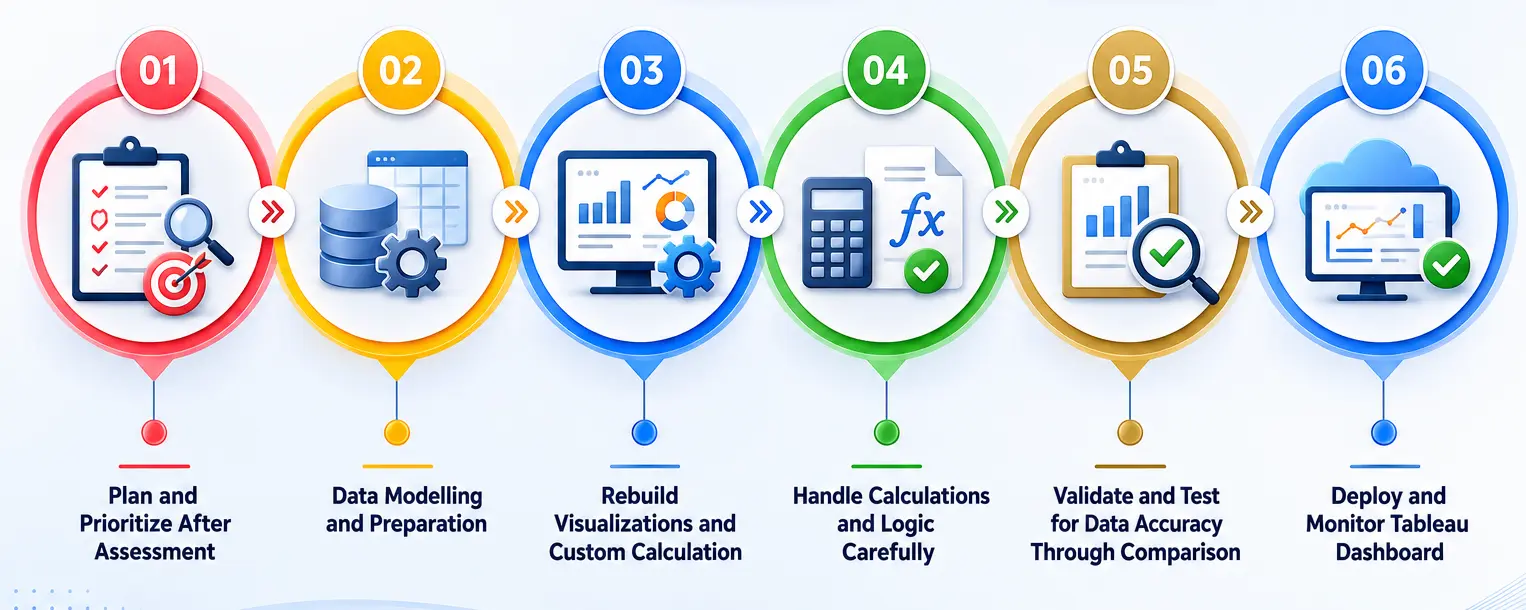
When migrating from Qlik to Tableau, organizations often struggle with identifying and prioritizing key datasets and visualizations for migration. This is crucial because both tools handle data differently, and a direct transfer might lead to inefficiencies or loss of data context.
Companies face challenges in aligning their business objectives with the technical requirements of the migration, which can result in delays or resource overuse if not managed properly.
To address this, it's essential to conduct a thorough assessment, map out critical data flows, and prioritize migration tasks based on business impact. Leveraging migration tools and consulting experts can further ensure a streamlined process.
When migrating from Qilk to Tableau differences in how the platforms structure their data can be major issues that will pop up sooner or later. Why? Well, data modeling especially presents a challenge due to differences in schema handling.
Tableau supports a denormalized structure, requiring optimized joins and calculated fields for accurate data representation.
This is why companies need to clean and standardize data before they initiate the migration process.
In doing so there are many kinds of tools that can be utilized like TableauPrep which helps for better WTL workflows. This tool helps a tonne with data transformation, defining calculated fields, LOD expressions, and custom SQL for complex logic.
On the whole, however, it’s strongly recommended that you work with a technical expert who’s equipped and experienced in handling the large datasets that migrating from Tableau entails.
Migrating visualizations and custom calculations from Qlik to Tableau presents technical challenges due to differences in how both tools handle expressions and charting logic. Qlik uses set analysis extensively, while Tableau relies on calculated fields and Level of Detail (LOD) expressions for similar functionality.
This discrepancy can lead to difficulties in replicating Qlik's advanced filtering and aggregation mechanisms, which can disrupt data accuracy or report logic.
To address this, organizations should map Qlik’s set analysis syntax to Tableau’s LOD expressions or calculated fields. Leveraging Tableau’s custom SQL and integrating parameter controls can help replicate complex dashboards. Additionally, manual fine-tuning of visuals ensures alignment with business logic while improving performance and interactivity in Tableau.
When migrating from Qlik to Tableau, handling calculations and logic requires precision, as both platforms utilize different approaches to data operations. Qlik relies heavily on set analysis and aggregation within its associative model, while Tableau uses calculated fields and Level of Detail (LOD) expressions for advanced logic.
This disparity can lead to challenges in replicating complex filters, aggregations, and nested expressions, which may result in inconsistencies in reports or dashboards.
To mitigate these issues, organizations should carefully translate Qlik’s set analysis into Tableau’s LOD calculations and parameterized controls. Utilizing Tableau’s custom SQL and incorporating calculated fields for complex logic can maintain data accuracy. Additionally, testing and validation of logic post-migration ensures consistent output.
With validating information, most of the time validating and testing for data accuracy is one aspect that’s quite easy to slip up with. Both Qilk and Tableau handle data relationships and calculations
Qlik uses an associative model, while Tableau operates on a relational database structure, which can result in mismatches in data aggregation, filtering, or calculation results during migration.
This can lead to inconsistencies in reports and dashboards, impacting data reliability for decision-making.
To address these issues, perform side-by-side comparisons of key metrics, replicating Qlik's logic using Tableau's calculated fields, LOD expressions, and custom SQL. Automated testing frameworks and thorough validation of data pipelines can further ensure consistency across platforms while maintaining performance and accuracy in Tableau.
Deploying Tableau dashboards after migrating from Qlik introduces several technical challenges, as Tableau’s deployment architecture differs significantly. Qlik’s associative engine is replaced by Tableau’s server or Tableau Online, requiring adjustments in data sources, user access, and permissions.
Without proper monitoring, companies may face performance issues, particularly when handling large datasets or complex visualizations. This can lead to slow load times, impacting user experience.
To address these challenges, ensure proper server scaling, optimize data extracts, and configure Tableau’s data sources efficiently. Use Tableau’s built-in monitoring tools, such as the Performance Recorder, to track load times and optimize dashboards. Additionally, set up automated alerts for data failures or anomalies during deployment.
With the steep learning curve associated with Qlik’s scripting language, there can be a lot of inconsistencies in reporting and delayed decision-making.
To leverage Tableau’s strengths, companies can utilize its drag-and-drop functionality for seamless data exploration and visualization. By integrating Tableau with existing data sources and employing its robust analytical features, businesses can enhance collaboration and drive better insights. Additionally, investing in training can accelerate user adoption, maximizing the benefits of migration.
Qlik to Tableau migration is all about moving from an associative engine to a relational one. This transition requires a team who can understand both platforms deeply. Entrans seems to be a perfect choice for this, as we take care of the complete platform migration.
Interested in knowing more about how we achieve zero data loss, accurate metrics, fast loading times, and a smooth handoff? Book a consultation call with us.

Map Qlik sheets, charts, filters, and calculations to their Tableau equivalents, then rebuild the dashboards. Since Qlik relies on an associative data model and script-driven sheets while Tableau uses a mark-driven layout with relational data connections, avoid direct pixel-for-pixel copies.
Translate Set Analysis functionality into Tableau calculations, filters, parameters, or LODs. Compare the outcomes with Qlik to highlight disparities in filtering and aggregation.
No. Qlik load scripts would normally require rewriting using Tableau Prep, SQL, or an existing ETL process. Consider reviewing joins, transforms, variables, and data loads before recreating the logic.
Identify Qlik tables, keys, relationships, and synthetic keys in terms of Tableau joins. Look out for duplicates and data aggregations after building a new model.
Compare dashboards, KPIs, filters, calculations, record counts, and data outputs across both platforms. Run business-user checks on important reports before switching fully to Tableau.
The main challenges in Qlik to Tableau migration are the data engine shift, calculation syntax, security rules, and proprietary Files.
Since Tableau cannot read proprietary QVD files directly, extract the data using Qlik scripts or automated converters into standard database tables or cloud warehouses. From there, point Tableau to those target databases or generate optimized Tableau Hyper extracts for high-speed querying.

-1.svg)