Planning to switch from MicroStrategy to Tableau? Discover a clear, step-by-step guide to data mapping, converting dashboards, and ensuring a smooth cutover.

Agentic Unconference 2026 - September 19, Chennai
View Event →




Are your traditional reporting tools struggling to keep up with modern analytics? Then switching to Tableau when the data grows complex could be a better choice. Migrating from MicroStrategy to Tableau helps reduce long-term licensing complexity, development effort, and maintenance overhead. Businesses are shifting towards Tableau to get better visuals, seamless cloud integrations, and flexible data modelling. Tableau’s drag-and-drop interface and compatibility make it a future-ready BI solution.
In this post, we will see a step-by-step guide to walk you through the MicroStrategy to Tableau migration without disruptions.
Moving from MicroStrategy to Tableau is often a strategic shift from a heavy reporting model to a self-service one. The reasons below explain why the move is needed.

Migrating from MicroStrategy to Tableau poses several technical nd organizational challenges. Through a structured approach and proper planning, we can mitigate the challenges raised by them. The primary challenges faced during the MicroStrategy to Tableau migration are
A successful MicroStrategy to Tableau Migration will need careful planning and execution. Starting from the initial assessment to the final deployment and training, the steps required are
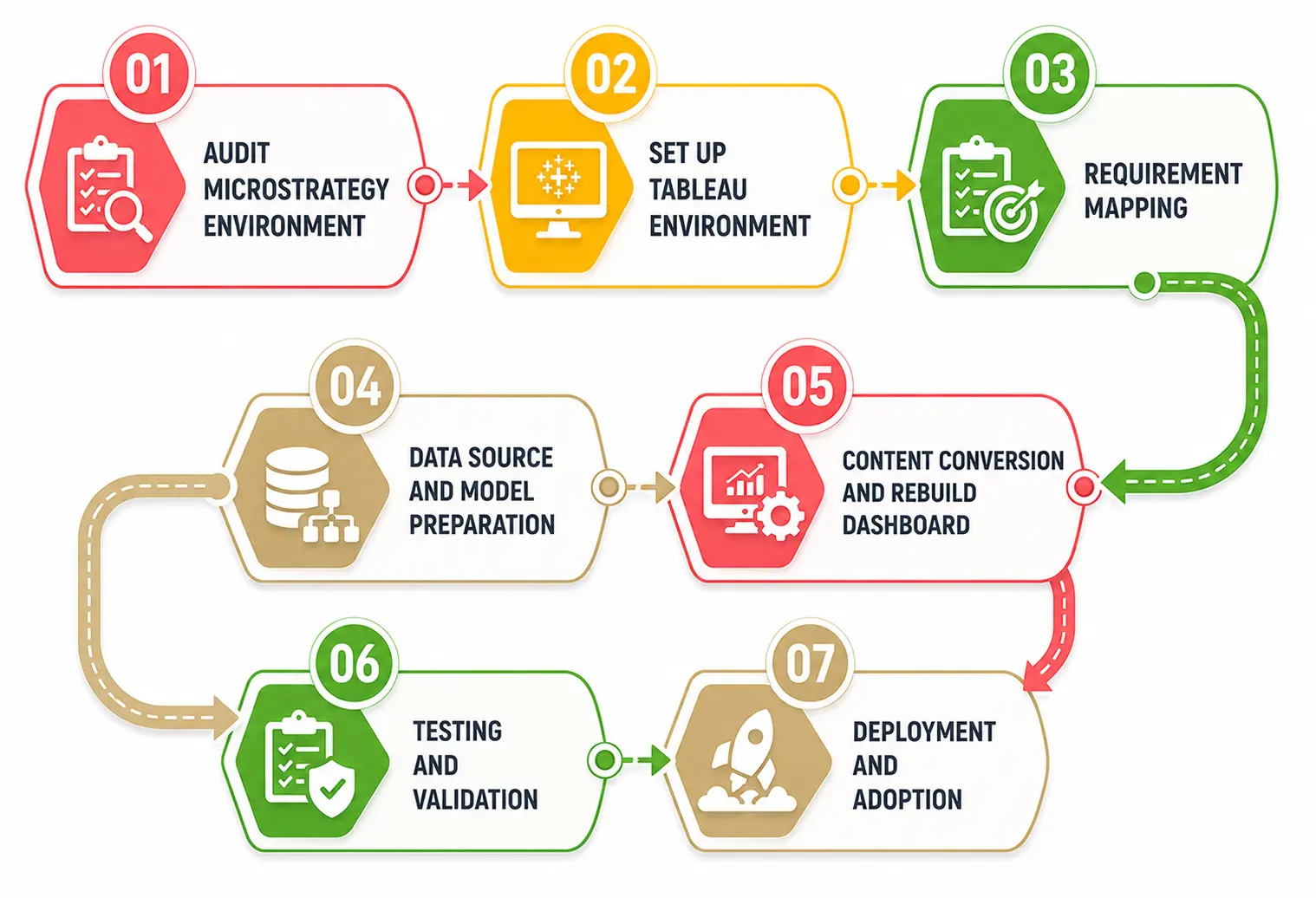
Analyze the existing MicroStrategy (MSTR) environment, including reports, dashboards, metrics, cubes, user roles, and data sources. Categorize the reports based on their complexity and usage, and prioritize high-impact content and mention them as business-critical reports. Evaluate data sources, semantic layers, and custom logic, and check the compatibility in Tableau.
Set up the Tableau server by ensuring all necessary licenses are configured. Find the MSTR equivalent in Tableau. Establish secure data connections from Tableau using Web Data Connectors (WDCs) for MSTR grid logic or custom SQL. Provide security roles and permissions to Tableau groups and user access.
Map MicroStrategy’s attributes need to be mapped to Tableau’s dimensions, and MSTR Metrics are to be measures in Tableau. MicroStrategy’s Cubes are to be mapped to Extracts in Tableau, and Dossiers are to be mapped to Workbooks in Tableau. Rationalize reports by finding unused reports, standardize KPI,s and confirm business logic with stakeholders.
Prepare data sources for Tableau by validating schemas and optimizing queries. Rebuild semantic layers using database views or Tableau data models to match MicroStrategy logic.
For bulk migration of workbooks, data sources, and permissions, use the Tableau Content Migration tool (CMT). Automate conversion of grids, graphs, and interactions into Tableau worksheets and dashboards. For specific items, do a manual migration and rebuild the dashboard in Tableau. Recreate MicroStrategy dashboards in Tableau using interactive visuals with filters, parameters, actions, and drill-downs while ensuring KPI accuracy and consistency.
Do rigorous testing on converted reports and dashboards for data accuracy, consistency, functionality, and performance. Conduct user acceptance testing (UAT) with business users for functional review. Get the feedback from the user to confirm that dashboards meet operational needs.
Run the MicroStrategy report and Tableau dashboard side-by-side and compare them. Translate MicroStrategy security filters into Tableau Row-Level Security (RLS) using User filters or Entitlement Tables.
A successful MicroStrategy to Tableau migration is to ensure they deliver maximum value in their new home. The post-migration steps to be considered are
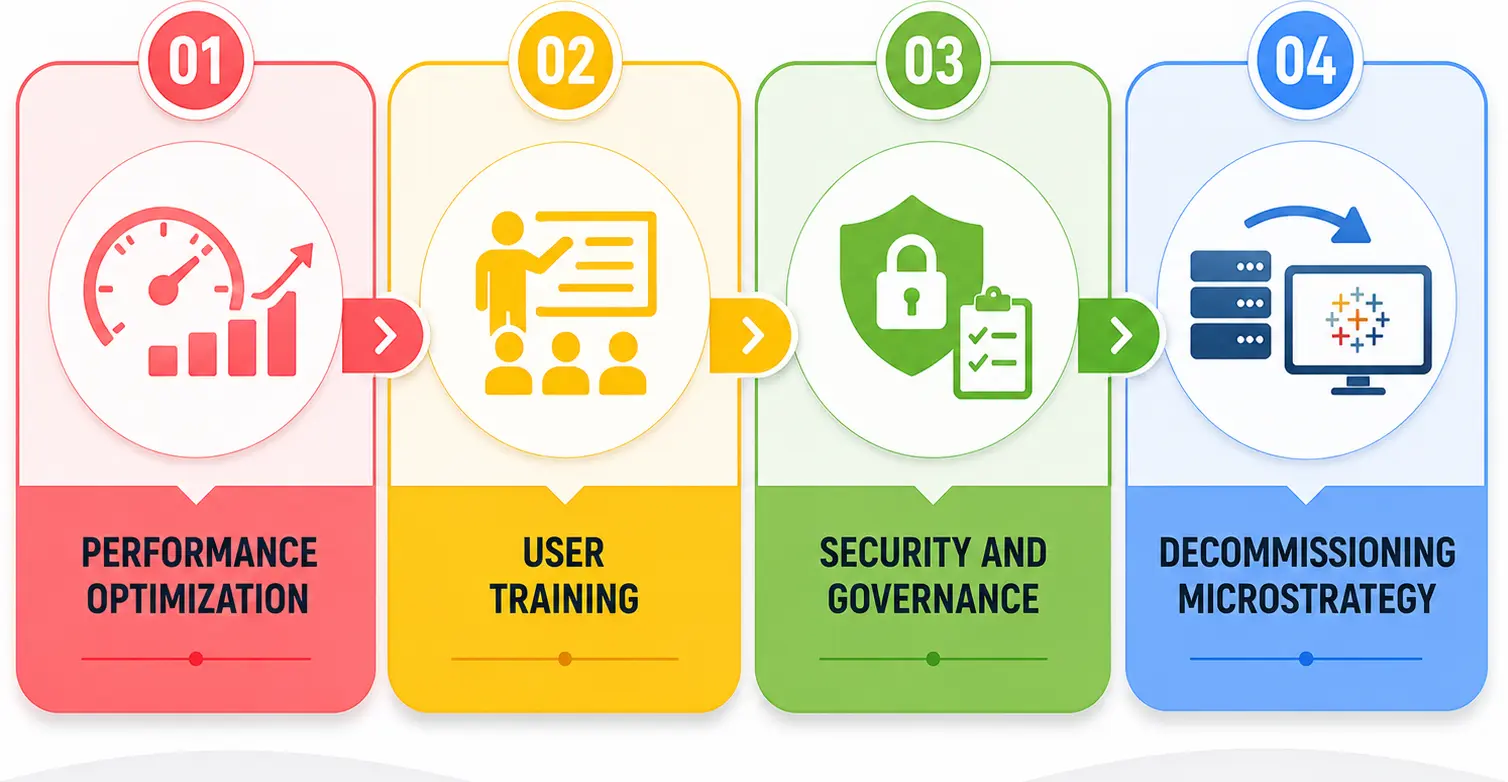
Tableau is a product people want to use. Partnering with Entrans for MicroStrategy to Tableau migration simplifies the analytics workflow, increases user adoption, and aligns with the BI ecosystem with modern cloud-ready data platforms.
With our proven track record of successful migrations, we also ensure that your system is secure and scalable. We ensure smooth migration, faster time to insight, and scalable analytics foundations that support long-term business growth.
Want to know more about? Book a consultation with us.

Organizations move to Tableau due to user adoption, agility, intuitive visual analytics, faster dashboard development, stronger self-service BI, and modern data ecosystems.
No, there is no direct migration tool from MicroStrategy to Tableau. We need to recreate reports and dashboards in Tableau manually.
Reusable objects, such as attributes, reports, dashboards, filters, Metrics, Prompts, security rules, and data source logic, must be moved upstream to the database.
MicroStrategy’s schema objects are recreated in Tableau by mapping attributes, facts, and hierarchies into Unified Tableau Data Sources (TDS) or Tableau Prep workflows. Rebuild the business logic in Tableau and validate key calculations against the original MicroStrategy reports.
Time taken to complete the MicroStrategy to Tableau migration depends on report complexity, data volume, and integration requirements. Typically, it may vary from 4 to 12 weeks for mid-sized environments and more than 6 months for large, complex enterprise migrations.
By comparing key metrics, calculations, data sources, and visual results between the original MicroStrategy dashboards and Tableau, the results can be validated. Final sign-off requires user acceptance testing (UAT) to confirm metric accuracy, dynamic parameter filtering, and row-level security integrity across user roles.
Performance is improved by optimizing data models, converting live connections into Tableau Data Extracts (.hyper) for faster in-memory processing, efficient calculations, and by applying best practices for dashboards.

-1.svg)