Step-by-step Qlik to Power BI migration guide covering data model redesign, DAX conversion, security mapping, performance tuning, and best practices.

Agentic Unconference 2026 - September 19, Chennai
View Event →




Does your Qlik environment feel fragmented or costly? It is time to migrate to the Microsoft Power BI ecosystem. Moving from Qlik to Power BI gives integration with Microsoft tools, improved data modeling capabilities, and flexible sharing options. Power BI gives clearer insights. A structured Qlik to Power BI migration ensures all reports, data models, and governance frameworks are carefully transitioned, ensuring long-term growth for the organization.
This article outlines the steps for a successful Qlik to Power BI migration, including the right approach to minimize inefficiencies.
Migrating from Qlik to Power BI offers significant advantages, such as cost savings, integration, and analytics capabilities. The following benefits can be obtained from Power BI.

Migrating from Qlik to Power BI comes with a lot of challenges and technical shifts. The key challenges are
Migrating from Qlik (Sense or View ) to Power BI is a translation of logic from a non-linear associative engine to a SQL-based relational engine. The step-by-step roadmap is discussed below.
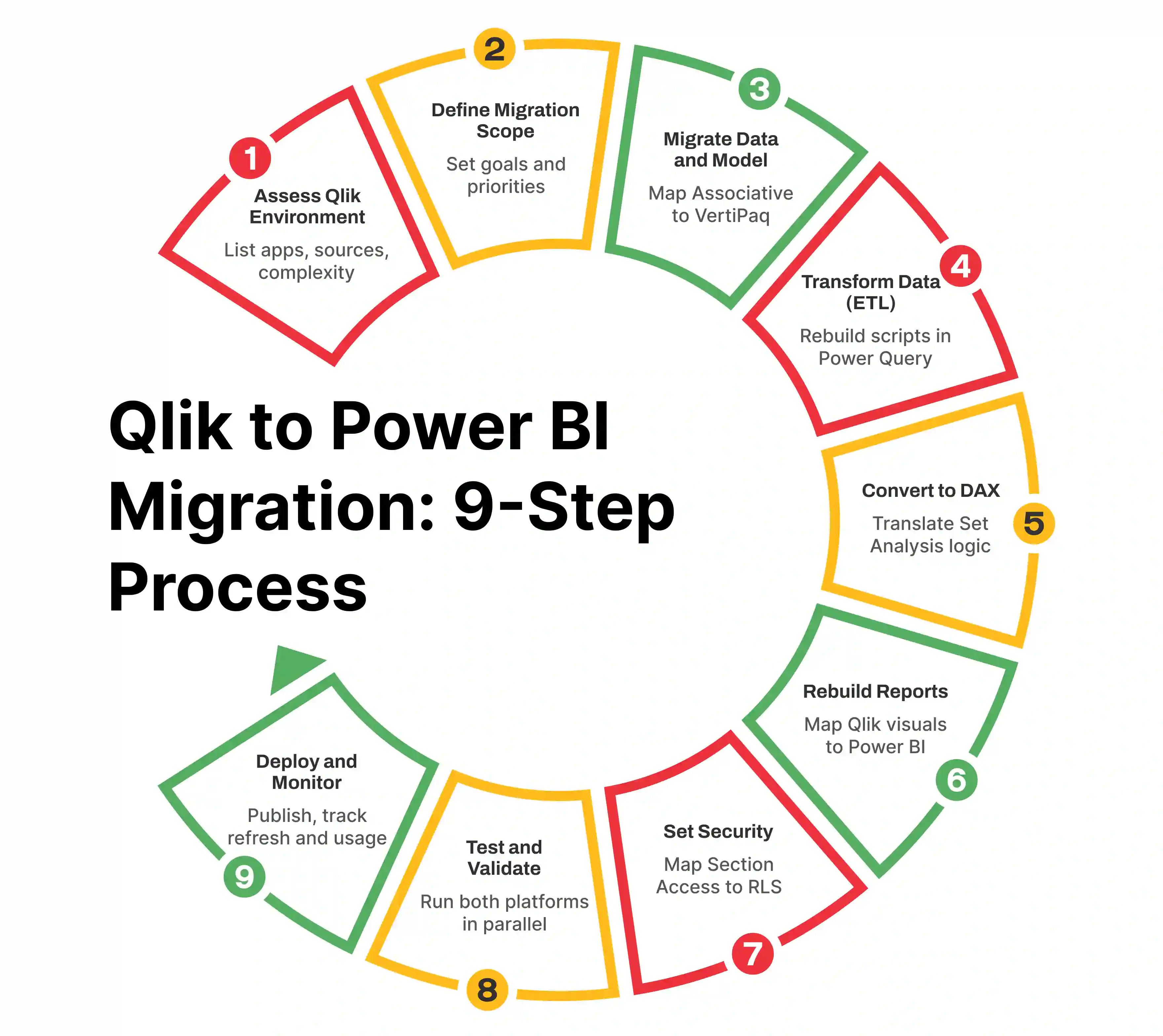
Before migrating from Qlik to Power BI, start by automating the discovery of your Qlik environment.
Check on the needs for Power BI, like why migration is needed. Power BI gives the following features: improving performance and scalability, reducing licensing costs, enabling self-service analytics, and standardizing reporting.
Qlik uses Associative Engine, whereas Power BI uses VertiPaq Engine. Check on the data compatibility of both Qlik and Power BI. Document Qlik load scripts to understand data transformations. Before rebuilding reports, review data quality and consistency. Power BI relies on structured and optimized data models. Proper preparation ensures better performance after migration.
Document Qlik load scripts to understand data transformation. Recreate the Qlik data model in Power BI Desktop. Using AI tools ensures performance-ready models aligned with Power BI best practices. Rebuild data models by establishing relationships between tables.
Convert Qlik’s Set Analysis into DAX (Data Analysis Expressions). Since Qlik’s associative engine differs from Power BI, filters and selections must be rebuilt using DAX. Use AI to reduce calculation errors and improve performance tuning.
Now start recreating reports by mapping Qlik visualizations to equivalent Power BI visuals. Try to re-evaluate if Power BI’s native visuals offer better insights and improve the report design. Use Copilot for Power BI to generate report pages based on your semantic model.
Map Qlik’s section Access to Power BI Row-Level Security (RLS). Define workspace roles and permissions. Thus, Power BI integrates with Microsoft Entra ID, allowing centralized identity and access control.
Run both Qlik and Power BI dashboards in parallel. By using Performance Analyzer, ensure DAX measures do not slow down the report. Validate calculations and KPIs. Use Computer Vision to compare the old Qlik dashboard and the new Power BI dashboard. Do performance testing and user acceptance testing to resolve any discrepancies that occur after deployment.
After validation, publish reports to the Power BI service. Continuously monitor usage and track refresh failures. It will help in maintaining reliability and user confidence.
A Qlik to Power BI migration is considered successful only after careful planning and implementation of post-migration steps.
Qlik to Power BI Migration involves data restructuring, logic rebuilding, performance tuning, governance planning, and user enablement. Parenting with a Migration expert like Entrans will bring in technical expertise and governance alignment. Entrans ensures smooth transition and long-term success with Power BI through a structured framework.
Want to know more about it? Book a consultation call with us.
For one of our clients, we have modernized the insurance renewal services from Qlik to Power BI. The client needed timely insights into policy renewals, expirations, and renewal initiation status to avoid revenue leakage. Challenges arose when complex dashboards were difficult to interpret, limited visibility into insurance agreement clauses, performance issues, and high maintenance effort. The client needed to migrate to the Power BI platform.
To solve this, we analyzed Qlik dashboards, KPIs, and calculations, recreated business logic using Power BI, Power Query, and DAX, and optimized data models. We migrated the details to Power BI, and through the Power BI dashboard, the customer was able to see KPI cards showing total policies, renewals, and expirations based on policy type, customer region, and renewal status.
Overall, we have shown more visibility to the customer about the insurance agreement, faster decision-making, and improved dashboard performance to improve customer retention.

Migrating Qlik to Power BI is the process of transitioning a data model, ETL scripts, and dashboards from Qlik to the Microsoft Power BI platform. This comprises rebuilding dashboards, rewriting scripts, and redesigning DAX calculations.
No, a fully automated tool is not available to convert Qlik dashboards directly to Power BI. We need to do it through third-party tools like Port BI, KPI Partners Migration Utility, and MigrateFAST, which use AI to automate the conversion of data models and visuals.
The Qlik to Power BI migration could take 12 to 18 months, though small-scale proofs of concept can be completed in roughly 3 to 4. Time depends on the number of reports, data sources, and the complexity of the Qlik environment.
Power BI uses role-based access control, row-level security, and Azure Active Directory integration to manage user permissions. User access is further refined using workspace roles, which dictate whether a user can edit content or interact with published reports.

-1.svg)