Map reality before automating: Enterprise workflow mapping exposes hidden workarounds, exceptions, approvals, and system dependencies that standard process diagrams often miss.
Match the right automation: Use RPA for fixed rules, AI for unstructured work, AI agents for multi-step decisions, and humans for high-risk approvals.
Design for failure: Production workflows need clear retry, rollback, escalation, permission, and stopping rules to prevent agents from creating costly errors.
Measure business impact: Track STP rate, rework, escalation rate, cycle time, and cost per transaction instead of relying on automation rate alone.
Most AI automation projects fail before the first model is deployed. Not because of a technical gap.
Because the team skipped discovery. They built automation on top of how the process was supposed to work. Not how it actually works. The result: AI that breaks on the first edge case.
This guide walks through how to map enterprise workflows before you automate them. How to find what work really looks like. And how to decide which parts belong to RPA, AI, or a human.
Table of Contents▾
What Is Enterprise Workflow Mapping?
Workflow mapping names the exact APIs, business rules, and human approvals needed to move a task from start to finish. That detail is what AI systems need.
Workflow mapping turns a vague automation idea into something an AI system can actually run. Without it, teams build on assumptions. Assumptions break fast.
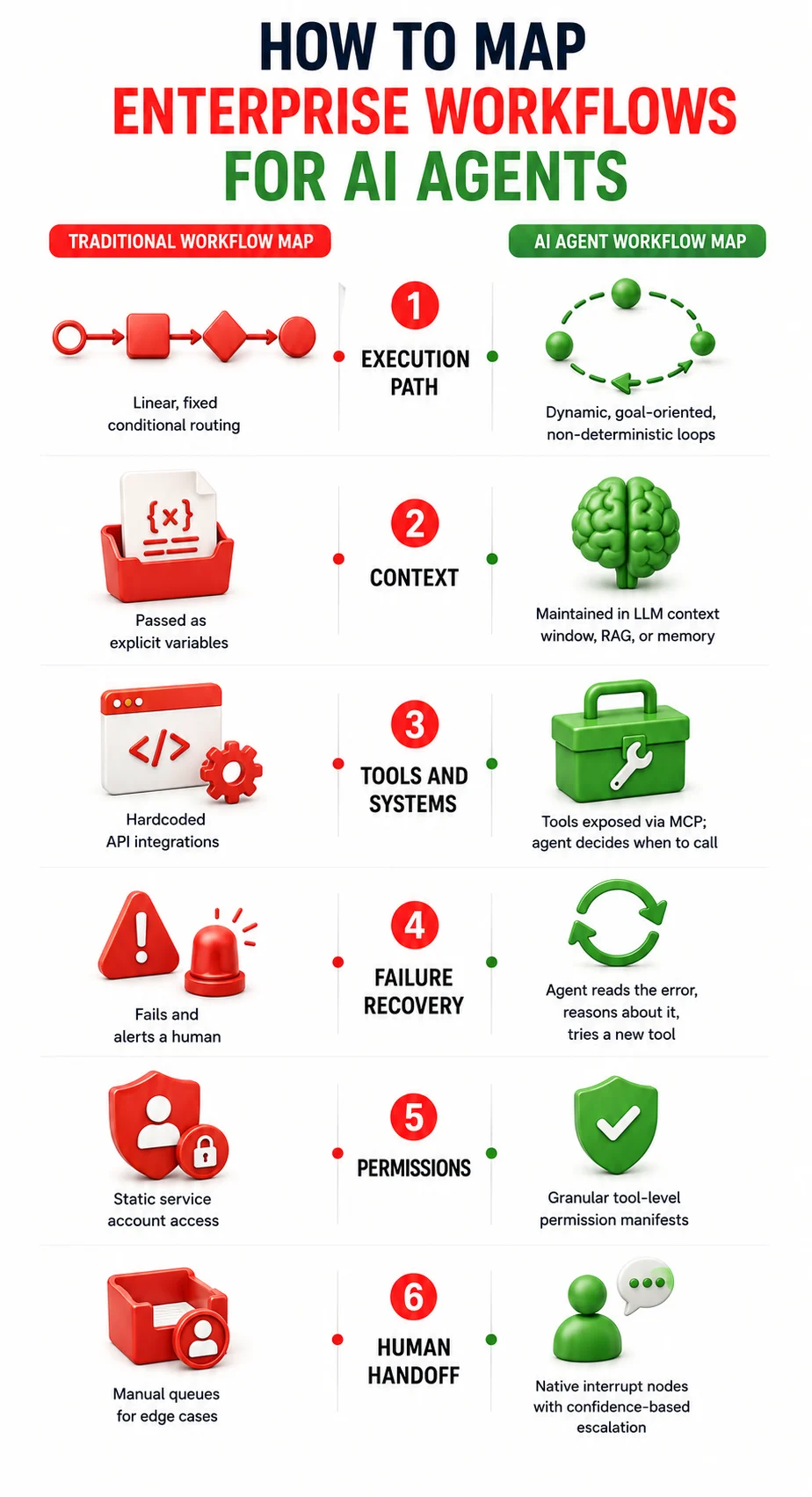
Standard tools like BPMN were built for fixed, rule-based flows. AI agents do not work that way. Agents make decisions based on probability and context.
Research from the University of Luxembourg confirms this. Standard BPMN has no way to show confidence levels, tool selection, or paths that change mid-run. It was never designed for that.
What an Enterprise Workflow Map Should Include
A workflow map built for AI needs more than boxes and arrows. Every node should document:
Trigger: The event that kicks things off. An email, a form submit, a system event.
Input: What comes in. Split it into structured inputs (database records) and unstructured ones (PDFs, email text).
Task or action: The work at each step. Label it as rule-based or AI-driven.
Decision or rule: The routing logic. Hard rules like compliance thresholds get coded as fixed logic. Don't hand those to AI.
System or API: The tool or data source at each step. Note the permissions needed.
Owner or handoff: Who is accountable. Especially where human sign-off is required.
Exception or escalation: The path when an API times out. Or when a confidence score drops too low.
Output or outcome: The final state change in the system of record.
How to Discover How Work Actually Gets Done
In practice, teams work around gaps using spreadsheets and email chains that never appear in any diagram. Enterprise AI workflow mapping is built on documented processes will stall the moment it hits one of those workarounds.
Process Discovery and Stakeholder Interviews
Stakeholder interviews surface context, intent, and informal rules. But they're incomplete.
People leave out workarounds they don't even know about. Use interviews to understand goals and set boundaries. But treat them as a starting point. Not a source of truth.
Process Mining and Event Data
Process mining pulls real execution data from enterprise event logs. Every time a task finishes in an ERP or CRM, a log entry gets created. Process mining reads those logs and rebuilds the actual sequence. Every variant. Every exception.
Traditional log formats force a single-case view. But most enterprise workflows involve multiple objects at once. Object-Centric Event Data, or OCED, captures those multi-object relationships. The map ends up showing what really happened.
Finding Variants, Bottlenecks and Exceptions
Process mining shows every path. Not just the happy one. Task mining adds another layer. It captures desktop-level activity between major system events. Keystrokes. Clicks. Screen activity.
These micro-tasks are invisible to backend logs. But they're exactly the work that benefits most from automation.
Feature
Process Discovery (Manual)
Process Mining (System-Level)
Task Mining (Desktop-Level)
Data Source
Interviews, workshops, docs
Application event logs, databases
Keystrokes, clicks, screen activity
What It Discovers
Human intent, business context
End-to-end workflows, bottlenecks
Repetitive manual tasks between apps
Best Use Case
Setting process boundaries
Mapping complex ERP/CRM workflows
Finding data entry tasks suited to RPA
Strengths
Captures organizational context
Fully empirical, finds all variant paths
Catches work invisible to backend logs
Limitations
Subjective, misses workarounds
Needs clean data, blind to manual work
High privacy risk, noisy data
Role in AI Planning
Defines the why and sets human-in-the-loop expectations
Provides architecture and exception metrics for AI
Finds deterministic micro-tasks for sub-agents or RPA
How to Map an Enterprise Workflow for AI Automation
Mapping an enterprise workflow for AI is not the same as drawing a flowchart. Here, any gap in the map turns into a failure point where agents can loop forever, can corrupt state, and even report success when nothing actually finished.
1. Define the Trigger, Inputs, and Desired Outcome
Set strict process boundaries. Write down the exact event that starts the workflow. Map every input. Split them into structured (JSON payloads) and unstructured (scanned documents).
Define the desired outcome as a state change you can verify. "The invoice was processed" is not verifiable. "The invoice status in the ERP is set to paid, and the purchase order is closed" is.
2. Map Tasks, Decisions, Systems and Data
Every step when mapping your enterprise AI workflow needs a clear label. Manual or automated? Rule-based or AI reasoning? System calls should point to specific API endpoints.
Note data quality and latency too. Say a workflow relies on data that refreshes every 24 hours. An AI agent can't make real-time decisions at that step. That gap matters.
3. Identify Handoffs and Business Rules
Map every point where the process crosses a team or system boundary. For decisions that involve strict math or compliance rules, code the logic as a fixed rule. Don't ask an AI model to reason through it.
4. Map Exceptions and Failure Paths
This is the step most enterprise AI workflow mapping diagrams skip. For every step, ask: what happens if the API times out? What if the document cannot be read? What if confidence drops too low? Each needs a mapped response — a retry, a rollback, or an escalation with full context preserved.
Workflow Step
Trigger / Input
Task / Action
Decision / Rule
System / API
Automation Type
Outcome
1. Ingestion
Email arrives at support desk
Extract customer ID and issue type
If not in English, translate first
Exchange API, CRM
AI extraction
JSON payload generated
2. Context Retrieval
JSON payload
Retrieve past tickets and account status
If inactive, tag as churn-risk
CRM API, vector DB
Deterministic rules
Context added to prompt
3. Resolution Generation
Enriched context
Generate resolution or refund offer
If refund over $500, escalate
LLM agent, document store
AI agent
Drafted response
4. Execution
Approved action
Execute refund in billing system
Must have valid transaction ID
Stripe API via MCP server
RPA deterministic
Refund issued, CRM updated
How to Identify AI Automation Opportunities
Not every workflow is worth automating. And not every automated workflow needs AI. Research from McKinsey shows that 88% of organizations use AI in at least one function. But 95% of generative AI pilots fail to deliver measurable business impact.
Start with high-volume workflows that follow a consistent pattern. Invoice processing. Support ticket triage. Data entry between systems. Those are strong picks. But high volume alone isn't enough. A high exception rate eats the savings.
AI adds the most value where inputs are unstructured. Summarizing a contract. Pulling entities from a scanned invoice. Classifying emails by intent. RPA can't do that work. But data readiness matters. If documents are inconsistent or the knowledge base is fragmented, AI quality drops fast.
AI agents work best when the right action at step three depends on what was found at step one. The signal to look for is goal-oriented execution. The path changes based on what the agent discovers.
A workflow is only automatable if the system underneath it is stable. Processes where the rules shift often or the interface changes will break automation. Data availability is just as important. If the data is fragmented, locked behind systems with no API, or formatted differently every time, automation will fail. Regardless of which AI approach you pick.
RPA vs. AI vs. AI Agents: What Should Automate Each Step?
Choosing the wrong Enterprise AI workflow mapping or automation type is one of the most costly mistakes in enterprise AI. Sema4.ai's analysis confirms that the most resilient architectures use RPA for deterministic execution and AI agents for cognitive orchestration. The two work best together.
RPA works best when inputs are predictable and logic is fixed. Moving data from an ERP to a CRM on a nightly schedule. Running a calculation with zero error tolerance. Those are RPA jobs. When an unexpected format shows up, RPA fails cleanly. That predictable failure is actually an advantage in regulated environments.
AI automation bridges unstructured inputs and structured downstream systems. Extracting vendor details from a scanned invoice. Routing an email to the right team. Summarizing a long document. The AI handles the understanding step. Then it hands a clean output to a deterministic system that takes the action.
AI agents are the right fit when a workflow needs planning across multiple steps. An agent uses an LLM as a reasoning engine. It breaks down a goal, picks tools, checks responses, and adjusts its plan. Say a payment agent hits a rate limit error. It reasons to wait and retry. RPA would crash.
Human-in-the-loop is a governance layer. Not a failure mode. High-risk actions need human approval even when an agent handles the surrounding work. Below a set confidence threshold, the agent pauses and routes the case to a human with full context.
Dimension
Rule-Based (RPA)
AI Automation
AI Agent
Human-in-the-Loop
Input Predictability
Must be strictly predictable
Handles variance in language and format
Adapts to highly unpredictable inputs
Handles total ambiguity
Decision Complexity
Pure execution, no reasoning
Pattern recognition and understanding
Autonomous planning and recovery
Strategic and contextual judgment
Tool Use
Follows hardcoded scripts
Used as a single tool in a script
Selects and runs multiple tools in loops
Oversees and overrides agents
Explainability
100% transparent
Low, black-box outputs
Medium, agent logs show steps
Variable, needs documentation
Book a Free Consultation
Share your details and our experts will reach out to discuss your goals.
Mapping Workflows for AI Agents
Define the agent's goal. Define when it should stop. Stopping rules keep the agent from burning tokens on a problem with no answer. Without them, it runs in a loop.
Map where the agent gets its context. It might pull from a RAG connection, a database, or memory from earlier in the session.
AI agents talk to enterprise systems through tool calls. The Model Context Protocol, or MCP, controls how those connections work. Your workflow map needs to define which MCP servers the agent can reach and which endpoints are exposed.
The principle of least privilege applies. If an agent only needs to read a database, its tool must not have write access. Enterprise deployments also need a permission manifest layer to enforce role-based access and audit trails.
Complex workflows often need more than one agent. A triage agent reads an incoming request and passes it to a specialist. That specialist hands off to a human approver before an execution agent posts the result. Map each agent's scope clearly. Define the exact state passed at each handoff.
Designing the Enterprise AI Automation Architecture
A workflow map is the input. The architecture makes that map run in production.
Map which systems of record hold the data each step needs. Note data quality and latency at each source. An agent can't make real-time decisions on data that only updates once a day.
Instead of building a separate link between every AI model and data source, use MCP as a standard connection layer. A single MCP server handles communication between the agent and the enterprise application.
The agent doesn't need to know the specifics of the system behind the server. New tools can be added without rebuilding integrations. As agents move from read-only to write access, treat them as non-human identities. Strict access rules. Automatic audit trails.
Build the architecture for failure from the start. If an API call fails, the agent must not treat a missing response as a success. Retrying a failed write must not create duplicate records. Rollback logic must exist for any action that partly completes before something breaks.
How to Measure AI Automation Success
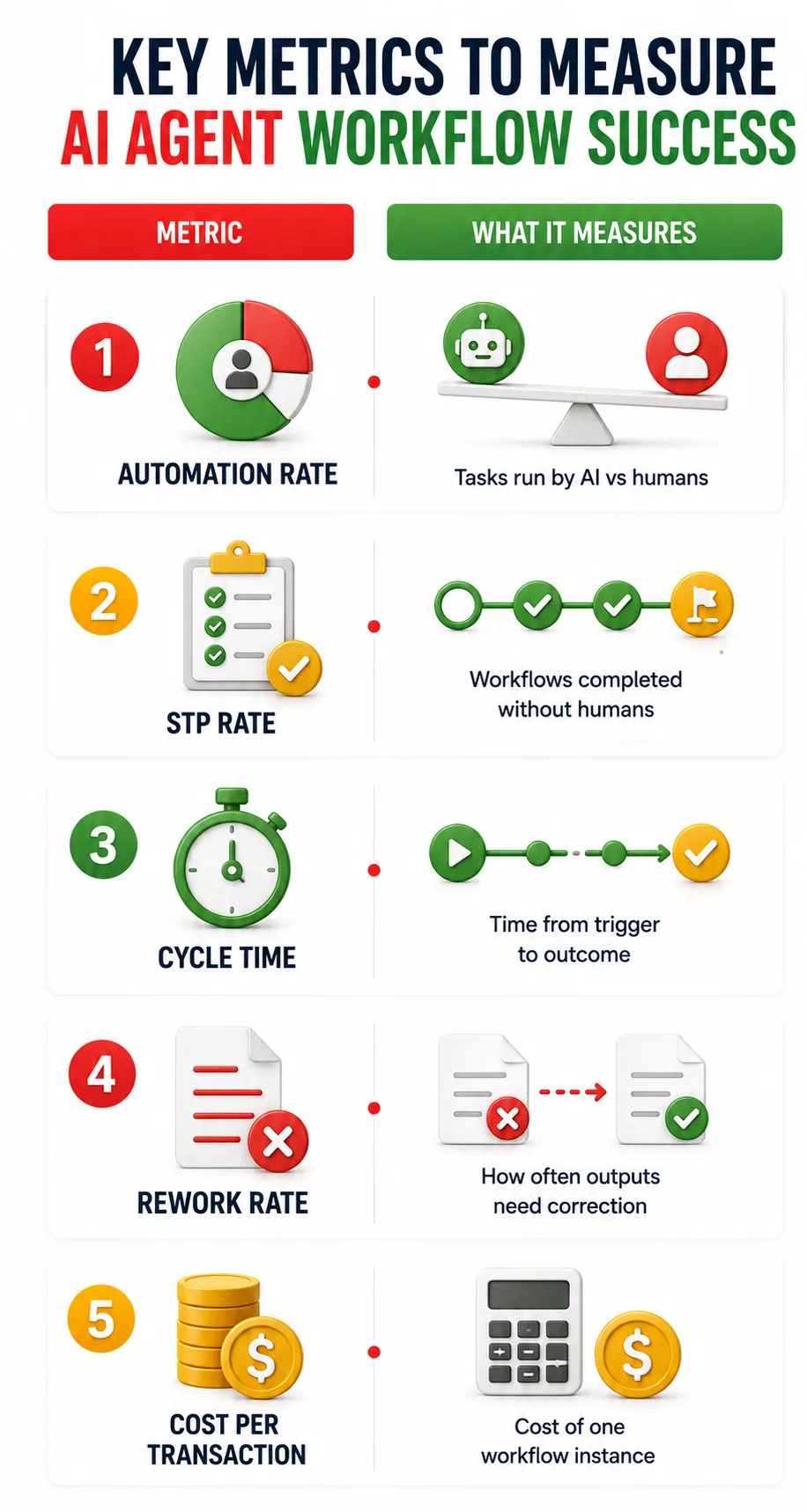
Automation rate is not a success metric on its own. It says nothing about whether the work is correct. An agent that closes 90% of tickets with generic answers creates more escalations than it prevents.
Straight-Through Processing rate measures cases that complete with zero human involvement. A 90% STP rate sounds strong. But a 10% exception rate where each case takes 20 minutes of manual work may cost more than the savings.
Track how often human intervention gets triggered. And why. A rising escalation rate over time means the agent is hitting more edge cases than it was built for.
Cost per transaction must include the hidden costs. API token usage. Engineering upkeep. Human recovery on exceptions. If the cost isn't lower than the manual baseline after a reasonable ramp period, the automation design needs revisiting.
Metric
What It Measures
What It Misses
Best Use
Automation Rate
Tasks run by AI vs humans
Whether the task was done correctly
Tracking adoption
STP Rate
Workflows completed without humans
The cost of exceptions and rework
Evaluating true workflow autonomy
Cycle Time
Time from trigger to outcome
Customer satisfaction and infra costs
Showing speed improvements
Rework Rate
How often outputs need correction
The root cause of the AI failure
Finding fragile tools or hallucination loops
Cost per Transaction
Cost of one workflow instance
Hidden costs like token bloat
Proving ROI to leadership
From Workflow Mapping to Continuous Improvement
Deploying an AI agent or Enterprise AI workflow is not the end of the project. Workflows will drift, new exceptions will surface, and the knowledge base will go stale.
AI observability captures execution paths, token usage, tool call payloads, and where reasoning went off course. OpenTelemetry's GenAI working group has defined tracing standards for multi-step agent runs that let teams trace exactly where a failure happened.
Execution logs from production agents are process mining input. Once automation is running, the event data it generates can be analyzed the same way pre-automation logs were. This reveals new bottlenecks, steps where the agent is slower than expected, and exception patterns clustering around specific input types.
Every exception that routes to a human is a signal. If the same type appears often, feed escalation reasons back into the workflow map. Update the agent's instructions or knowledge base. Add new tool definitions if the agent needs a capability it lacks. The exception rate drops over time.
One critical failure mode is context poisoning. An agent makes a small error early in a workflow. It carries that wrong information forward. Every later output builds on top of the mistake. One bad data point at step one can corrupt every decision that follows. The fix is to validate the data after high-risk tool calls before it enters the agent's context.
Mapping Enterprise Workflows for AI Automation With Entrans AI Engineers
Enterprise workflow mapping is where most enterprise AI projects either build a solid foundation or set themselves up to fail.
Getting it right means combining process mining know-how, AI architecture experience, and a clear understanding of how real systems behave in production.
Entrans brings all three. Our AI engineers work inside your operations and IT teams. We build the automation layer by layer. RPA for deterministic execution. AI agents for variable work.
If your team is ready to move past pilot projects and build automation that holds up in production - Book a free consultation with the Entrans team.
Identify automation opportunities, hidden bottlenecks, and AI readiness with an evidence-led workflow assessment.
20+ Years of Industry Experience
500+ Successful Projects
50+ Global Clients including Fortune 500s
100% On-Time Delivery
Thank you! Your submission has been received!
Oops! Something went wrong while submitting the form.
FAQs
1. What is enterprise workflow mapping?
Enterprise workflow mapping is the process of writing down every step, decision, data handoff, and system used in a workflow. For AI, the map also needs to capture failure paths, API needs, and the exact points where an agent needs human approval to move forward.
2. When should a workflow use an AI agent instead of RPA?
Use RPA when inputs are structured and the logic is fixed. Use an AI agent when the workflow involves unstructured inputs, multi-step reasoning, or a path that changes based on what the agent discovers. If a process requires reading a document, making a judgment, and then deciding what action to take, that's an agent workflow.
3. What is context poisoning in an AI agent workflow?
Poisoning in an AI agent workflow happens when an agent makes a small error early in a workflow and carries that wrong data forward. Every later decision builds on top of the mistake. The fix is to check the data after each high-risk tool call before it enters the agent's context.
4. What metrics should teams track for AI automation success?
The most useful ones are Straight-Through Processing rate, cost per transaction, and rework and escalation rate. Automation rate alone doesn't tell you much. A high automation rate with a high rework rate means the system is producing wrong outputs at scale.
Hire AI Automation Engineers
Build scalable enterprise workflows with experienced AI engineers skilled in RPA, AI agents, APIs, and enterprise integrations.
Free Project Consultation
Trusted by Enterprises & Startups
Top 1% Industry Experts
Flexible Contracts & Transparent Pricing
50+ Successful Enterprise Deployments
Arunachalam
Author
Arun S is co-founder and CIO of Entrans, with over 20 years of experience in IT innovation. He holds deep expertise in Agile/Scrum, product strategy, large-scale project delivery, and mobile applications. Arun has championed technical delivery for 100+ clients, delivered over 100 mobile apps, and mentored large, successful teams.
Related Blogs
Business Process Automation Examples: 24 Use Cases Across Finance, HR and Operations
Explore 24 business process automation examples across finance, HR, and operations to reduce manual work, cut errors, and improve efficiency.
Explore top forward-deployed engineering services in 2026. Discover how FDE-as-a-service helps teams ship production-ready software inside live workflows.
Intelligent Automation Use Cases: 15 End-to-End Examples Across Industries
Explore 15 real-world intelligent automation use cases across industries to see how AI, RPA, and smart workflows cut costs and boost operational speed.






-1.svg)