Learn how to build a production-grade RAG ingestion pipeline with reliable parsing, chunking, indexing, incremental sync, security, and monitoring.

Agentic Unconference 2026 - September 19, Chennai
View Event →




Does your RAG system work great in testing? Then fall apart once real users touch it?
That's normal. Most demos run on a small, clean folder of files. Production runs on messy, live company data. That data changes by the hour.
Research shows 73% of RAG errors trace back to the data pipeline.
Which is why this guide walks through every stage of a strong ingestion pipeline. What to build. Why it matters. And what quietly breaks when you skip a step.
A prototype and a production RAG ingestion pipeline solve two different problems. A prototype works on files that never change.
A production pipeline runs all day, every day. It works against data that changes all the time. That one difference shapes everything else about how you build it.
Most teams start with a prototype. They load some documents. They split the documents into chunks. They turn the chunks into vectors. Then they save the vectors to a small local database. One script does the whole job.
That's fine for testing an idea. It's not how real company data works.
Company files live in many places at once. Think SharePoint, Confluence, Google Drive, Notion, and Jira. Files get updated all the time. Files get deleted too. New rules get attached to who can see what. A prototype pipeline handles none of that.
A production-grade RAG ingestion pipeline stays in sync with every live source. It survives partial failures without breaking the whole system. And every chunk can be traced back to the exact document that made it.
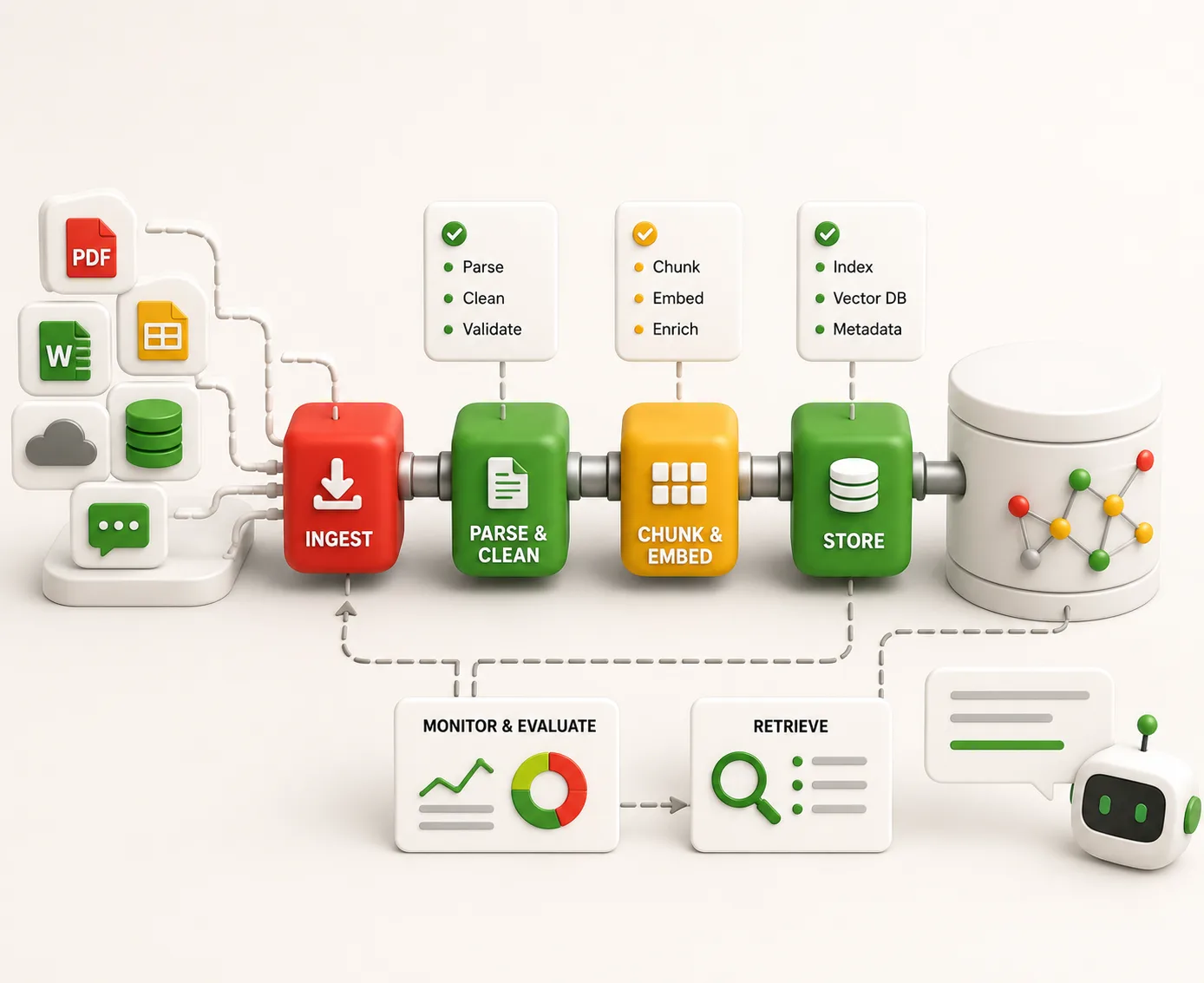
A production RAG ingestion pipeline is not one big black box. It's a chain of clear steps. Each step has its own input.
Each step has its own output. Each step can fail in its own way. Treat it as one single blob, and you'll never find where quality breaks down. Break it into stages instead, and every failure has a clear address.
Each stage below in the RAG ingestion pipeline runs on its own. Each one can fail on its own. Each one needs its own check.
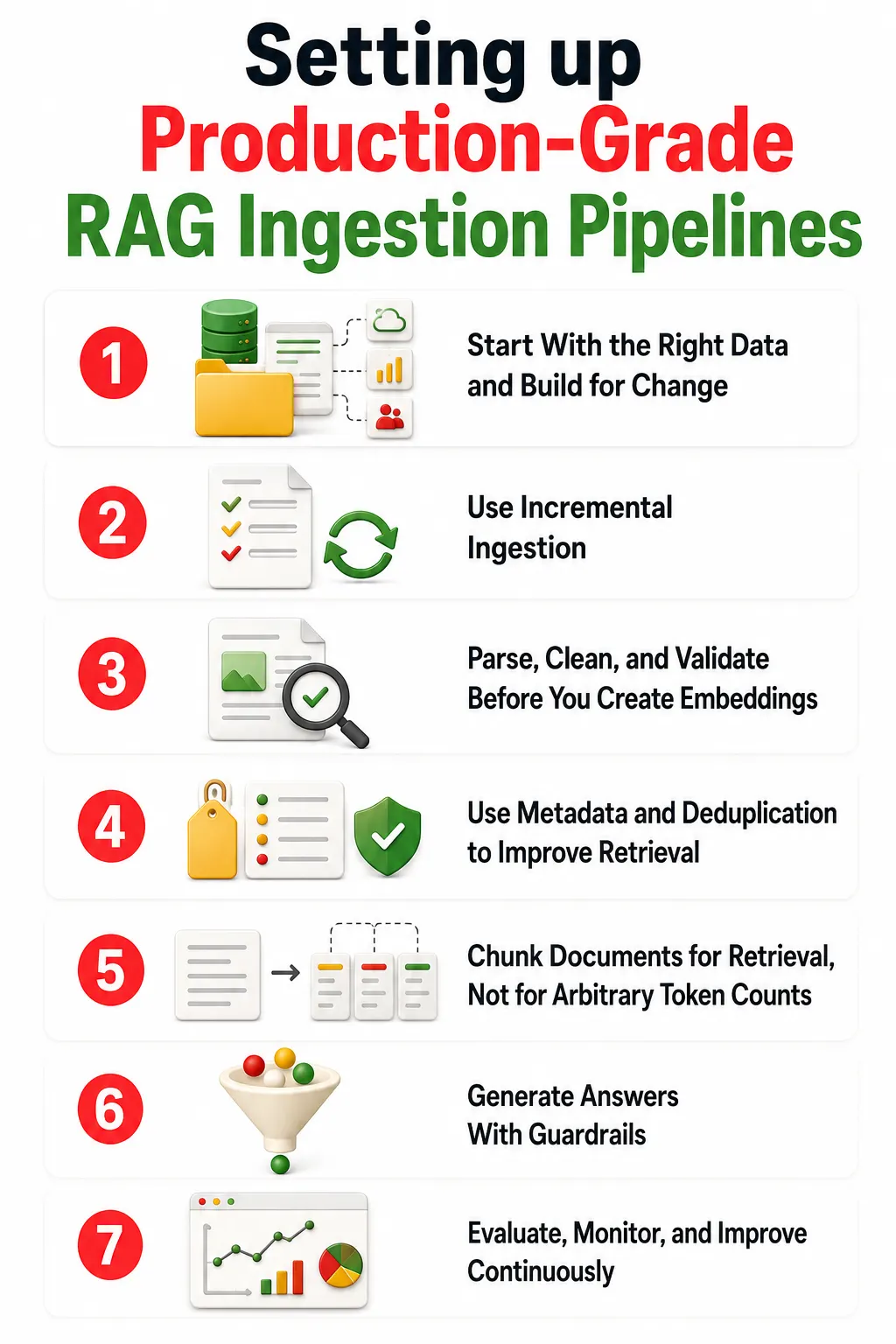
Your RAG ingestion pipeline system is only as good as its data. No clever prompt can fix facts that were never there. And no system stays clean without a real plan to keep it fresh.
Company knowledge never lives in one place. It's spread across many tools at once. Each tool has its own rules. Each has its own limits. Each flags changes in a different way.
Ask three questions about every source. How does it show a change was made? How does it show who can see what? How steady are its document IDs over time?
That last one matters most. Every document needs an ID that survives renames and moves. Without one, the pipeline can't tell new from updated. Every update turns into a duplicate.
Rebuilding the whole index from scratch does not scale. Re-checking 100,000 documents every night costs a lot. It also leaves the index stale for hours at a time.
This method only processes what changed. The RAG ingestion pipeline creates a short code, called a hash, for each document. It compares that code to the last one saved. Same code, skip it. Different code, run it through again.
Parsing mistakes never stay in parsing. A bad parse breaks the chunk. A bad chunk breaks the vector. A bad vector breaks the final answer. The real problem often starts three steps before the model even sees it.
Basic tools read a page as one long stream of text. A table with four columns turns into four separate strings. The model has no way to put it back together.
Smart, layout-aware tools fix this. They read a document the way a person would. As tables. As headers. As columns. One study by IBM found this method hits 97.9% accuracy on tables pulled from dense PDFs. Basic tools don't come close.
Save the raw file before parsing starts, every single time. If the parsing tool gets updated later, you'll need that original file. The same goes if a mistake shows up weeks later.
After parsing, check the work. Did the tables survive? Did the headings stay whole? A RAG ingestion pipeline that reports success while it quietly drops a table is not working. You won't know until a user gets a made-up answer.
Most guides treat tags as an afterthought. In production, tags are a core part of search. And cutting out duplicate files decides if your knowledge base helps, or just confuses everyone.
That last point matters most. Many systems check permissions after retrieval. They fetch the top results first.
Then they filter out what the user can't see. This breaks retrieval. If every top result gets filtered out, the user gets zero results. Even when the right document exists. Build access rules into the search itself instead.
More documents don't mean better answers. Say the same policy sits in SharePoint, on a shared drive, and in an old wiki. Now you have three near-identical entries. They crowd out the good ones.
This check works on two levels. Exact matching catches the same file twice. Similarity checks catch near-matches - same content, different format. Only the best copy moves forward.
Splitting a document every 512 tokens is easy. It's also usually wrong. It ignores sentence breaks. It ignores paragraph structure.
RAG ingestion pipeline ignores words that point back to something said earlier. The result: a chunk where "it" means nothing on its own.
Small chunks are sharp and precise. But they often miss the surrounding context. Large chunks keep more context. But they lose that sharpness.
Parent-child chunking fixes both problems at once. Small chunks get searched for precision. Each small chunk links back to a bigger parent chunk. When a small chunk matches a search, the pipeline pulls in the full parent section.
This gives the model real context, without losing precision. Studies show this method boosts context recall by 10% to 15%.
Embedding and indexing are not the finish line. They're part of an ongoing cycle. That cycle has to handle constant change.
Every chunk gets a version code before it's turned into a vector. That code stops the RAG ingestion pipeline from saving the same vector twice after a retry.
This step runs in batches, with automatic retries built in. A RAG ingestion pipeline that quietly drops chunks when a call times out is not ready for production.
Switching to a new embedding model is a bigger deal than it sounds. Every old vector becomes useless with the new model. The whole set of documents needs new vectors. Test the new model on a copy of the index first, before you switch for real.
A vector database is not a write-once tool. Vectors get updated and deleted all the time. The RAG ingestion system needs to support that from day one.
Full-size vectors cost a lot to store at scale. Shrinking them can cut memory use by up to 8 times, with barely any loss in accuracy. A more extreme method can cut memory use by 32 times, while still keeping over 94% accuracy.
Tags and rules belong inside the search system itself. Not bolted on after the fact. Filtering after the search breaks the results.
The most dangerous RAG ingestion failure is not a crash. It's when the system quietly answers using a document that no longer exists. This is called the Staleness Gap. It can sit unnoticed for weeks.
Change detection has to be constant and cheap. A simple trick works well here: compare a short code from the current file to the last saved code. Same code, skip it. Different code, process it again.
Deletions are the hard part. A nightly batch job can easily miss a file that vanished between two runs. Live, event-based ingestion fixes this. The moment a file gets deleted at the source, a signal fires. The RAG ingestion pipeline marks that file for removal right away.
When a document updates, remove the old vectors first. Then write the new ones. Skip this step, and the system starts mixing old and new content. There's no way to tell them apart.
Safe retries protect against duplicate work. Steady IDs and content codes let the pipeline check if a vector already exists. If it does, the write gets skipped. A retry after a timeout should never duplicate work that already finished.
Deleted documents need a hard delete or a marker, called a tombstone. This avoids gaps that could show up mid-search. Cleanup happens later, during routine maintenance.
A production-grade RAG ingestion pipeline will fail sometimes. An API will time out. A parser will quietly drop a table. The real question isn't whether failure happens. It's whether you catch it before your users do.
Every stage needs to fail on its own. It should not drag down stages that already finished. Say an embedding call times out partway through a big job. The RAG ingestion pipeline should retry only what's left. Not the whole job.
Dead-letter queues catch events that fail too many times. This stops one bad document from blocking the whole pipeline. Those events get reviewed and sent back through, separately.
Safe retries are the foundation of all this. Every write to the system has to be safe to repeat. Without that, retries create duplicate data and broken states. Those are painful to fix later.
System checks tell you if the pipeline is running. They say nothing about whether the pipeline makes good knowledge. You need both kinds of checks.
A pipeline can hit 100% on every system check. And still quietly drop tables. And still strip out context. Each of those silent failures turns into a wrong answer later.
Quality checks catch what system checks miss. Tools like Ragas test search quality after every run, using a known set of questions. A sudden drop after a change is your signal to roll back.
Most RAG testing only looks at the final answer. That's a slow signal. By the time a bad answer shows up, the real problem may have been live for weeks.
We actually have a detailed guide on how to improve RAG accuracy that dives deeper into how this can be done.
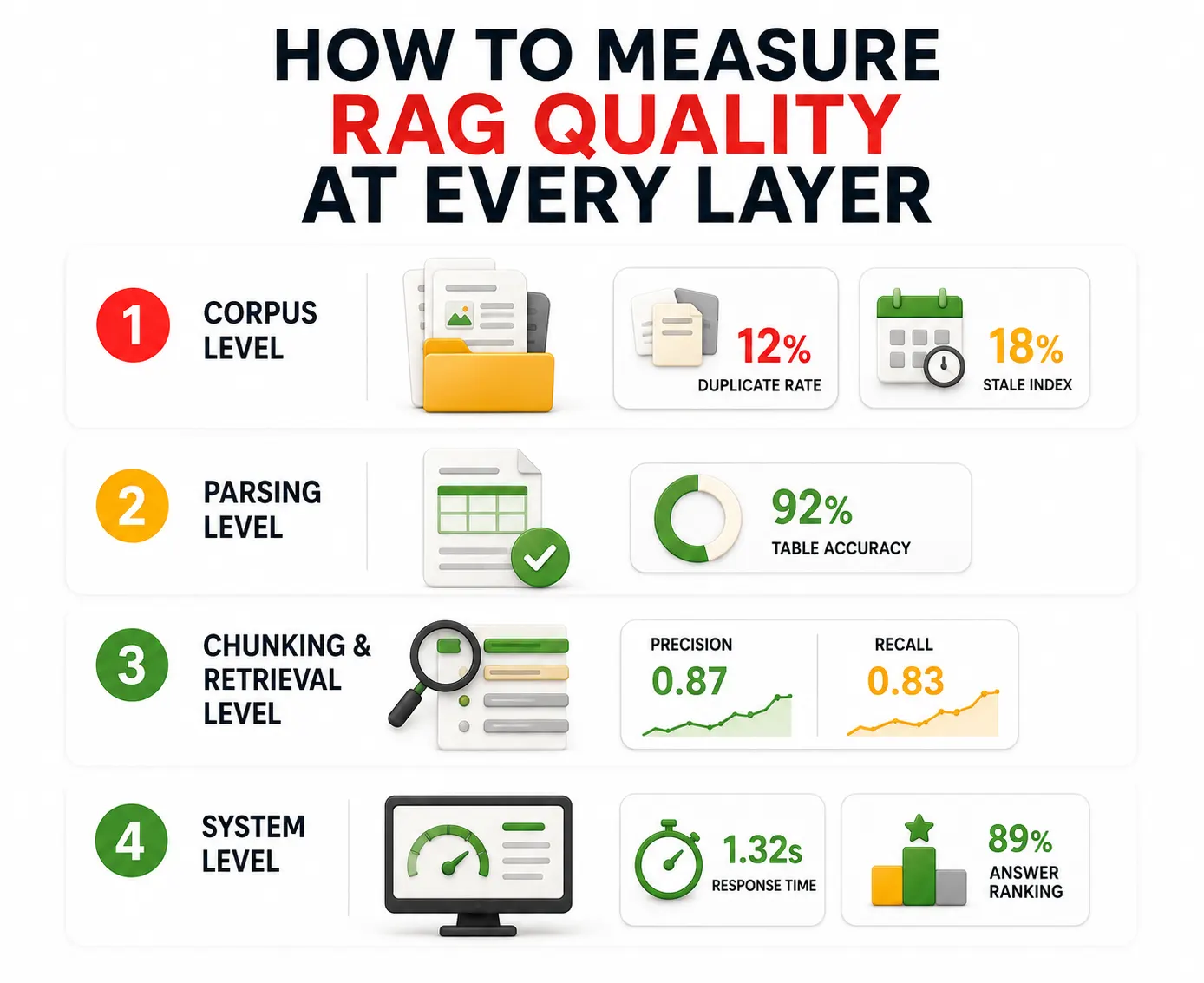
Run through this list before any new RAG ingestion pipeline touches real user traffic.
73% of RAG ingestion pipeline errors stem from data pipeline failures rather than AI models.
Which is why hiring expert AI engineers from Entrans ensures your ingestion architecture is built for continuous change.
By automating critical stages like layout-aware parsing, dynamic chunking, and incremental syncing, Entrans prevents the silent killers of stale data and dropped context.
This includes aspects like dead-letter queues and safe retries.
Want to see how we can build you a RAG system that delivers accurate, traceable, and up-to-date answers from messy, real-world data?
Schedule a free consultation call with our AI engineering team!

The ideal frequency that RAG ingestion pipeline update its knowledge base depends on how quickly the underlying data changes. Frequently updated sources may need event-driven updates, while slower-moving content can use scheduled synchronization.
when a RAG pipeline has to deal with a corrupted file, It should isolate the problematic file rather than stopping the entire ingestion process. Failed events can be held separately for review and reprocessing.
To know if your RAG ingestion pipeline is working correctly, you need to look beyond pipeline uptime and measure the quality of what the system retrieves. Checks can cover duplicates, parsing accuracy, retrieval precision and recall, ranking quality, and response speed.

-1.svg)