Forward-deployed engineers close the gap between AI demos and production by handling enterprise data, integrations, security, testing, and deployment.
Successful AI agent deployment starts with the right workflow, clean business context, clear human controls, and measurable outcomes.
FDEs use tools such as GraphRAG, MCP, OpenTelemetry, Docker, Kubernetes, and CI/CD to build agents that can safely operate in live systems.
The goal is not just to launch one agent, but to create reusable tools, guardrails, and deployment patterns that make every future rollout faster.
Is your AI agent stuck in a demo that never ships?
Developing a prototype for your AI is the easy part. But putting it into use in a company is what trips up most projects.
The problem?
Transferring the AI agent from a simulated environment to a live environment involves working with legacy data, security constraints, and inefficient processes.
According to Gartner, more than 40 percent of AI agent projects will be abandoned even before going live by 2027.
This typically due to implementation. That said, a clear Forward Deployed Engineering plan gets around these problems - here’s how FDEs deploy AI agents…
Table of Contents▾
What Is Forward Deployed Engineering?
Forward Deployed Engineering is a model where top software engineers work on-site inside a client's systems to solve hard tech problems. Palantir built this approach twenty years ago to handle secret, on-premise data work for defense and spy agencies.
The FDE does not work from a vendor's office. These are developers work within your operations, understand your software stack, and write code that interacts with your data.
What Does a Forward Deployed Engineer Do?
A forward deployed engineer does a bit of everything, being a programmer, architect, and business consultant. The FDE does not install out-of-the-box software but redesigns processes, builds secure data pipelines, and writes the code that allows the integration of AI models with the real world.
An FDE works across the full rollout cycle, and their daily tasks include things like:
Process Mapping: FDEs map the way work gets done inside your company, and not the way a process doc says it should happen.
Hands-On Engineering: These developers build the data links, safety layers, and test frameworks needed to move an agent from demo to live use.
Direct Feedback Routing: FDEs send failure signals from the field straight back to the core product team for fast fixes.
Team Alignment: FDEs close the gap between tech teams, legal groups, and business leaders to keep the rollout on track.
Why Enterprise AI Agents Need Forward Deployed Engineers
AI agents are powerful. But the gap between a working demo and a live system is where most firms lose time, money, and trust.
The Issue Between an AI Demo and a Live Agent
A demo shows that a model can do a task. It reads files and gives decent answers inside a safe test space. But a real business needs more. It needs an AI that reads, thinks, plans, and makes real changes inside live systems.
The moment you let an agent update a Salesforce record, query a locked-down database, or sum up a private client call, the project leaves the AI world. It crashes into the hard rules of business IT.
While 79% of firms test AI agents, only 11% get them to full live use. The problem is not brains. It is how things connect. The OWASP Top 10 for AI Agents makes this clear. An agent without limits is open to goal hijacking, prompt tricks, and risky free-range access.
What FDEs Bring to AI Agent Rollout
how FDEs deploy AI agents and remove this gap is by working where engineering and business meet. They bring clear perks that normal setup teams cannot match:
Direct Embedding: FDEs work inside your space from day one. They ship a working demo into your real systems within the first week, skipping months of planning.
Full-Stack Coding Depth: FDEs are not setup staff who tweak off-the-shelf tools. They are real coders who write Python, SQL, and complex AI workflow logic that holds up under stress.
Messy Data Skills: FDEs do not wait for clean, neat data. They dive into old databases, build data pipelines, and make the data maps an agent needs to think straight.
Direct Product Feedback: When the FDE hits a bug in the field, they send that signal straight back to the core team. This is how FDEs deploy AI agents faster and with quicker fixes instead of vague future plans.
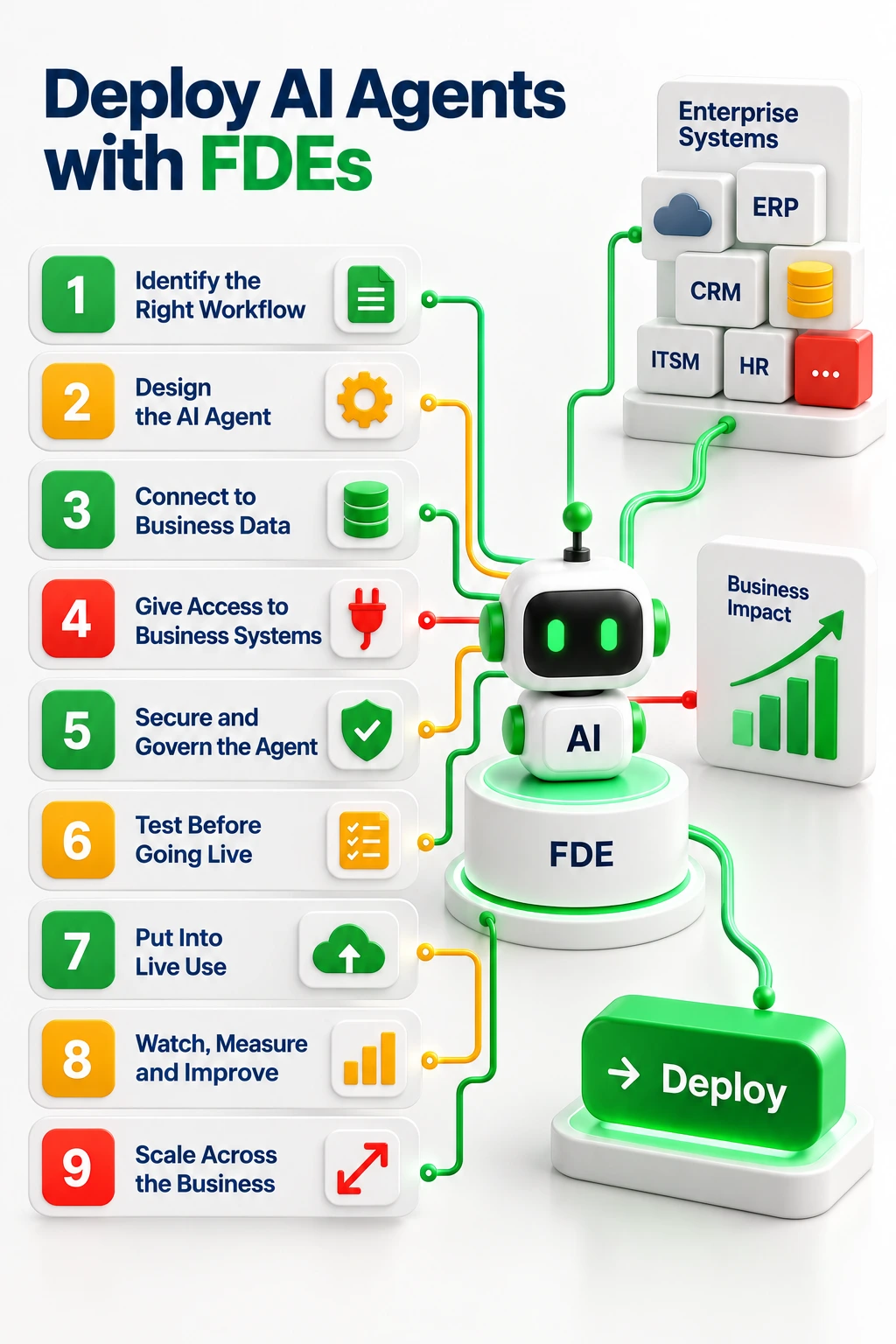
Steps for Forward Deployed Engineers to Deploy AI Agents in Enterprise Systems
Step 1: Identify the Workflow an AI Agent Should Handle
Firms often start AI projects based on hype rather than real need. This leads to "agent washing," where basic scripts get sold as AI agents. Key steps for forward deployed engineers to avoid this include:
Audit How Work Gets Done: Map the real, hidden ways tasks happen. Use process mining tools to find the true workflows, not the ones in old guides.
Check Data Health: Make sure the data the agent needs is easy to reach, clean, and fresh. An agent built on stale or broken data will fail the moment it goes live.
Flag Legal Risks: Spot rules and laws that apply early on. A workflow in health care or finance has tighter limits than one in shipping or retail.
Pick by Impact: Choose a workflow that is high-volume, repeats often, and crosses many systems. These are the tasks where AI adds the most clear value.
Set Baseline Numbers: Measure how humans do the task now before you build. Set clear targets for time saved, errors cut, and cost per task.
Step 2: Design the AI Agent Around the Workflow
Plugging a raw language model into a business database gives shaky results. Your forward deployed engineer must frame the model with controls that limit what it does and define when a human steps in. Key steps include:
Pick an Agent Design Pattern: Use the patterns laid out by AI leaders like Andrew Ng. These include Reflection, Tool Use, Planning, and Multi-Agent Teamwork.
Set the Safety Gate: Draw the exact line where the machine stops and a human takes over. High-stakes actions must always need a human sign-off.
Choose a Workflow Engine: Use tools like LangGraph, CrewAI, or AutoGen to manage the agent's choices. A good state machine keeps the agent on track and stops runaway loops.
Do Not Over-Build: Do not use complex AI reasoning for tasks a simple rule can handle. Overthinking raises costs and creates needless errors.
Measure Efficiency: Track how many tokens the agent burns versus its success rate. A good agent solves the task without wasting compute on extra steps.
Step 3: Connect the Agent to Business Data and Context
An AI model is frozen in time based on its training data. To think about your business, it needs access to live, well-ordered data.
In this step your FDE or forward deployed engineer builds the link between the model and your ground truth.
Connect Business Data
Build a Knowledge Graph: Go past basic vector search. Build a data map that tracks how things in your business tie to each other. The agent must pull from one real, live source of truth.
Keep Data Fresh: Set up pipelines that keep the agent's data current. Old data leads to wrong actions the agent will carry out with full confidence. Make sure every data point can be traced back to its source.
Use RAG and Context Engineering
Go Past Basic RAG: Standard Retrieval-Augmented Generation often fails in live use. Simple vector search cannot grasp complex business links. Pulling a generic policy doc without the right add-on leads to wrong actions.
Use GraphRAG: Graph-based retrieval knows how data objects link to each other. This cuts false answers and boosts accuracy for complex, multi-step reasoning tasks.
Step 4: Give the AI Agent Access to Business Systems
What makes an agent an agent is its power to act. But for forward deployed engineers building custom API links for every model to every old system creates a mess that does not scale.
Connect APIs, Tools, and Business Apps
Open Internal Systems Safely: Set up links that let the agent talk to your ERP, CRM, and ITSM tools. Each link must check inputs and handle errors cleanly.
Code for Errors: If the agent cannot read an API reply, it must fail safely. An agent that fakes a success after a timeout causes silent data damage.
Use Tool Calling and MCP to Let AI Agents Act
Set Up the Model Context Protocol (MCP): Anthropic's MCP is an open-source JSON-RPC framework for linking AI agents to business tools. It gives AI agents one way to find tools, read data, and take action without custom code for each vendor.
Fix the N×M Problem: Without a shared standard, linking every AI model to every system creates a tangled web of custom code. MCP solves this by giving AI agents one safe way to connect to any system on the fly.
Book a Free Consultation
Share your details and our experts will reach out to discuss your goals.
Step 5: Secure and Govern the AI Agent
Giving software the power to act on its own brings real security risks. An agent open to prompt tricks could be fooled into stealing data, changing records, or abusing its access. The FDE builds a layered defense plan based on the OWASP Top 10 for AI Agents.
Control What the Agent Can Reach: Lock down access to the bare minimum for every agent. Map row-level security so the agent gets the exact same rights as the human who calls it. Set clear read-versus-write lines. Use short-lived access tokens that expire after each session.
Add Guardrails and Human Sign-Off: Build required human checkpoints for high-stakes actions. Money moves, data changes, and outside messages need a human okay before they run. Add prompt-trick defenses and strict checks on every tool call.
Meet Security and Legal Rules: Build lasting audit logs that track every choice the agent makes. Link with identity tools like Azure Active Directory and CyberArk. Make sure the system follows data rules for your region and field.
Step 6: Test the AI Agent Before It Goes Live
Normal software tests are fixed. The same input always gives the same output. AI agents are not like that.
An agent might get the right answer using the wrong tools. FDEs must test how the agent acts, not just what it outputs. Key steps include:
Test the Output: Check that every final answer is correct and fits the needed format. Run scripts that compare results against known right answers.
Test the Path: Look at whether the agent picked the right tools in the right order. A right answer reached through a blocked API is a security failure, not a win.
Test the Business Result: Confirm the full business outcome worked end to end. A perfect number that shows up too late for a deadline has zero value.
Measure Repeat Success: Run the agent through the same task many times. Pass^k metrics show the odds of success over many tries and catch silent, random failures.
Step 7: Put the AI Agent Into Live Use
Moving an AI agent from a coder's laptop to live business systems means working through IT rules, security reviews, and network setups. Key steps for forward deployed engineers here include:
Package the Agent: Wrap the agent using Docker and run it on Kubernetes. This makes sure it works the same way across dev, test, and live setups.
Guard Secrets: Feed API keys through a secrets manager. Never hard-code private info into the agent's code or config files.
Set Up CI/CD Pipelines: Automate the build, test, and deploy cycle. Make sure tested updates reach live systems fast and safely.
Lock the Model Version: Pin the exact model version in the live system. When the LLM provider pushes an update, make sure it does not break your prompts or tool setups.
Step 8: Watch, Measure, and Improve the Agent in Live Use
In live use, AI agents hit data patterns and edge cases that tests never covered.
Without the right tracking, a failure deep in a workflow shows up as a vague timeout and the root cause stays hidden.
Set Up Agent Tracking
Capture Traces: Log every step, model call, data pull, and tool action using OpenTelemetry. This gives you a full record of what the agent did and why.
Watch for Drift: Track whether the agent's answers change over time as data shifts. Catching drift early stops quality from falling before users notice.
Create a Live Feedback Loop
Send Failures to the Team: Turn live errors into better prompts and tighter tool rules. Every failure the agent hits in the field is a chance to improve.
Let Humans Flag Problems: Build ways for staff to mark wrong outputs in real time. Capture these fixes and feed them back into the test pipeline to stop the same errors from coming back.
Step 9: Scale the Agent Across the Business
Building every new AI agent from scratch creates tech debt and walled-off knowledge. Scaling needs shared parts and reuse. Key steps include:
Pull Out Reusable Parts: Find the data setups, safety rules, and tool links from your first rollout. Package them as ready-made templates for future agents.
Build a Shared Tool Catalog: Create a central list of MCP servers and API links. New AI agents reuse what exists instead of building from scratch.
Track Rollout Speed: Measure how long each new agent takes to go live. The goal is clear gains each time. The second agent should ship in a fraction of the time the first one took.
Hand Off to Internal Teams: The FDE writes the playbook and gives the working system to your own engineering team. The goal is that your org can run on its own, not depend on outside help forever.
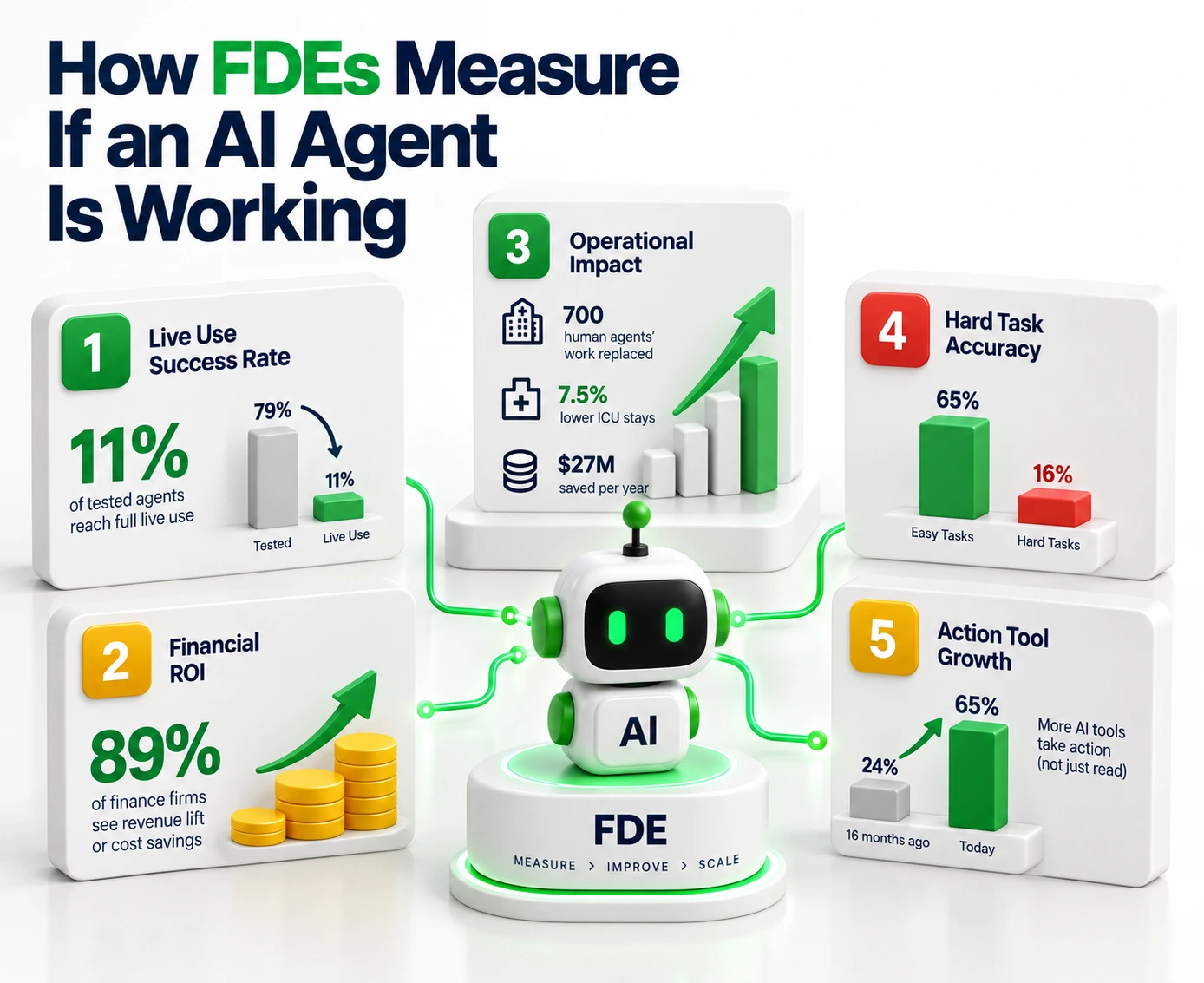
How FDEs Measure Whether an AI Agent Is Working
The truth about how FDEs deploy AI agents and the rollout shows up in the numbers that split winning projects from costly failures.
Live Use Success Rate: While 79% of firms test AI agents, only 11% get them to full live use. FDEs focus on crossing this gap.
Financial ROI: 89% of finance firms say deployed AI has raised revenue or cut costs. Morgan Stanley's agent hit 98% uptake among 16,000 advisors and saves about 30 minutes per client meeting.
Ops Impact: Klarna's AI agent did the work of 700 human agents and aims for a $40 million profit gain. Tampa General Hospital used Palantir AIP to cut ICU stays by 7.5% and save $27 million per year.
Hard Task Accuracy: On Terminal-Bench 2.0, top models score 65% on easy tasks but drop to 16% on hard, multi-step work. This is why FDE-built test systems matter so much for live use.
Action Tool Growth: The share of AI tools that take action rather than just read data rose from 24% to 65% in 16 months. This shift makes strong security design more critical than ever.
The Forward Deployed AI Engineer Skill Set
The FDE role is very demanding. It needs what the field calls an "Engineer-Plus-Diplomat" someone who can tune a RAG pipeline in the morning and defend the security plan to a hospital CIO after lunch.
Technical Skills
Hands-On Coding: Mastery of Python, SQL, and building end-to-end ML and data pipelines that hold up through changes and migrations.
Agent Design and LLMOps: Deep knowledge of workflow engines like LangChain, LangGraph, and DSPy. Skill in building planning, reflection, and multi-agent teamwork patterns.
Model Context Protocol (MCP): Ability to build and run MCP servers that turn old APIs and databases into JSON-RPC resources for AI use.
Systems Linking and Security: Skill in row-level security, PII masking, short-lived access tokens, and managing access across locked-down networks.
Tracking and DevOps: Setting up OpenTelemetry traces, packaging systems via Docker and Kubernetes, and running CI/CD pipelines.
Enterprise Skills
Process Discovery: Using structured methods like MECE or the Pyramid Principle to break vague executive goals into specific, doable engineering tasks.
Stakeholder Management: Working through complex office politics, running war rooms, and getting legal, IT, and business teams on the same page.
Change Management: Owning the human side of the switch. Designing the experience so staff understand the AI's limits, trust its outputs, and adopt the new workflows with confidence.
The Enterprise AI Agent Deployment Checklist
For forward deployed engineering teams scaling AI agents into live use, this FDE-driven checklist helps you avoid the most common demo-to-live failures:
Business workflow picked with a clear, measured baseline and target outcome.
Business data is easy to reach, cleanly mapped, and legal risks have been checked.
The exact scope of what the agent can do on its own is written down. Humans keep final say.
Business context is linked via Knowledge Graphs, GraphRAG, or a unified data map.
Tools linked via standard paths like MCP. Read and write limits are clear.
Strict least-access rules in place. The agent gets the same rights as the human user.
Prompt-trick defenses and tool input checks are blocking bad requests.
High-stakes actions need a human okay before they run.
Agent tested across output quality, tool-call paths, and recovery rates using pass^k metrics.
Audit trails cannot be changed. The system follows data rules for your region.
CI/CD pipelines live with rate limits, secret handling, and model backup plans.
Tracing live for every step, logging token spend, speed, and tool errors.
Human fixes and edge-case failures feed back into prompt tuning and tool updates.
Success measured by time saved, errors cut, or clear ROI — not just model scores.
Partnering With Entrans to Take Your AI Agent Demo to Live Business Use
Getting an AI agent from demo to live use does not have to be slow or risky.
At Entrans, our Forward Deployed Engineering team pairs fast rollout tools with expert guidance. This cuts changeover time and lowers the risk of project failure.
We handle the hard work of linking data, setting up security, and building controls. We make sure you see real business value from your AI spend faster without giving up on safety or legal rules.
Don't let your AI demo stay a demo!
Book a call with our FDE engineers today to plan your path to live use.
Deploy secure, production-ready AI agents that integrate with your enterprise systems and deliver measurable business value.
20+ Years of Industry Experience
500+ Successful Projects
50+ Global Clients including Fortune 500s
100% On-Time Delivery
Thank you! Your submission has been received!
Oops! Something went wrong while submitting the form.
FAQs on How FDEs Deploy AI Agents
1. Why do most AI agent projects fail before going live?
The failure is rarely about the model's smarts. Projects fail because of poor workflow picks, broken data, and a lack of rules and controls. Gartner says over 40% of AI agent projects will be cut by 2027 due to unclear value and weak risk controls. An FDE stops this by checking the use case, data health, and security plan before writing any agent code.
2. What is the Model Context Protocol and why does it matter?
MCP is an open-source JSON-RPC framework made by Anthropic. It creates a standard way for AI agents to find and use outside tools and data sources. Without MCP, linking every AI model to every business system creates a tangled mess of custom code. MCP gives AI agents one safe way to connect to any system on the fly.
3. How long does it take an FDE to deploy an AI agent?
Timelines shift based on data health and system complexity. But the FDE model is built for speed. Unlike normal projects that spend months on planning, an FDE ships a working demo into your real systems within the first week. A full rollout, from workflow pick to going live, takes 8 to 16 weeks based on security and legal needs.
4. Can we scale AI agents after the first rollout without starting over?
Yes, and this is a core goal of the FDE method. The FDE pulls reusable parts from the first rollout. These include tool links, safety templates, MCP servers, and test setups. They become ready-made building blocks. Each new agent ships faster than the last because it builds on proven parts instead of starting from zero.
Hire Forward-Deployed AI Engineers
Get experienced engineers who can build, integrate, secure, and scale AI agents across complex enterprise environments.
Free Project Consultation
Trusted by Enterprises & Startups
Top 1% Industry Experts
Flexible Contracts & Transparent Pricing
50+ Successful Enterprise Deployments
Aditya Santhanam
Author
Aditya Santhanam is Co-founder & CTO of Entrans Technologies, spearheading AI-driven cloud and data solutions. A 13-year tech veteran, he leads innovation in generative AI, AI agents and MLOps. He also co-founded Infisign (identity security) and Thunai.AI (enterprise AI agents)
Related Blogs
AI in Accounts Payable: 2026 Guide for Enterprise Finance
Discover how AI in Accounts Payable automates invoice processing, improves matching, reduces manual work, and helps finance teams measure ROI.
AI Agents Examples: 30 Real-World Use Cases Businesses Are Running in 2026
Explore 30 AI agents examples across business functions and industries, with real-world results, practical use cases, and tips to choose your first project.
The AI Implementation Roadmap That Ends in Production, Not a Slide Deck
Build an AI implementation roadmap that moves projects from idea to production with a step-by-step guide, timelines, costs, and measurable business results.






-1.svg)