> Blog >
How to Migrate from Power BI to Amazon QuickSight (Step-by-Step Guide)
Learn how to migrate from Power BI to Amazon QuickSight step by step. Discover migration strategies, DAX conversion tips, and best practices for AWS analytics.

How to Migrate from Power BI to Amazon QuickSight (Step-by-Step Guide)

4 mins
March 6, 2026
Author
Kapildev Arulmozhi
TL;DR
  • Migrating from Microsoft Power BI to Amazon QuickSight can reduce BI costs and simplify analytics for companies already running workloads on AWS.
  • The biggest migration challenge is converting complex DAX calculations and redesigning dashboards to work with QuickSight’s SPICE engine and calculated fields.
  • A successful migration requires a structured approach that includes data extraction, transformation, security mapping, dashboard rebuilding, and parallel validation.
  • Enterprises that plan migration carefully can gain serverless scalability, pay per session pricing, and deeper integration with AWS data services.
  • Thinking of reducing your BI total Cost of ownership (TCO) by up to 40%?. Though Power BI offers strong reporting capabilities, it introduces operational friction for organizations running data lakes, warehouses, and applications entirely on AWS. Migrate from Power BI to QuickSight to make your reports faster, friendlier, and more accessible. QuickSight offers interactive insights, eliminates cross-platform complexity, reduces data movement, and supports serverless scaling.

    In this post, we will see in detail the steps for the Power BI to Amazon QuickSight migration, which gives AI-powered insights moving towards a scalable, cloud-native environment.

    Table of Contents

      Why Migrate from Power BI to Amazon QuickSight?

      Amazon QuickSight has a Serverless architecture, uses a pay-per-session pricing model, and supports seamless integration. It makes an affordable and scalable option for companies. While Power BI has powerful features, QuickSight is better suited for companies using AWS infrastructure. It offers the following benefits.
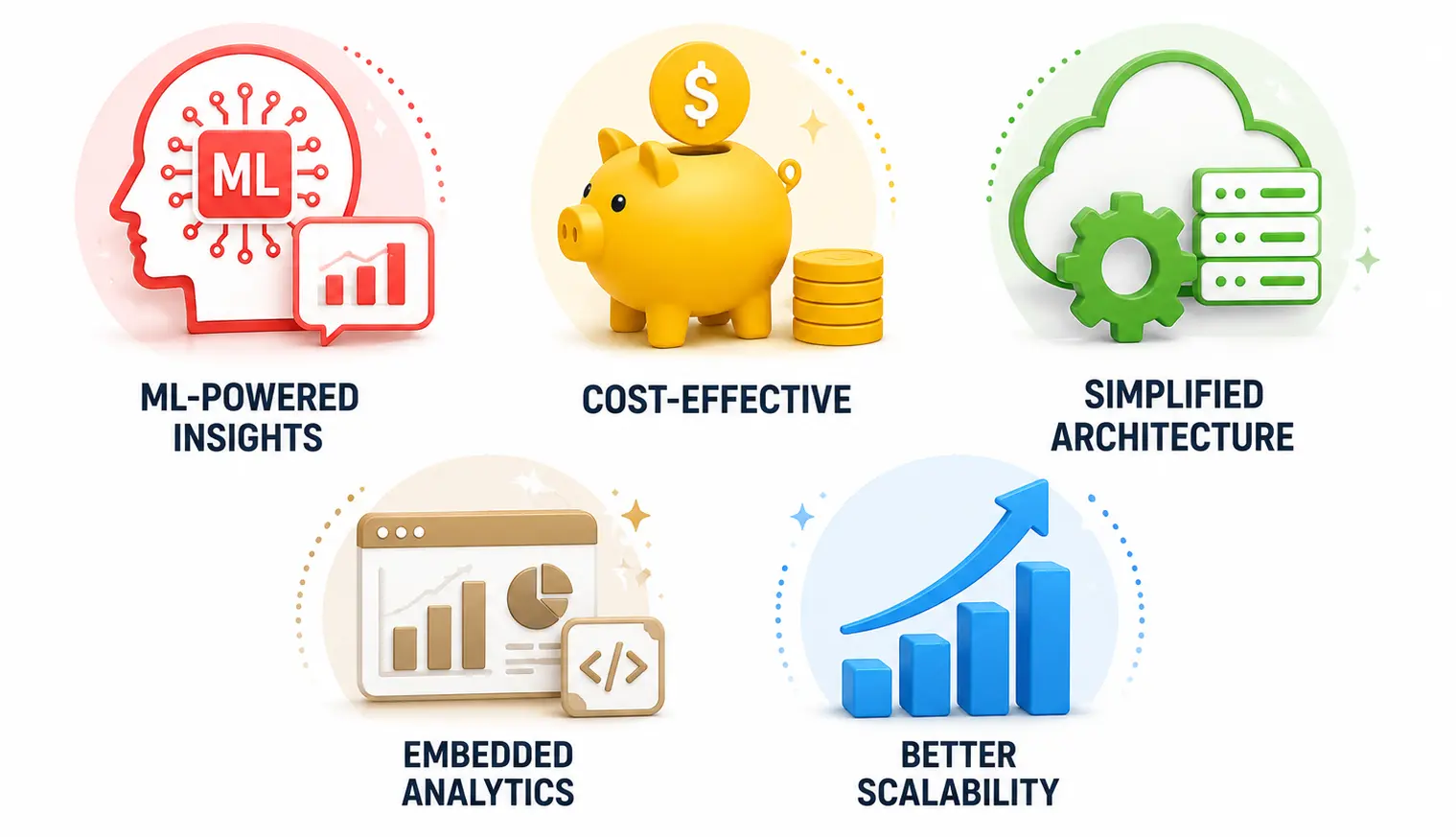

      • ML-powered insights: Amazon QuickSight includes QuickSight Q, which has natural language queries over structured data. Users can type in normal Q&A questions, and the system generates visual answers instantly. 
      • Cost-effective: QuickSight uses a unique Pay-per-session model, which means you pay only when users interact with the dashboard. 
      • Simplified Architecture: QuickSight is cloud-native, which eliminates the need to manage servers, desktop authoring tools, or on-premises gateways, reducing operational overhead.
      • Embedded Analytics: QuickSight provides robust SDKs and APIs to make embedded dashboards look like part of its own UI. It allows you to use customizable themes and branding, and usage-based billing for end users.
      • Better Scalability: Power BI’s licensing model can become costly at scale. QuickSight’s pay-per-session approach is more cost-effective, especially for large companies. What this does is make your costs a lot more predictable than with PowerBI. Aside from this, Quicksight also reduces your overall pricing overhead. On the whole, Amazon, being the largest cloud service provider, is also a good consideration. This goes especially considering that, as a business, they’re serving users and experienced profit (90 billion USD in net revenue in 2024) with the large user base they’ve amassed.
      Open Popup

      Things to Consider Before Migrating from Power BI to Amazon QuickSight

      Before migrating from Power BI to QuickSight, we need to check technical fit, cost, user experience, and change-management impact. The critical considerations to weigh before initiating your migration to Amazon QuickSight.

      • Logic Calculations: The most significant hurdle is that Power BI’s DAX does not support QuickSight. It uses calculated fields, dataset-level transformations, and SPICE in-memory acceleration. Complex DAX-heavy dashboards require rebuilding effort in QuickSight. Some teams that use Amazon Bedrock to parse DAX and suggest the equivalent QuickSight syntax. This can still require human validation, but reduces manual logic up to 80%.
      • SPICE Engine constraints: QuickSight’s SPICE (Super-fast, Parallel, In-memory Calculation Engine) and Power BI’s Import Mode have different boundaries. QuickSight Enterprise supports up to 5-minute incremental refreshes, but SPICE capacity is a shared pool across your account.
      • Cloud Infrastructure Alignment: QuickSight is more optimized for AWS-native environments. If the ecosystems are heavily based on Azure or Microsoft technologies, the Power BI to QuickSight migration increases complexity.
      • License and Cost Structure: QuickSight offers Pay-per-session reader pricing, author-based pricing, and SPICE capacity pricing. So, based on the number of active dashboard viewers, frequency of report access, and the need for embedded analytics.
      • Security and Governance: The Security Model is different from Power BI and QuickSight. QuickSight utilizes AWS IAM, user groups, and namespaces, with row-level security configurations. 
      • Need for Embedded Analytics: For SaaS products, evaluate embedding capabilities by secure dashboard embedding, API-driven management, and Multi-tenant architecture.

      How to Migrate from Power BI to Amazon QuickSight (Step-by-Step)

      Migrating from Power BI to QuickSight is a structured process that moves your analytics from a client-server model to a cloud-based environment. The steps below denote your Power BI to QuickSight migration process
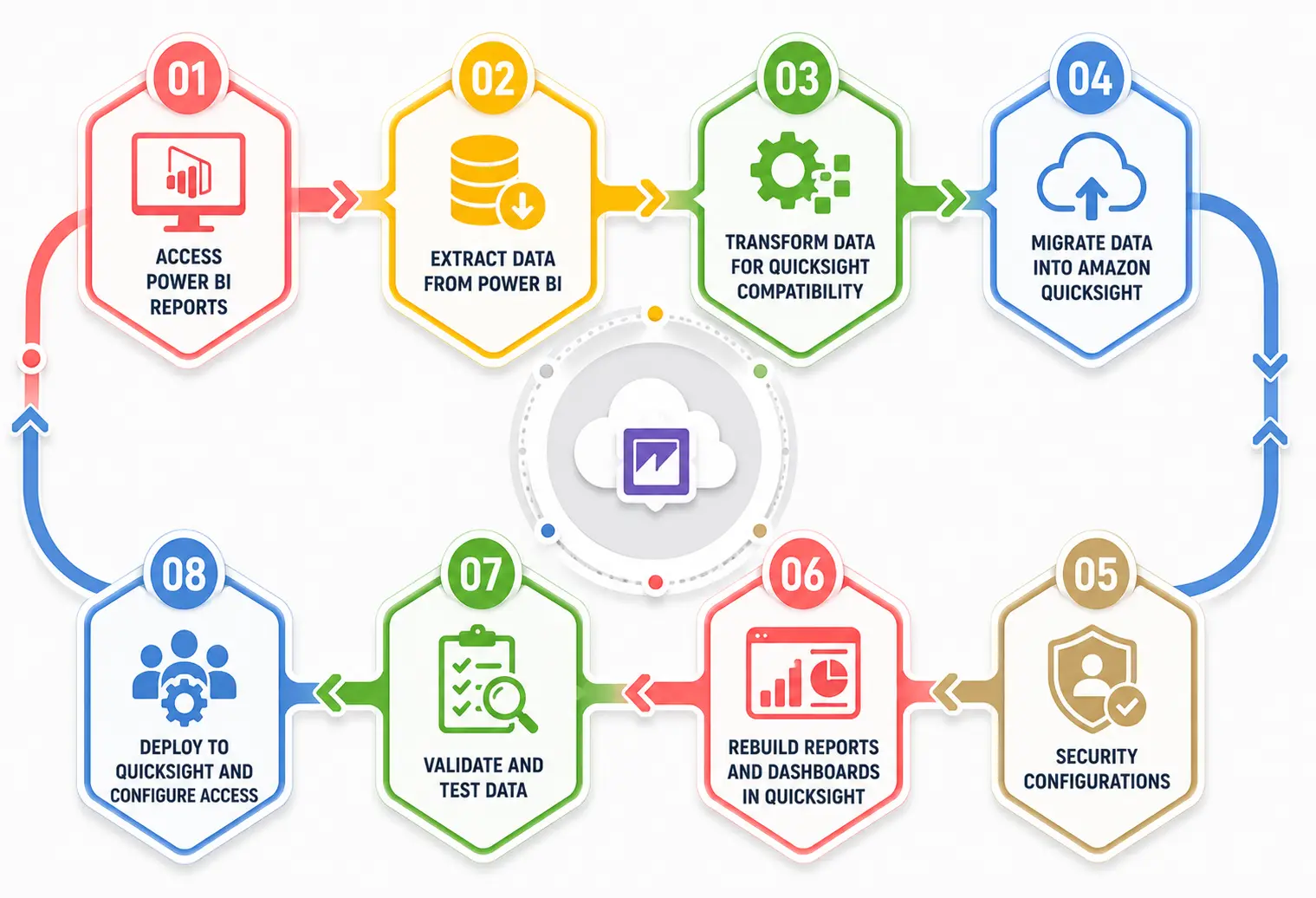
      Step 1: Access Your Power BI Reports

      When starting to migrate from Power BI to Amazon QuickSight, look at your existing Power BI reports to make sure that there is a structured route to your migration process. In doing this, prioritization helps you look at reports first while eliminating redundancies in the process, which in turn also reduces storage costs. So overall, we will identify which needs full migration, optimization, or retirement.

      • Identify Key Reports: Catalog all Power BI dashboards, reports, and datasets. Prioritize based on usage and business impact. In doing so, you lower the overall effort needed in the migration process.
      • Analyze Complexity: Review embedded DAX calculations, data transformations, and dependencies that might influence migration. By doing this, what you’re doing is making sure there are minimal performance issues later on and that the operational overhead is not as high.
      • Define Migration Phases: After this, we’d recommend you sort reports into logical phases to improve the transition process. By carrying out your migration in phases, you prevent business disruption that can cost you customer trust, and you control the cost of the overall effort.

      Step 2: Extract Data from Power BI

      Extracting data correctly is a major part of making sure there is consistency and integrity when migrating from Power BI to Amazon QuickSight. 

      • Access Source Databases and Employ ETL Tools: Use Power BI REST APIs to export datasets while preserving key metadata. Retrieve data directly from the sources rather than Power BI’s internal storage for more control. Use AWS Glue or other ETL solutions to structure data for QuickSight.
      • Establish Connectivity: Pull Power BI reports from on-premises or Azure-based sources by migrating datasets to AWS, rebuilding ETL pipelines, and optimizing schemas for analytics performance. Now start connecting QuickSight to your data sources. Ensure QuickSight has proper IAM permissions to access those services.

      Step 3: Transform Data for QuickSight Compatibility

      QuickSight’s full potential can be obtained when the data is flat and pre-aggregated. Data transformation makes sure that datasets align with QuickSight’s requirements and enhance performance when migrating from Power BI.

      • Standardize Formats and redesign: Adjust schemas, field types, and relationships to match QuickSight’s architecture. Both Power BI and QuickSight differ in their modeling layer and DAX calculations. QuickSight uses SPICE (in-memory engine), recreates DAX logic into QuickSight formulas. They validate joins and aggregations. 
      • Define Data Joins and Use AWS Glue: Set up relationships to support accurate aggregations and queries in QuickSight. Utilize AWS Glue to clean, format, and prepare data efficiently.

      Step 4: Migrating Data into Amazon QuickSight

      Loading data efficiently is critical to ensure users can interact with reports seamlessly.

      • Optimize SPICE: Use QuickSight’s SPICE engine for faster performance with large datasets. It can handle up to 1TB of data in-memory for sub-second dashboard performance. 
      • Schedule Refreshes and Translate Logic: Set automated data refresh intervals to maintain data accuracy. Recreate your DAX measures using QuickSight’s calculated fields using Amazon Q for Business.

      Step 5: Security Configurations

      Security mapping is the most critical one. When comparing the security configurations, Power BI relies on Azure Active Directory and RLS rules. But QuickSight is managed by AWS IAM policies, QuickSight user groups, Dataset-level permissions, and Row-level security rules. Create a separate dataset that maps users/groups to specific data values and re-implement security rules.

      Step 6: Rebuild Reports and Dashboards in QuickSight

      Start rebuilding the dashboards, focus on using QuickSight’s unique features such as ML Insights and narratives. It ensures continuity and unlocks new capabilities for your ecosystem.

      • Analyze Existing Reports and Use QuickSight Features: Identify key metrics, filters, and visual elements to be replicated. Utilize calculated fields, interactive dashboards, and ML-powered insights of QuickSight. Other features of QuickSight, such as ML insights and Narratives, provide auto-generated text summaries of your data. Use filters, drill-downs, and interactive elements for better engagement of customers.

      Step 7: Validate and Test Data

      Run both Power BI and QuickSight in parallel. It is an important step to check data integrity and alignment with business requirements. To do this effectively, we would recommend that users:

      • Cross-Check Metrics and Gather User Feedback: Compare key figures between Power BI and QuickSight. Look for missing values, inconsistencies, and incorrect mappings. Engage end users to validate reports and confirm alignment with expectations.

      Step 8: Deploy to QuickSight and Configure Access

      Deployment makes reports accessible and ensures there is proper governance and visibility on your full ecosystem.

      • Publish Dashboards and Monitor Usage: Define user access controls to maintain security and compliance. Make sure reports are rendered properly and ready for distribution. Track reports engagement to refine dashboards based on user behavior.

      What to Do After You Migrate from Power BI to Amazon QuickSight

      A Power BI to QuickSight migration is considered successful only when post- migration steps are carried out.

      • Validate KPI Consistency: Do a comparison of key KPIs between Power BI and QuickSight. Verify calculated fields and aggregations and test filters, drill-down, and parameters. By doing a parallel validation phase, we report discrepancies that can impact decision-making.
      • Optimize SPICE Engine: QuickSight supports datasets up to 2TB. Check SPICE ingestion logs to see if any datasets are failing to approach the limit. Set up an incremental refresh to only pull in the last 24 hours of data by reducing the load on your source database.
      • Governance and Security: Verify that Row-level Security (RLS) is implemented. Provide group-based permissions to individual users. Use IAM Groups or QuickSight Groups to manage access at scale.
      • Train Users and Document Migration Processes: Proper training and documentation improve adoption and ease future maintenance. Develop user guides, FAQs, and video tutorials tailored to different roles. Offer hands-on training for report building and data analysis. Keep a record of migration steps, data sources, and dashboard configurations.
      • Decommission Power BI: Set your Power BI reports to Read-Only. This allows users to check any discrepancies in new QuickSight reports. So once everything is ready, decommission Power BI and cancel its license.

      Why Choose Entrans for Your Power BI to Amazon QuickSight Migration

      Power BI has limitations when it comes to large-scale cloud analytics. Migrating to Amazon QuickSight offers a more scalable, cost-effective, and AWS-friendly solution.

      At Entrans, we have PowerBI experts, certified AWS professionals, and teams equipped to handle maintaining and automating your cloud infrastructure, data pipelines, and even help you put CI/CD systems in place.

      Want to know about how we make the Power BI to QuickSight migration smoother? Book a consultation call.

      Share :
      Link copied to clipboard !!
      Migrate from Power BI to Amazon QuickSight Without Disrupting Your Analytics
      Entrans helps enterprises modernize BI with secure data migration, dashboard rebuilding, and scalable AWS-native analytics.
      20+ Years of Industry Experience
      500+ Successful Projects
      50+ Global Clients including Fortune 500s
      100% On-Time Delivery
      Thank you! Your submission has been received!
      Oops! Something went wrong while submitting the form.

      FAQs

      1. What is the Power BI to QuickSight migration?

      Power BI to QuickSight migration is a process of moving an organization’s BI ecosystem, such as reports, datasets, and security configurations, to Amazon QuickSight. It also includes rebuilding dashboards, converting calculations, and data sources in a cloud-based environment.

      2. How long does the Power BI to QuickSight migration process take?

      The timeline to complete the Power BI to QuickStart migration depends on the complexity of DAX calculations, dashboards, data volume, and security configurations. Simple migrations may take 2 to 4 weeks, whereas enterprise-scale migrations take place 3 to 6 months or more.

      3. What happens to the DAX calculations during the Power BI to QuickStart migration?

      It is one of the most important challenges faced in the Power BI to QuickStart migration. DAX Calculations are not directly transferable and must be recreated using QuickSight calculated fields, SQL logic, or ETL transformations. Complex reports need redesigning to maintain performance and accuracy. 

      4. Are all Power BI features fully supported in QuickSight?

      No. Not all the features are supported in QuickSight. Power BI does not have equivalent functionality in QuickSight. But QuickSight provides strong AWS-native integration, SPICE performance acceleration, and scalable embedded analytics features.

      Hire QuickSight Experts for Your BI Migration
      Work with Entrans developers experienced in Power BI migrations, AWS data pipelines, and enterprise analytics architecture.
      Free project consultation + 100 Dev Hours
      Trusted by Enterprises & Startups
      Top 1% Industry Experts
      Flexible Contracts & Transparent Pricing
      50+ Successful Enterprise Deployments
      Kapildev Arulmozhi
      Author
      Kapil is the Co-founder and CMO of Entrans, bringing over 20 years of experience in SaaS sales and related industries. He is responsible for creating and overseeing the revenue-driving systems at Entrans. Having collaborated extensively with tech leaders and teams, Kapil possesses a keen understanding of the decision criteria and ROI-justifiable initiatives essential for business growth.

      Related Blogs

      Mainframe to AWS Cloud Migration: Tools, Services, and How to Run a Successful Program

      Migrate your mainframe to AWS and cut infrastructure costs by up to 85%. Explore tools, migration phases, security standards, and the AWS MAP program.
      Read More

      Mainframe Modernization to Cloud: What It Means, How It Differs from Migration, and Which Path Is Right for You

      Mainframe modernization to cloud is not just migration. Explore the full spectrum of approaches, ROI ranges of 288 to 362%, and how to avoid the modernization trap.
      Read More

      ETL Migration to Cloud: Key Considerations, Best Practices & Complete Guide (2026)

      Learn key considerations, migration strategies, and best practices for ETL migration to cloud. Reduce timelines and modernize your data pipelines in 2026.
      Read More