Plan a seamless AngularJS to React migration. Learn how to manage coexistence, lower security risks, and execute a phased rollout without downtime.

Agentic Unconference 2026 - September 19, Chennai
View Event →





AngularJS lost official support on December 31, 2021. If it still runs your product, every quarter adds cost you never budgeted for. Security questionnaires get harder to answer. Engineers willing to maintain it get scarcer and more expensive. And the toolchain around it keeps moving without you.
An AngularJS to React migration is one of four routes off that framework. It is not automatically the right one. This article puts the four routes side by side. It covers the mechanics of running both frameworks at once, a phased sequence with exit criteria, and the drivers that set your cost and timeline. It also names the three cases where we would tell you not to migrate at all.
There are no code samples here. It is written for the person who has to fund the work and defend the date.
An AngularJS to React migration replaces the AngularJS 1.x front end with React, component by component. It is a rewrite, not an upgrade: no supported path exists between the two frameworks. The work splits into three tracks: components become JSX, two-way bound state becomes unidirectional state, and routing moves to React Router.
Get the name right first, because the search results do not. AngularJS is Angular 1.x, sometimes written Angular JS. Angular 2 and later is a different framework that happens to share a brand. Four of the nine pages currently ranking for this query never mention AngularJS at all. They use Angular examples, and those examples do not apply to your codebase.
So your decision is not React or no React. It is which of four routes to fund, what that route costs, and whether React is a destination your team can staff.
Unsupported means no patches, ever. The Angular team ended long-term support for AngularJS on December 31, 2021, after extending it once during the pandemic. Its angular/angular.js repository is archived. You can no longer file an issue or a pull request against it, which the official version support page confirms. The npm and bower packages are still published, but marked deprecated.
Here is what that means in practice. NIST's vulnerability database carries CVE-2024-8372, a srcset sanitization flaw in AngularJS. It affects every version through 1.8.3, and 1.8.3 is the last release there will ever be. The record is flagged "Unsupported When Assigned" and states plainly that the project will not receive updates.
So there is no version to upgrade to. The only fix is to stop using the framework.
That risk lands in three places on a CTO's desk.
None of the nine pages ranking for this query cites a single one of the three sources above. That is why "AngularJS is old" rarely wins a budget conversation. A named vulnerability that will never be patched usually does.
There are four routes, not two. Most articles present a rewrite and an incremental migration, then stop. Read the table, then pick the row that matches your two hardest constraints rather than the row that sounds most ambitious.
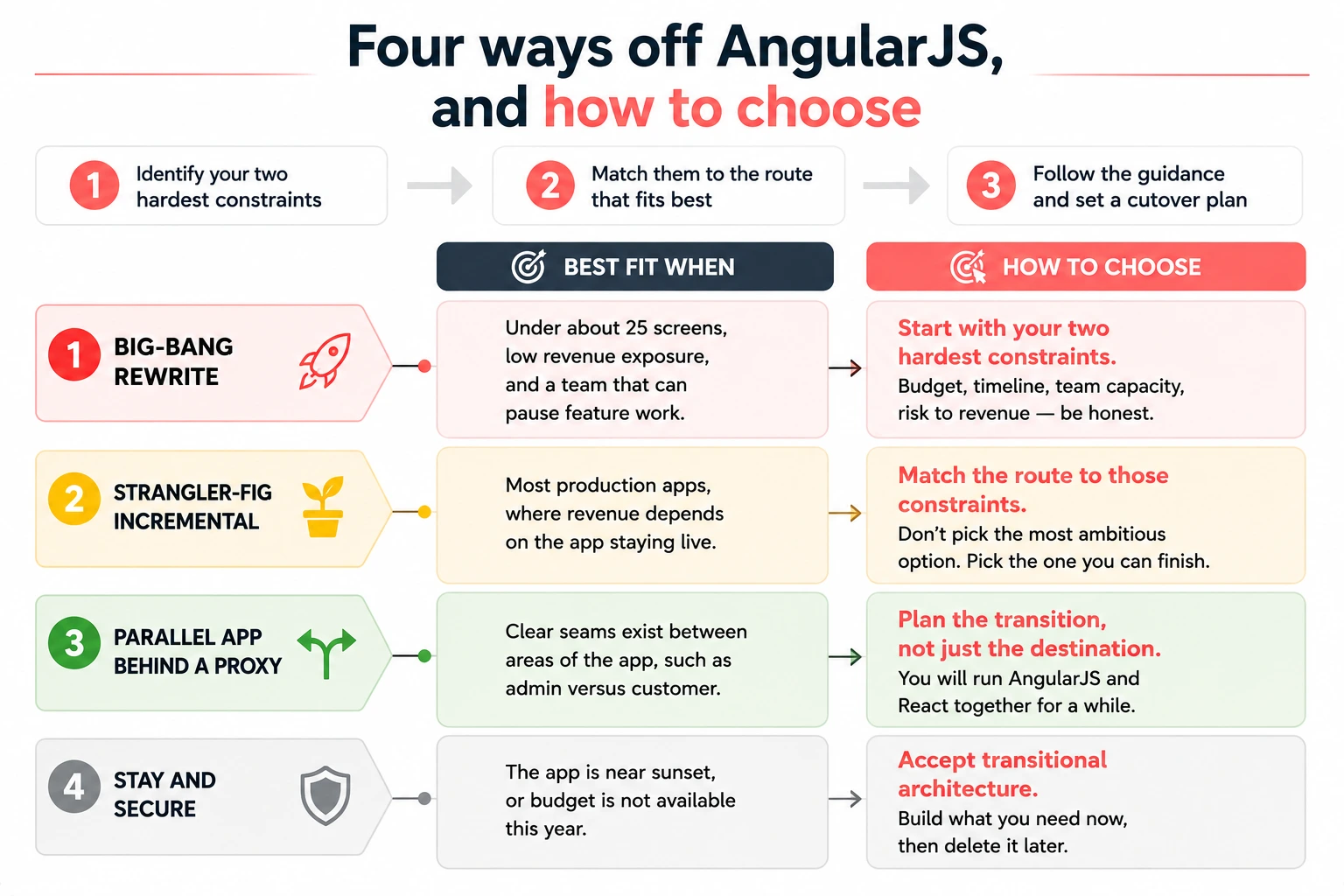
Read Martin Fowler before you commit to row one. On the full-replacement plan, he writes that he and his colleagues have watched it go down in flames most of the time. His case for the incremental route is that teams rarely specify existing behavior accurately, and much of that behavior turns out not to be wanted. He also defends transitional architecture, meaning code you build and later throw away, because reduced risk and earlier value outweigh the waste.
Rows two and three are where most enterprise applications land. Choosing either one commits you to running AngularJS and React together for a while. That is the part almost nobody documents, and it is where an application modernization program either holds together or comes apart.
They can run together, and React's own documentation says so. The Add React to an Existing Project guide opens by telling you that you do not have to rewrite. It documents two supported patterns. React can own an entire subroute behind a server or proxy rule, or it can mount into a specific element on an existing page. React's docs note the second pattern is how most React usage looked at Meta for years.
The table below covers the options teams actually choose between, and what each one does to the four things that break during coexistence.
Two things break more often than anything else here. Neither gets much coverage on page one.
Routing ownership comes first. One framework has to own the top-level route, and reversing that call is expensive. Leave it with AngularJS while React handles leaf screens, then hand it over in one deliberate step once React covers enough of the app.
Session sharing comes second. You have two bundles and one login. Keep the token in a cookie on a single domain and read it from both. Never sync two auth states.
Not everyone agrees with coexistence. The ButterCMS engineering team argues against mixing frameworks in one application, and the argument is fair. You carry two runtimes, two mental models, and a wrapper layer somebody has to remove later.
Here is the tradeoff. Coexistence buys continuous delivery and costs you transitional code. A rewrite buys a clean codebase and costs you a delivery gap. Pick the cost you can absorb.
[DIAGRAM 1: Two-lane diagram of a coexistence period. Top lane AngularJS shell owning the router and the auth cookie, bottom lane React screens mounted via wrappers, with a vertical marked handover point where React Router takes the top-level route and a second marked point where the AngularJS bundle is deleted. ALT: Coexistence period showing AngularJS owning routing until React Router takes over at handover]
The half-migrated app is the real risk, not the code. The top result for this query is a developer asking how to stage the release without it looking like Frankenstein. Nobody in that thread answers him. The answer is exit criteria, a feature freeze, and a cutover date you set before phase one begins.
Seven phases, in this order. Each one ends on a condition rather than a date.
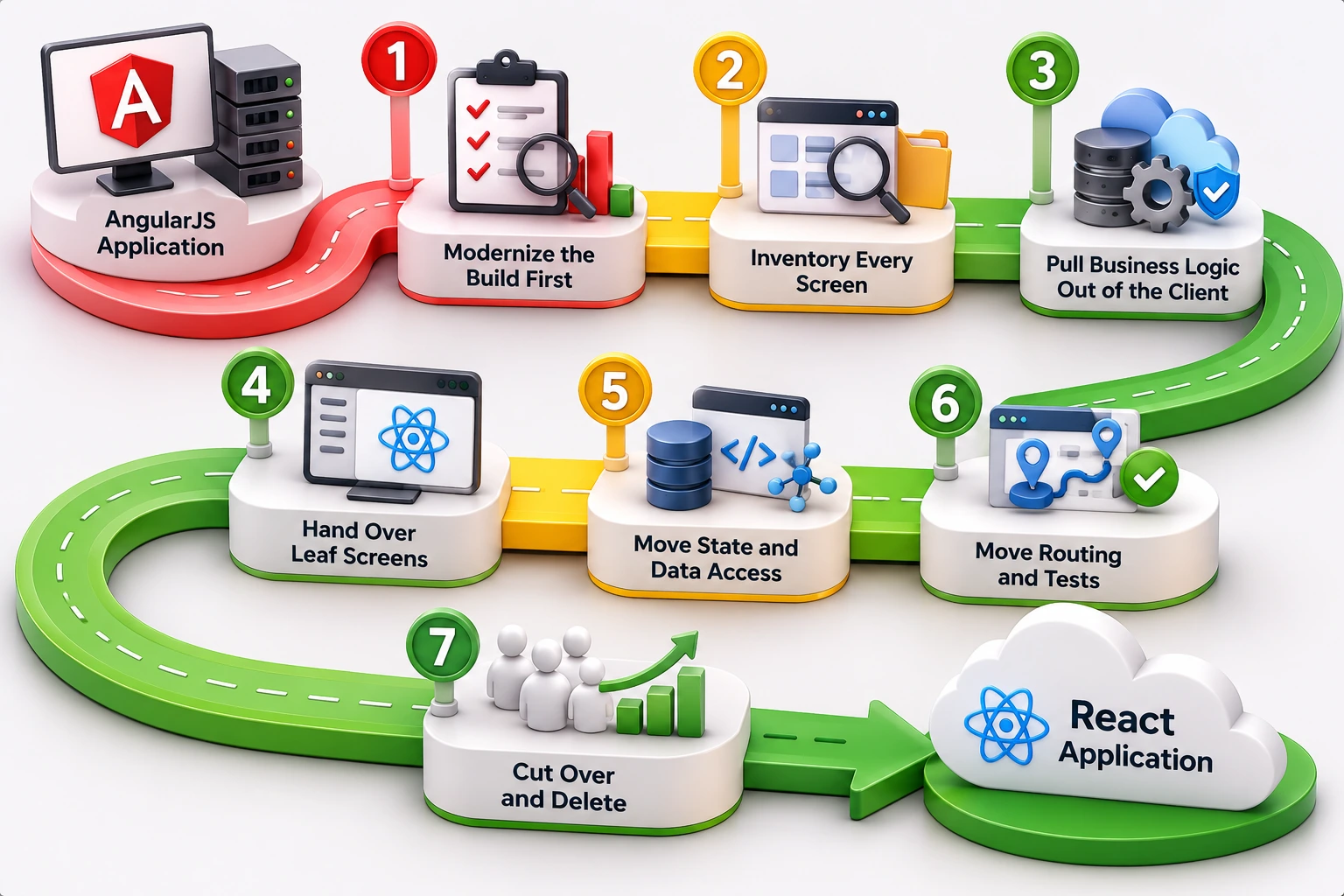
Three controls keep this from stalling, and the first is the one teams skip.
Freeze feature work in the old framework. Anything new gets built in React. Skipping this control is the single most common reason a migration runs for years instead of quarters.
Make every screen earn its port. Both publicly documented migrations off AngularJS quietly deleted features rather than porting them, with stakeholder signoff, and neither team framed it as a policy. Make it one.
Set the cutover date before phase one. A date you renegotiate once is a plan. A date that does not exist is not.
Staged does not have to mean risky. On one Entrans engagement, a legacy ExtJS front end was modernized alongside a backward-compatible API migration instead of a single cutover. The published outcome was a 100 percent uninterrupted API migration with no production incidents, plus a 40 percent cut in UI interaction lag. Different framework, same principle. Stage the change, hold the contract stable, and the business never feels it.
The real question is not whether shifting from AngularJS to React is worth it. It is what your specific codebase makes it cost. Nobody can price that from a blog post, and any page that tries is guessing. What you can do is name the drivers, then get a range from someone who has read your code.
Six drivers, in rough order of impact:
One cost is easy to miss. React ships with almost nothing, so routing, forms, data fetching, and dependency injection all become choices your team makes and then owns. AngularJS made most of those decisions for you. Budget the evaluation time, not only the code.
Two migrations are documented publicly with real numbers. Mark Erikson's team converted roughly 95,000 lines with four to five engineers over about 21 months. A ButterCMS engineer reports roughly three years, with the engineering team split in half. Neither figure transfers to your app, and both teams had other work running. Use them to sanity-check a proposal, never to build a budget.
The column no competing article includes is the cost of doing nothing. Staying on AngularJS never appears in a project budget. You pay it in security review time, higher contractor rates, and dependency upgrades deferred until they cannot be deferred. That cost is real, it grows, and it never gets a line item.
Team models come in three shapes. Internal only is cheapest when you already have React fluency and some slack. Partner-led is fastest when you have neither. A blended pod sits between them: the partner runs the conversion track while your team keeps shipping features. Where the constraint is capacity rather than approach, adding dedicated React developers to your existing team beats reshaping the whole program around a vendor.
Partly. AI handles the mechanical work well and the decisions badly. Demand for a converter is obvious. A VS Code extension that converts AngularJS components into React through the OpenAI API ranks on page one for this query. Half the related searches ask about automated conversion.
The only first-hand evidence is discouraging on the full-conversion promise. Mark Erikson evaluated automated conversion tools on his own MEAN codebase and judged the output not useful enough to adopt. That is one engineer on one codebase. It is still the most honest data point available.
What AI genuinely speeds up:
Four things it does not do: choose your route, rewire two-way binding into unidirectional flow, decide which screens to delete, or lift business rules out of the client into a service. Those four are the expensive parts. AI-driven legacy modernization pays off when you point it at inventory and test generation. It disappoints when you expect a working React app back.
Three cases where we would tell you not to do this.
Your team is fluent in Angular and the app leans on Angular idioms. Angular is then the cheaper destination, and its upgrade path is far better documented. Search demand agrees, because more people ask about the AngularJS to Angular route than the React one. If that describes your team, read the AngularJS to Angular migration guide and skip React entirely.
The app is inside about 18 months of sunset or replacement. Buy extended support and stop there. The official AngularJS support page names XLTS.dev as a commercial option. Funding a migration for an app you are about to switch off spends the money in the wrong place. We would say so before quoting the work.
Automated test coverage is near zero and nobody wants to build it. Migrating without a safety net turns a framework problem into a regression problem, and your users find the regressions first. Build the test layer on the AngularJS app before you migrate. It is unglamorous work, it costs less than the alternative, and it survives the migration.
One correction, because the search results contradict each other on it. One ranking page lists React as bad for SEO while two others sell server-side rendering as the fix. Both are half right.
React is no worse for search than AngularJS, but a client-rendered single-page app is. Server-side rendering solves it, usually through Next.js. That is a real engineering line item rather than a free benefit. Budget for it, or accept the rendering behavior you have today.
Two governance items get forgotten every time. A staged rollout can regress accessibility on the screens that move, so somebody has to own testing it. And if the app sits in a regulated workflow, the cutover needs an audit trail agreed in advance.
If AngularJS is still in production, the open question is which route off it to fund, not whether to move. Entrans runs a two-week front-end modernization assessment. We inventory every screen and custom directive, then score the four routes against your test coverage and release cadence. You get back a phased plan with exit criteria, a cutover date, and a cost range you can take into a budget conversation. On one recent legacy front-end engagement, the staged API migration finished with zero production incidents while the business kept shipping. Talk to an Entrans architect to scope yours.

No. Official AngularJS support ended on December 31, 2021, and the Angular team confirmed it no longer supports AngularJS. The angular/angular.js repository is archived, so nobody can file new issues or pull requests. The npm and bower packages remain published but deprecated. New vulnerabilities are not patched.
Choose Angular when your team is already fluent in it and the app leans on Angular idioms. The path is better documented and the concepts carry over. Choose React when you need a larger hiring pool, want incremental delivery, or are rebuilding the interface anyway. The cheaper route usually follows your team, not the framework.
Yes. React's own documentation supports two coexistence patterns. React can mount into a specific element on an existing page, or own an entire subroute behind a server or proxy rule. Wrapper libraries such as react2angular and angular2react let each framework render the other's components during the transition period.
Published migrations range from under a year to three years. The main drivers are screen count, custom directives, how much business logic sits in the client, and existing test coverage. One documented team converted roughly 95,000 lines with four to five engineers in about 21 months. Neither number generalizes to your codebase.
Not entirely, but a partial freeze on the AngularJS codebase is what stops a migration from stalling. Freeze new feature work in the old framework, build anything new in React, and set a hard cutover date before the first phase starts. Without those three controls, teams stay half-migrated for years.
Partially. AI handles mechanical work well: inventorying screens, transforming templates into JSX, running codemods, and generating missing tests. It does not make the architectural calls. One engineer who evaluated automated conversion tools on a real codebase found the output not useful enough to adopt. Treat AI as an accelerator, not a converter.

-1.svg)