Learn how to detect and handle schema drift in data pipelines using schema validation, data contracts, automated checks, and approval workflows.

Agentic Unconference 2026 - September 19, Chennai
View Event →


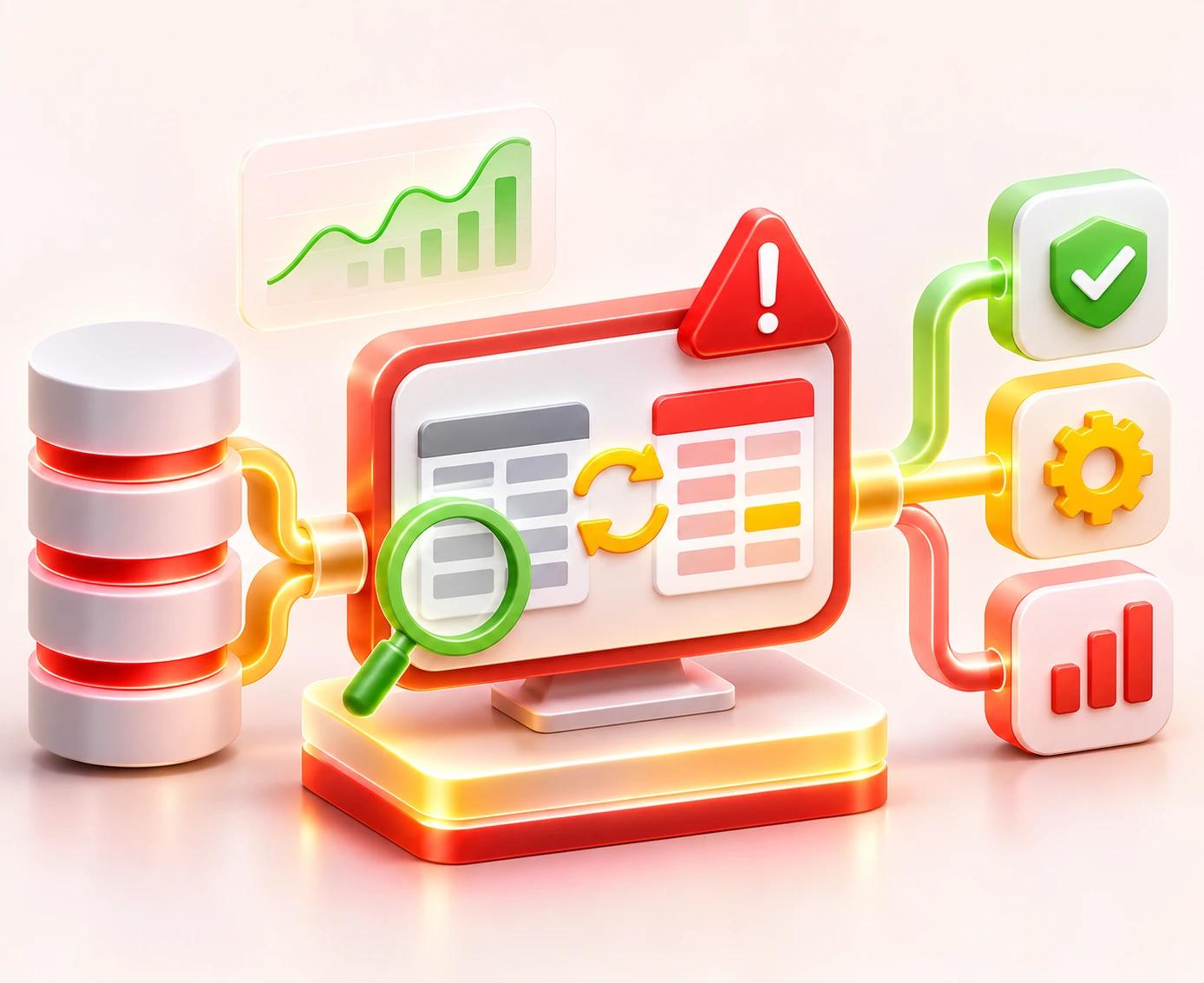


Schema drift is one of the top reasons data teams lose trust in their own reports.
Monte Carlo's 2023 State of Data Quality survey found that the mean time to fix a data issue rose by 166% to roughly 15 hours. Those polled also guessed that data quality issues hit 31% of revenue.
With this in mind, schema drift detection, automated schema validation, and data quality monitoring need to sit inside the pipeline, not around it.
Below, we'll cover what schema drift is and how to spot it. We'll also look at how to respond to each type of change.
Then we'll point out where tools still need a human call. On the whole, you'll get a clear plan for every case.
Schema drift is a sudden change to the shape of source data. Downstream systems never hear about it. The change can take many forms. Meaning, columns get added, dropped, or renamed.
Data types change. New nullability rules pop up. Source teams also reshape nested JSON objects. In doing so, they often give no warning.
Pipeline schema drift is unlike database environment drift. In environment drift, the dev, test, and prod databases fall out of sync with each other. Data drift is a separate case. In other words, the values and their spread shift while the structure stays the same.
Schema validation and data contracts catch pipeline drift. Schema evolution is how teams plan for shape changes ahead of time.
Schema drift is an unchecked change in shape. Meaning, an upstream producer ships an update and never tells the teams that use its data.
Schema evolution is the opposite. Here, schemas change through versions and compatibility rules that producers and consumers have agreed on. With this in place, evolution is the plan. Drift is what happens when that plan gets skipped.
Not every structural change breaks a pipeline in the same way. In order to detect schema drift you notice hoy they cause a hard failure that stops a job immediately.
However, with others some types of schema drift cases let the pipeline keep running and quietly corrupt the data feeding your dashboards.
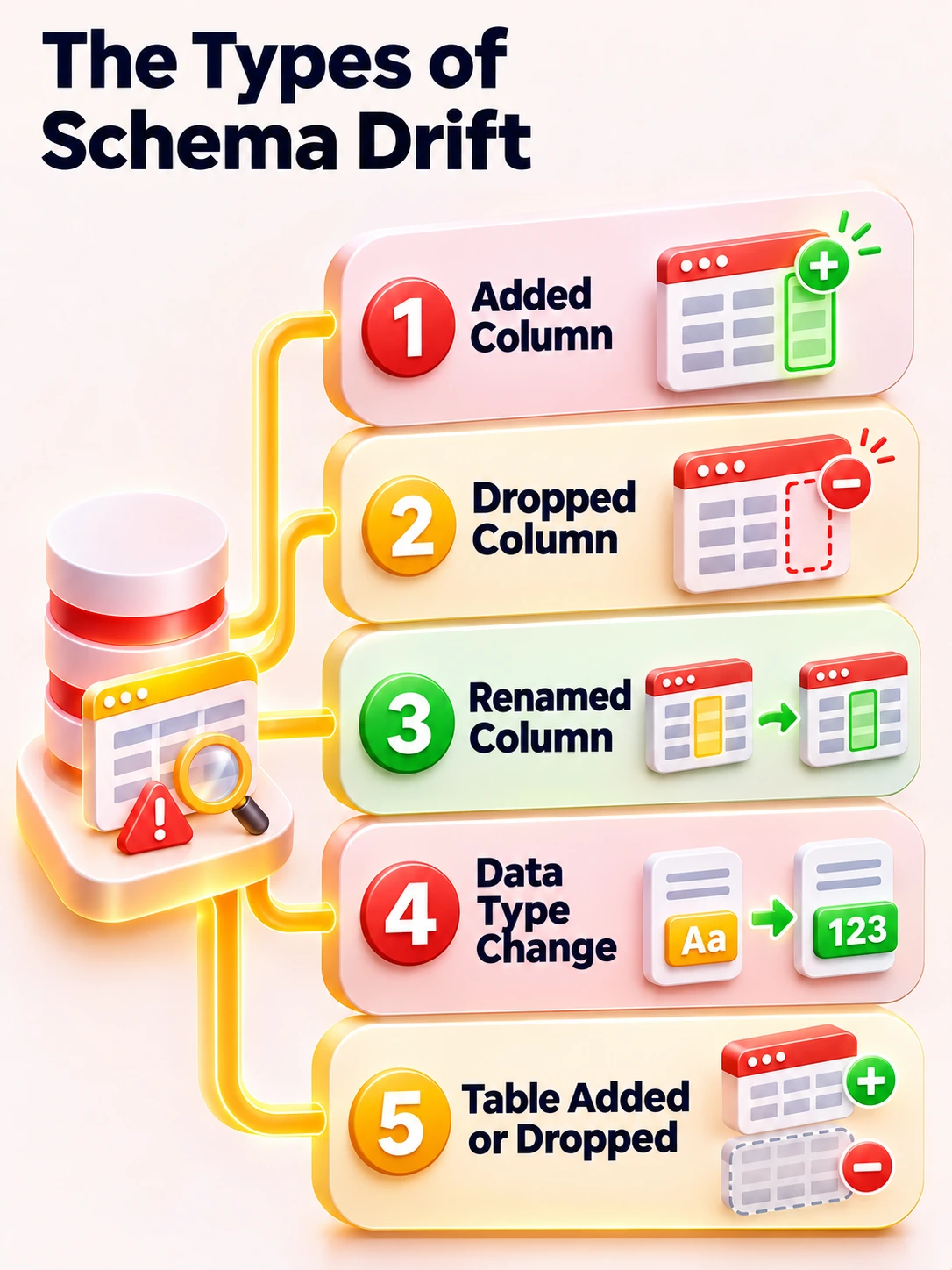
Here's how each type shows up in ETL and ELT pipelines:
Added columns are the most common type of drift, and the least harmful. Source apps add fields to track new features. As a result, tools like Delta Lake (using mergeSchema) or BigQuery (using ALLOW_FIELD_ADDITION) can take them in on their own.
The risk comes from allowing field addition blindly. A new column can carry unchecked or private fields, such as personal data, straight into downstream SELECT * queries.
In doing so, the column adds storage costs and legal risk that nobody signed off on.
A dropped column happens when a source team retires a field or tidies up a table. Many load tools fill the missing field with NULL instead of failing. The pipeline keeps running - and this is exactly why it is so challenging to spot.
Downstream, any join, roll-up, or dbt model that leans on that column either errors out or returns partial results.
Reports keep refreshing on schedule. Meanwhile, every metric built on the missing field slowly turns wrong. With this, the damage stays out of sight.
Renames are the most deceptive type of drift. Most systems can't tell that customer_id used to be cust_id. Meaning, they read the change as one column dropped and a brand-new column added.
Mappings break, and past lineage gets cut off. The old column fills up with NULLs while the new one goes unused.
With this, every report built on the original field starts showing gaps until someone adds a manual mapping.
Type changes are the trickiest failure. A field might move from VARCHAR to INTEGER, or from DECIMAL to FLOAT.
Some warehouses reject the load outright. Others force failed values to NULL and carry on. But by doing this, they keep the job green while the data goes wrong.
The silent version does far more damage. Calculations still run, but digits get cut off, or rows go missing. Finance totals and KPIs drift away from the source of truth. In other words, not a single error shows up in the logs.
Database migrations and rework projects can add new source tables or remove old ones. Pipelines built on fixed table lists either miss the new data or fail when an expected table disappears.
The damage spreads across DAG paths, referential integrity, and the data catalog. As a result, lineage breaks. Downstream reports stay partial until someone updates the job flow and metadata by hand.
So how do you catch drift before it does harm? Schema drift detection has to happen before transform steps run.
Meaning, standard code tests won't help with schema drift detection or catch changes in the data itself.
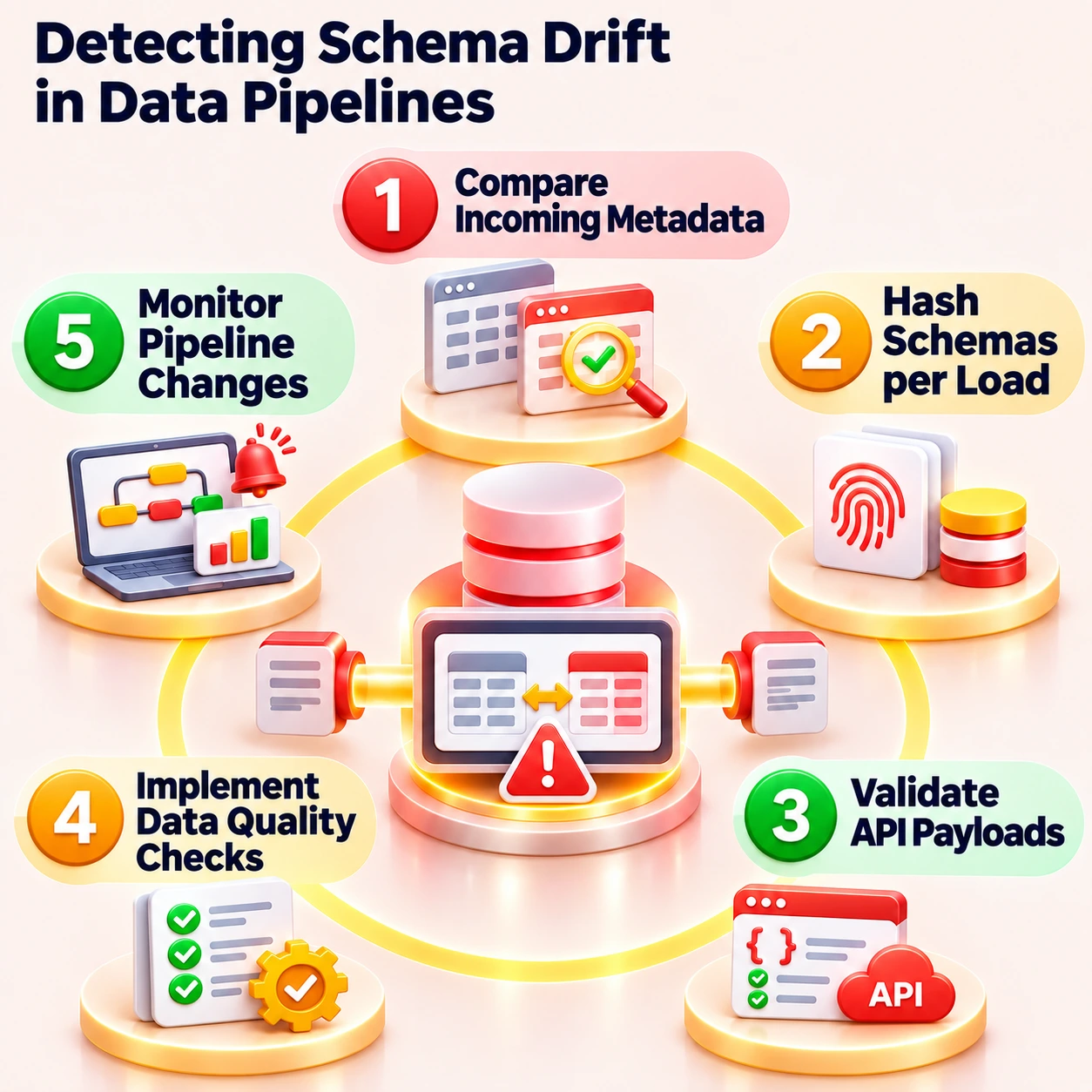
Automated detection needs to compare each batch or stream that lands against an expected schema or data contract.
This type of schema drift detection should work across both batch and streaming pipelines. In doing so, teams catch each change before it hits a model. Key methods for schema drift detection include
AI data quality tools can back up these rule-based schema drift detection. These are tools that learn what normal shapes and volumes look like and flag anything that looks odd.
So can AI tools do the whole job? Not quite. Soda's anomaly detection, for instance, needs several steady scans to set a baseline before it can judge a change.
Meaning, AI tools can't block a zero-day shape shift on their first run. Rule-based checks should stay the first line of defense.
Once drift is found, the pipeline has to decide what to do next. Smart data teams skip the simple pass or fail test.
They map each type of change to a risk level, a set response, a sign-off step, and a named owner. In doing so, no change gets left to chance. The four core responses are:
Teams can tweak this matrix to fit the compatibility rules they already use. A schema under backward compatibility can safely absorb optional additions. Workloads that need forward or full compatibility are stricter.
Meaning, they may have to block any change that older consumers can't read.
Data contracts spell out which fields are promised. That makes the line between absorb and block clear.
The key part of this, however, would need a named owner for each response.
Without this, every change ends up as either an auto schema update or a generic alert that nobody acts on.
Detecting a schema change is not the same as approving it. So who signs off? Auto schema evolution cuts down on manual work. But by doing this, a new column holding personal data can land in a governed warehouse before anyone has looked at it.
That is why shape changes should follow a controlled workflow. A good rule is to let raw Bronze tables change freely while keeping Gold tables locked.
The data owner should decide what goes live, not the on-call engineer fixing a midnight failure. With this rule, the call sits with the person who knows the data best. The workflow looks like this:
Entrans applied this workflow while building a Microsoft Fabric data warehouse for a client whose Snowflake source environment changed constantly.
Metadata monitoring identified table additions, column type changes, and field deletions as soon as they appeared in the source.
Instead of letting automatic evolution merge those changes, each one was classified, held in a pending state, and sent to client stakeholders for review.
Only approved changes were executed in the warehouse, while rejected changes were isolated, keeping the warehouse aligned with its data contract without manual pipeline rewrites.
Each major data platform handles schema drift and schema evolution differently, and none of them handles every type of drift automatically. Here's how the capabilities, configuration options, and limitations compare:
Fabric splits intake between Lakehouse and Warehouse workloads. Lakehouse tables are stored in Delta format.
Meaning, they can support schema evolution during the load. Dataflow Gen2 and Fabric pipelines can map changing source shapes into flexible targets.
Warehouse tables are stricter. They often need manual DDL updates when the source changes. With this split, there is a handy line between flexible lake storage and governed warehouse tables. That line is where checks and sign-off belong. For a deeper look, see our guide to Microsoft Fabric setup.
In Mapping Data Flows, Azure Data Factory gives you an Allow schema drift setting on source transformations. With this on, the data flow takes in columns that aren't set in the source projection. The Infer drifted column types option can then give types to new columns from self-describing sources.
The trade-off is that drifted columns are late-binding. They don't get strict type checks. To protect database sinks with effective schema drift handling, engineers often add a Derived Column or Cast transformation right after the source.
In doing so, they set clear types for primary keys and key business fields, whatever changes upstream.
Databricks Auto Loader stores the inferred schema in a schema location and changes it through the cloudFiles.schemaEvolutionMode option. The addNewColumnsWithTypeWidening mode adds new columns and safely widens types, such as integer to long, without rewriting data.
In the default addNewColumns mode, the stream stops when it finds a new column and picks it up on restart. Meaning, your job runs should expect those restarts.
So what happens to a value that breaks the schema? Values that don't match, such as a string landing in an integer field, drop into the _rescued_data column instead of crashing the stream.
On the storage side of schema drift handling, Delta Lake checks schemas on write by default. With this, tables only change when options like mergeSchema are set. That gives teams a clear line between flexible loads and controlled table changes.
Snowflake can detect file schemas using INFER_SCHEMA. Tables can then change on their own when ENABLE_SCHEMA_EVOLUTION is set to TRUE and COPY INTO uses MATCH_BY_COLUMN_NAME. Snowflake can add new columns. In doing so, it can also drop NOT NULL rules for columns missing from new files.
There are limits, to this type of schema drift handling though. By default, schema evolution is capped at 100 added columns per COPY run.
Semi-structured data landing in VARIANT columns can change shape without setting off any shape change at all. Meaning, Snowflake only handles what it can see. So watching the gaps between source and warehouse schemas is still a must.
Not all schema drift comes from upstream sources. Database environment drift happens when dev, test, and prod schemas slowly fall out of step.
Meaning, a fix made by hand in one stage never makes it to the rest. Manual changes that never reach version control are the main cause. The best safeguards include:
For instance, a dev changes a column type in a Snowflake dev environment to test a hotfix. The DDL change never makes it into the migration scripts. The CI/CD release goes through, yet prod queries fail against the mismatched schema.
On the whole, versioning every change, comparing schema states before each release, and blocking unapproved differences keep every stage easy to rerun, trace, and roll back.
Automated schema drift checks are sound on the mechanics, but they are often blind to the rules you’ve set.
Can a tool tell what a column really means? The answer is not without users and an NLP tool pointing this out. With this in mind, here are the four areas where human review and business context still matter most in schema drift handling:
On the whole, the tools you use should handle the routine while people or the developers themselves should handle the odd cases.
Entrans builds data pipelines that expect source schemas to change. We pair tools for safe changes with rules for risky ones.
In a Microsoft Fabric project with a fast-changing Snowflake source, this method kept the pipeline up 100% of the time across schema changes.
Teams looking into governed data platforms can find out more about our data platform modernization services. So what does that look like in practice? Here's our method:
Need help building governed, drift-resilient pipelines?
Why not book a free 30-minute consultation call with Entrans' data engineering team?

A common example is a source database renaming timestamp to created_at, adding a new tracking column, or changing an INTEGER to a FLOAT without telling the data team. The ETL pipeline may fail at ingestion, load NULLs into the old column, or keep running while dashboards show blank or inaccurate values.
Teams detect schema drift by comparing incoming metadata against an expected schema, generating schema fingerprints for every run, enforcing data contracts, and applying data quality checks with tools like Great Expectations, Soda, or dbt. The goal is to catch changes before transformations run, not after reports break.
Schema drift is a structural change, such as a renamed column or a new data type. Data drift is a statistical change in the values themselves, such as shifting distributions or a sudden spike in nulls within a structurally valid column. Schema drift needs metadata validation, while data drift needs statistical monitoring.
You can't stop upstream sources from changing, but you can stop those changes from breaking your pipelines. Schema versioning, data contracts, compatibility checks, automated testing in CI/CD, and approval workflows before production promotion all reduce the impact of unexpected changes.
Yes. Dropped columns, incompatible data types, and incorrect mappings can cause values to be silently dropped or coerced to NULL. If rejected records are quarantined in a dead-letter queue or rescued data column, the loss is recoverable. If they are discarded without logging, the data may be lost permanently.
Confluent Schema Registry and AWS Glue Schema Registry enforce compatibility between producers and consumers. Great Expectations and Soda run rule-based schema and data quality checks, dbt enforces model contracts at build time, and Databricks Auto Loader tracks and evolves schemas during ingestion.
Pipeline schema drift refers to unexpected changes in the structure of incoming source data. Database schema drift refers to development, testing, and production databases falling out of sync, usually because of manual changes or failed deployments. The first is solved with validation, while the second is solved with migrations as code.
Only for compatible, additive changes like new optional columns in the raw ingestion layer. Renamed columns, type narrowing, dropped fields, and any change to curated reporting tables should go through validation and data owner approval before reaching production.