> Blog >
MCP Server Development: How to Build, Secure, and Scale Servers for Enterprise AI
MCP server development for enterprise AI: the 2026 spec changes, a nine-step build framework, the threat model, and what an in-house build costs.

MCP Server Development: How to Build, Secure, and Scale Servers for Enterprise AI

4 mins
August 14, 2026
Author
Aditya Santhanam
TL;DR
  • The July 2026 spec rebuilt MCP for cloud deployment, so anything written before it actively misleads. Stateless transport replaced stateful Server-Sent Events, and stdio-based builds break behind an enterprise load balancer.
  • The most common failure is wrapping 30 or 40 REST endpoints as tools. Build outcome-level tools that complete a whole business action, and keep orchestration in your systems rather than in the model's reasoning.
  • Tool definitions burn context before a single action runs. Lazy discovery and Code Mode gateway approaches have cut token costs by up to 92.8% across hundreds of tools.
  • Tool poisoning is the ecosystem's most common client-side attack, with Full Schema Poisoning research reporting success rates up to 84.2%. Defending against it takes schema diffing, length limits and signed tool definitions, not a code review.
  • Are your AI agents stuck in pilots while integration costs keep climbing?

    Giving agents real access to your systems should not mean handing over your security posture or your token budget.

    The issue? Most MCP builds copy tutorial patterns that were written for a laptop, not a load balancer. 

    Luckily, disciplined MCP server development gets around these challenges.

    And here's how our nine-step build framework does this - that said, you can also work with our MCP server development services for a system that can be carried out by agentic AI engineers …
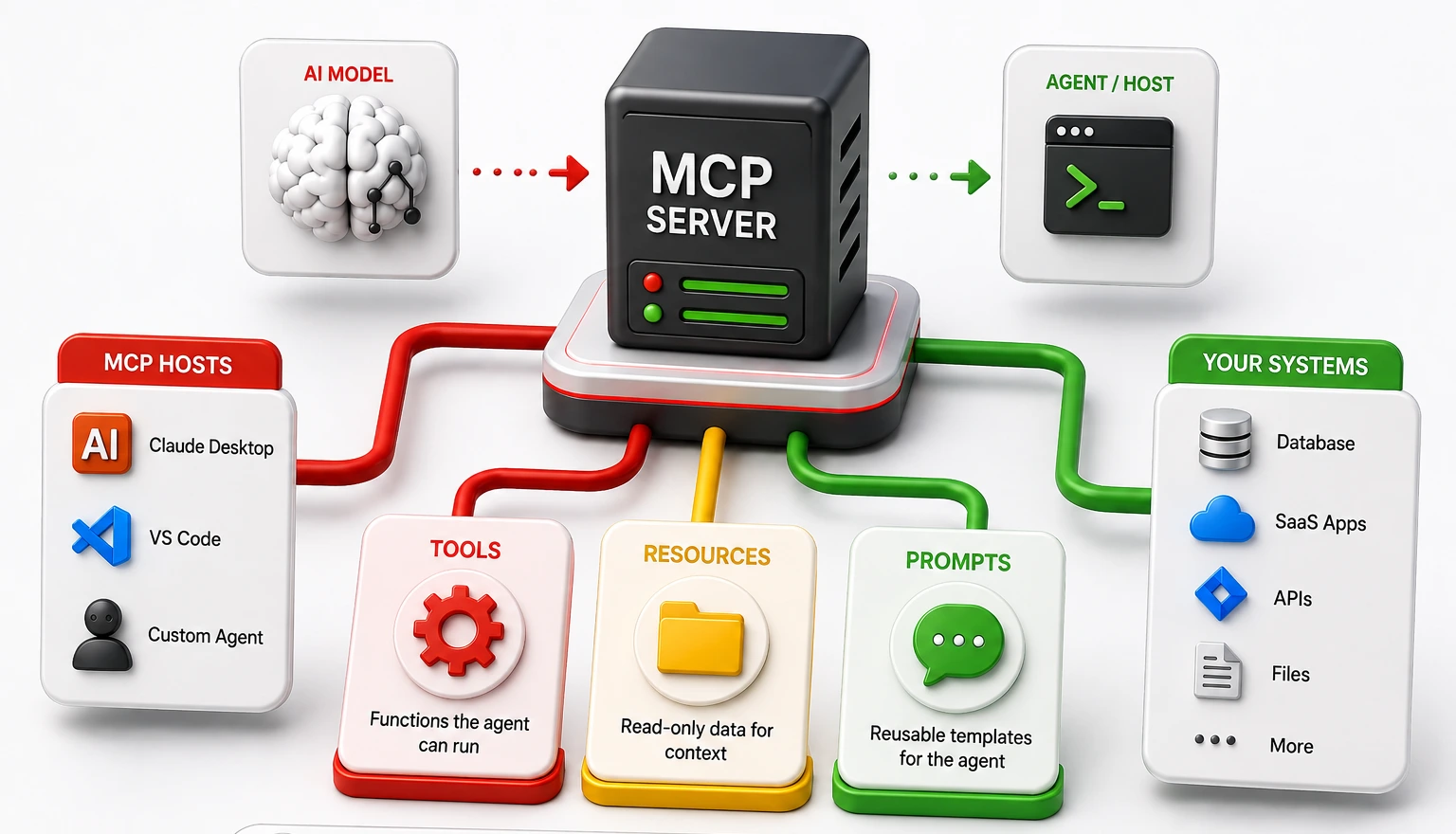
    Table of Contents

      What is MCP server development?

      MCP Server Development

      Anthropic introduced the Model Context Protocol in late 2024. The protocol is now the standard way to connect large language models to company data and tools. Many engineers call MCP the USB-C port for AI, since one connector replaces a pile of brittle custom API glue.

      MCP server development is the work of building, securing, and shipping those connectors. You stop writing new code for every new model. Instead, you build one server that opens up your APIs, databases, and platforms over JSON-RPC.

      The design splits the thinking part from the doing part. The model reasons. The server acts. A production server hands agents three building blocks:

      • Tools: Functions the agent can run to get something done. Examples include querying a Postgres database or opening a Jira ticket.
      • Resources: Read-only data the agent can read for context. Examples include config files, user profiles, and customer records.
      • Prompts: Reusable templates that tell the agent how to work inside one part of your business.

      You build the connection once. Any MCP-ready host can then use it, whether that is Claude Desktop, a VS Code extension, or your own internal agent.

      Why enterprises build their own MCP servers instead of using public ones

      There is a wide gap between AI spending and AI payoff. Global corporate AI investment hit $581.7 billion in 2025. McKinsey found that 88% of companies use AI somewhere in the business. Only about 6% see real financial value from it.

      The problem sits in production, not in testing. McKinsey found 62% of companies are trying AI agents, but only 23% run them at scale. IBM reports that 42% of AI projects were dropped in 2025 over unclear returns. Gartner expects more than 40% of agentic AI projects to be cancelled by 2027.

      There are now over 10,000 public MCP servers. Most are a bad fit for a zero-trust environment, which is why serious teams put money into their own MCP server development:

      • Access is too broad: Off-the-shelf servers ask for wide permissions across company systems. Regulated industries cannot accept that data residency and authorization risk.
      • Business rules get lost: A raw SQL tool invites damaging queries and made-up syntax. A custom server gives the agent tight, purpose-built tools instead.
      • The controls must be yours: Owning the server lets you set fine-grained access rules, mask sensitive fields in transit, and lock tool use to certain networks.

      What changed in the 2026 MCP specification, and why older tutorials mislead you

      Teams working from 2024 or 2025 docs hit hard failures at scale. The July 2026 spec update rebuilt the protocol for cloud environments. Older guides lean on local stdio connections or stateful Server-Sent Events. Both break behind an enterprise load balancer.

      Here is what actually changed:

      • Stateless Core Transport Protocol: Every request now carries its own context tokens and signature headers. This drops the need for session memory on the server, so traffic can spread across a pool of servers.
      • Dynamic Capabilities Negotiation 2.0: Servers can add, update, or retire single tools without dropping live connections. This fixes the version problem that broke earlier builds.
      • Structured Error Telemetry: Error codes are now standard for timeouts, rate limits, and denied permissions. Agents can read why a call failed and fix themselves.
      • Required input checks: Running shell commands from string inputs is now banned. Every input must pass a strict schema check, such as Pydantic or Zod, before anything runs.

      The five design decisions that determine whether your MCP server actually works

      An agent is not a deterministic client. Agents are probabilistic reasoning engines, and five decisions separate production servers from failed prototypes.

      1. Outcome-level tools, not endpoint wrappers

      The most common mistake is treating the server as a literal proxy for an existing REST API. Teams expose 30 or 40 granular CRUD endpoints as tools, and failure rates climb.

      • Design for sub-tasks: Build tools that complete a whole business action, such as reconcile_invoice_discrepancy. Make sure the agent is not orchestrating four sequential calls to finish one job.
      • Externalize state: Keep complex orchestration in your systems, not in the model's reasoning. This lowers the number of decisions the agent has to get right.

      2. Tool budget and context economics

      Context windows are finite and expensive. Your server advertises tools, descriptions, and schemas before a single action runs, and all of that consumes tokens.

      • Practice lazy tool discovery: Load definitions only when a domain becomes relevant. Restrict schemas to strictly necessary parameters.
      • Consider Code Mode: Gateway approaches such as Bifrost compile tool operations and have cut token costs by up to 92.8% across hundreds of tools. Letting the model write code to chain calls beats round-tripping each one.

      3. Resources as context contracts, not data dumps

      Resources supply read-only data, and they must be bounded. Exposing a whole knowledge base as one URI guarantees attention drift.

      • Pre-filter by session: Return only records relevant to the current session state. Make sure the server does the narrowing, not the model.
      • Format for reasoning: Render records into clean semantic Markdown rather than deeply nested JSON. This measurably improves how well the agent reasons over the data.

      4. Prompts as standard operating procedures

      Prompts are the most underused primitive in MCP server development. Tools give the agent hands and resources give it memory. Prompts give it procedural knowledge.

      • Bundle your standards: Ship prompt templates that encode internal rules. A server exposing AWS tools should also carry your exact tagging, logging, and deployment standards.
      • Govern from turn one: Make sure the agent follows your framework on the first interaction, not after a review catches the mistake.

      5. Transport and topology: local stdio versus remote HTTP

      Your transport choice defines the server lifecycle. Stdio is process-bound, spawned by the client as a subprocess, and suits isolated desktop use with zero network configuration.

      • Use Streamable HTTP for anything governed: A single network endpoint handles concurrent clients, works with API gateways, and runs inside container orchestration.
      • Default to remote for new builds: In the 2026 landscape, any server intended for production scaling should use Streamable HTTP exclusively.

      How to develop an MCP server: a nine-step build walkthrough

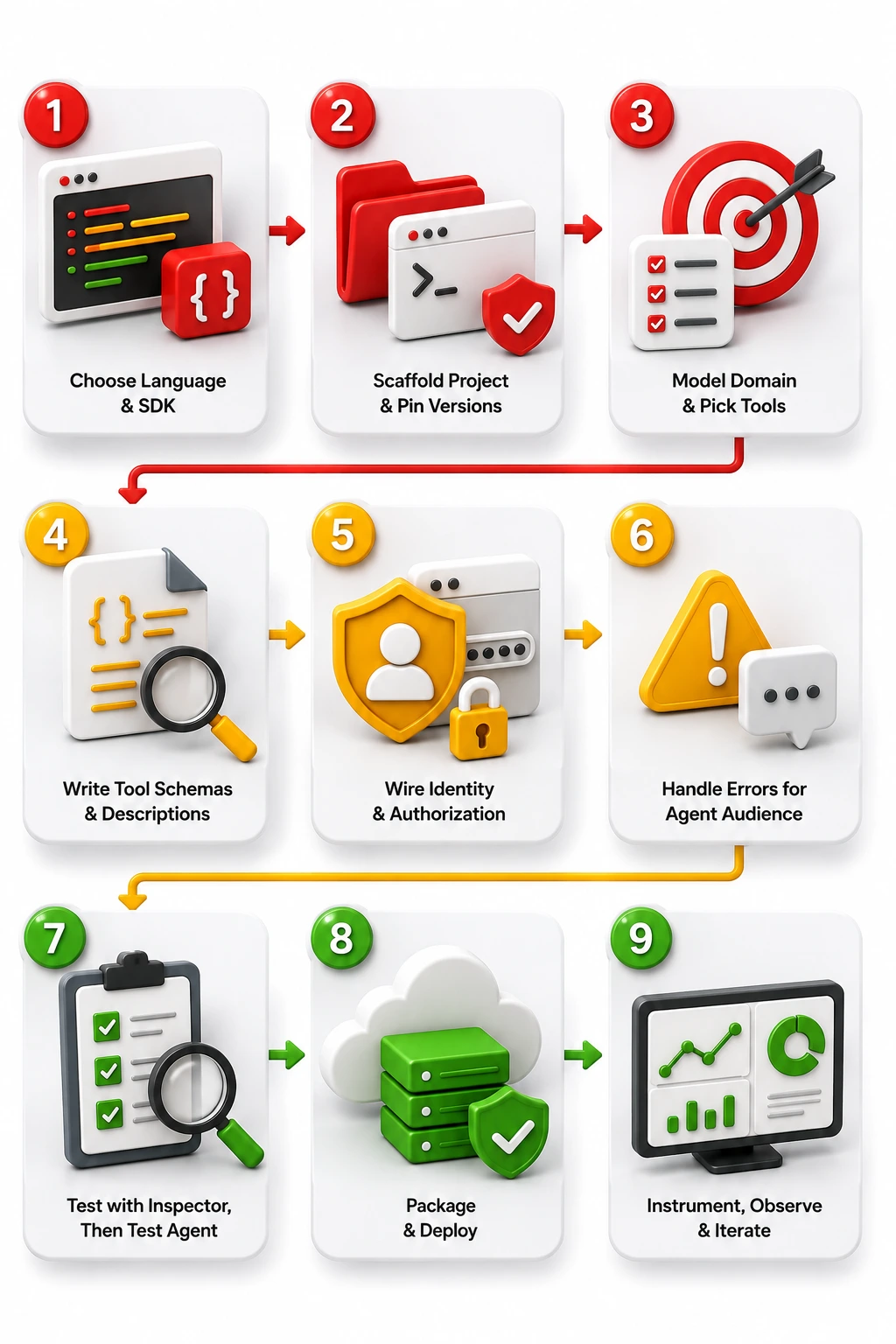
      A compliant server follows a structured lifecycle. This nine-step framework aligns with the 2026 specification.
      How to develop an MCP server

      Step 1: Choose the language and SDK

      The official SDKs are maintained in Python and TypeScript. For Python, the 2026 standard is FastMCP, a decorator-based framework that generates schemas from type hints and docstrings and works natively with Pydantic.

      For TypeScript, the @modelcontextprotocol/sdk package uses Zod for runtime validation. Python suits data and AI infrastructure work. TypeScript suits web-based agentic architectures.

      Step 2: Scaffold the project and pin your versions

      Dependency hygiene prevents supply-chain exposure. Use uv to initialize the project and lock dependencies. 

      • Follow strict naming conventions such as github_mcp or stripe_mcp, keeping module names descriptive and free of version numbers.
      • Pinning prevents transitive dependency drift, which remains a major vector in rogue MCP deployments.

      Step 3: Model the domain and pick your first three tools

      Avoid monolithic servers with dozens of tools. Identify the narrowest useful domain first. 

      • A customer success agent might start with get_customer_health_score, list_active_tickets, and escalate_account.
      • Make sure each tool is a complete, composable business action.
      • Prefix tools with domain context, such as jira_create_issue instead of create_issue, to avoid naming conflicts.

      Step 4: Write tool schemas and descriptions the model can act on

      The model decides when to call a tool based on its text description. State the purpose, the boundaries, and the expected return format explicitly. FastMCP parses docstrings straight into the MCP schema. If a parameter needs specific formatting, the docstring and the Pydantic field must both enforce it. Bad agent inputs should fail at the schema, before they reach internal APIs.

      Step 5: Wire identity and authorization per request

      Authentication cannot be delegated to the client. On Streamable HTTP, the server must act as an OAuth 2.1 Resource Server and mandate PKCE. 

      • Validate the audience claim on every incoming token to block token replay and confused-deputy attacks.
      • Wire identity per request so the agent operates only within the permissions of the invoking user. Never pass client-supplied tokens downstream unscoped.

      Step 6: Handle errors for an agent audience

      An HTTP 500 stack trace is useless to a model. Return structured, fuzzy-matched suggestions the agent can act on.

      A missing record should produce something like "Error: Resource not found. Please verify the ticket ID formatting." Map backend exceptions to clear directives.

      This lets the model adjust its parameters and retry without human intervention.

      Step 7: Test with the inspector, then test the agent

      The MCP CLI ships an inspector for isolated testing. Trigger executions manually before connecting a model.

      • Confirm that payloads serialize correctly, that schemas reject malformed inputs gracefully, and that the server meets stateless transport requirements.
      • Add a chaos phase: send malformed inputs, empty arrays, and unexpected types.
      • Make sure the server rejects bad inputs instead of crashing.

      Step 8: Package and deploy

      Containerize with Docker and run with minimal privileges. Standard practice means no shell access and read-only filesystems beyond /tmp.

      • Bind network egress by firewall rule to the specific APIs the server needs.
      • Deploy behind a managed API gateway or an MCP-specific gateway that enforces TLS 1.3 and handles load balancing.

      Step 9: Instrument, observe and iterate

      Log at the protocol layer. Track call volume per tool, P95 latency, and error rates. Agents have short patience: tools exceeding five seconds are often abandoned mid-execution.

      Capture the parameter variations agents construct. That data reveals how agents actually read your descriptions versus how you intended them.

      Secure MCP server development: the threat model the tutorials leave out

      Wiring an autonomous model into production changes your threat model. Standard security frameworks miss the risks that belong to this protocol alone.

      Treat this section as a practical guide for secure MCP server development, because STRIDE and DREAD modeling brings out several attack paths that beginner tutorials never mention.

      Authorization and the confused-deputy problem

      A confused deputy is a trusted program tricked into misusing its own power. Your server acts for the model, and the model acts for a user. So the agent inherits authority it cannot check.

      An attacker who hides instructions in a GitHub issue can get an agent to run them with operator credentials. In multi-agent chains, one injection can cross team boundaries. Scope every token tightly to the action at hand.

      Tool poisoning and instructions hidden in descriptions

      Tool poisoning is the most common client-side attack in this ecosystem. A rogue or hacked server hides instructions inside its own tool descriptions. Most clients accept those descriptions without checking them, and almost nobody reads full JSON schemas during approval.

      Research on Full Schema Poisoning and the MCP-ITP framework reports success rates up to 84.2% while dodging detection.

      Attackers hide payloads in Unicode whitespace or below the visible part of a description. Your defense needs schema diffing, length limits, and signed tool definitions.

      Session, tenant, and context isolation

      Context bleed is a common failure in enterprise builds. Poor state handling can leak one user's results into another user's context window.

      A 2026 move to stateless transport lowers bleed on the server side. Make sure you also require per-session state keys and tenant-bound storage.

      Supply chain and dependencies

      With more than 10,000 public servers out there, rug-pull attacks and typosquatting are widespread.

      A harmless-looking package can drag in malicious dependencies. Run dependency scans, audit pipelines, and version pinning before you approve any server for internal use.

      Data handling, residency and audit

      Every agent action needs an audit trail. Normal logs record what a person typed. Your server has to log the whole tool call, including token cost, where the data came from, and the exact inputs the model chose.

      Cross-repository data theft stays a real risk when the server does not separate records by team or tenant.

      MCP server development best practices: a checklist you can review in a design meeting

      Evaluate any architecture against these criteria before build approval:

      • Architecture: Implement outcome-level tools over raw CRUD APIs. This prevents context exhaustion and improves reasoning accuracy.
      • Transport: Use Streamable HTTP behind a load balancer. This is required for high-availability, multi-tenant environments.
      • Security: Validate all inputs via Pydantic or Zod schemas. This mitigates command injection and malformed parameter errors.
      • Identity: Enforce PKCE OAuth 2.1 per request. This prevents confused-deputy attacks and unauthorized access.
      • Economics: Practice lazy tool discovery or Code Mode. This lowers upfront token overhead by up to 92%.
      • Resilience: Return structured, fuzzy-matched errors. This allows the model to self-correct failures autonomously.
      • Supply chain: Cryptographically sign tool definitions. This prevents Full Schema Poisoning and rug-pull attacks.

      Where MCP server development fails: five honest failure modes

      1. Context bleed and session collapse: Without hard boundaries between sessions, an agent serving User A surfaces information retrieved for User B. This is a failure of state boundaries.
      2. Token bankruptcy: Defining 50 or more tools in one server makes the capability handshake consume thousands of tokens. Costs rise and the model gets pushed out of its effective reasoning window.
      3. The "works in demo" cascade: Demos rarely simulate partial failure. If the third tool in a five-tool chain times out, the agent needs a rollback path. MCP provides the wires, not the guardrails.
      4. Raw JSON cognitive overload: Returning huge unformatted payloads degrades the model's ability to extract the relevant fields. Build a translation layer into semantic formats before handing data back.
      5. Implicit bias in tool descriptions: Vague descriptions cause hallucinated capabilities. Overlapping descriptions cause decision paralysis, with the agent alternating between tools at random.

      Governance when you have twenty MCP servers, not one

      For better MCP server governance when working with multiple servers - here are the typical steps:

      1. Wider use brings Shadow MCP, which means unmanaged local servers pointed at sensitive internal systems.
      2. Engineers install community servers to move faster, and in doing so they skip procurement, compliance, and security review.
      3. Shadow MCP acts a lot like Shadow IT. Default credentials stay in place, and databases sit open to model queries with no logging.
      4. MCP server development at fleet scale needs one central gateway, not twenty separate configs. Platforms such as Bifrost, Docker MCP Gateway, Tyk, and Cloudflare Access act as that control plane.
      5. All tool traffic runs through the gateway. The gateway checks the server, limits which tools each user can call, and logs everything. Gateways also filter schemas at request time and block direct agent-to-tool connections.

      Build, buy or partner: how to decide, and what it actually costs

      Gartner predicts 40% of enterprise apps will include task-specific agents by 2026, up from under 5% in 2025. Gartner also expects over 40% of agentic projects to be cancelled by 2027 over cost, unclear value, or weak controls.

      IBM notes that clearing legacy technical debt can lift AI ROI by up to 29%. So the real question is whether MCP server development belongs in-house, in a bought tool, or with a partner.

      What an in-house build really costs

      The usual mistake is underestimating the total cost of ownership. A proof of concept takes hours. A real deployment needs gateways, developer portals, telemetry, and constant patching.

      Building portals and gateways in-house can run $120,000 to $350,000 over three years. Upkeep adds another 15% to 20% of the build cost every year. Most in-house programs take 9 to 12 months to produce useful insight, and your team carries all the risk.

      MCP server development by system: where the work actually differs

      • Transactional systems (Salesforce, SAP): Connecting straight to raw SAP tables is dangerous. Wrap standard BAPIs or Salesforce Apex REST endpoints so business rules stay centralized in the host system.
      • Analytical databases (Snowflake, BigQuery): Free-rein SQL generation invites destructive queries and heavy token costs. Expose parameterized reporting tools or a semantic layer that translates intent into optimized read-only queries.
      • Unstructured stores (SharePoint, Google Drive): Work here leans on the Resources primitive. Chunk and format text dynamically, often alongside a vector database such as Pinecone, Weaviate, or Qdrant, to retrieve tight context.

      KPIs: how to tell whether your MCP server is working

      Move past uptime and track how the agent performs. These five numbers tell you whether your MCP server development work is paying off:

      • Tool latency (P95): Agents quit when calls drag. Hold the ceiling under five seconds.
      • Context token overhead: High overhead points to bloated tool descriptions. Measure the share of your context budget it eats.
      • Self-correction rate: Track how often the model retries a failed call and succeeds using your error messages.
      • Cost per workflow: Look for a downward trend. This proves your token work is landing.
      • Blocked executions: Confirm your access rules and gateway are working, with no false positives.

      A 90-day path from first server to governed capability

      • Days 1 to 30 (discovery and sandbox): Audit Shadow MCP use across the company. Set up an API gateway as your control plane. Ship one read-only server, such as internal doc search, to test the pipeline.
      • Days 31 to 60 (first transactional workflow): Pick a high-value, low-risk workflow like IT ticket triage. Build outcome-level tools, require PKCE OAuth 2.1 identity, and deploy to a sandboxed staging setup.
      • Days 61 to 90 (production and governance): Roll out to a small user group. Watch latency and token overhead. Refine schemas from real behavior, sign your approved tools, and write the registry policy for the next server.

      Moving forward MCP server development and next steps

      Teams that treat MCP as an API wrapper end up with rising token costs, fragile workflows, and open doors for confused-deputy and tool poisoning attacks. 

      Which is why - at Entrans, we build to the 2026 spec: stateless transport, strict input checks, per-request identity, and gateway governance from day one.

      Your next step is to audit your current AI tool connections and shut down Shadow MCP.

      Don't let ungoverned agent access hold your AI strategy back!

      Book a free consultation with our agentic AI architects today to map out your first governed MCP server.

      Share :
      Link copied to clipboard !!
      We Build and Secure MCP Servers
      Built to the 2026 spec, with identity and governance wired in from day one.
      20+ Years of Industry Experience
      500+ Successful Projects
      50+ Global Clients including Fortune 500s
      100% On-Time Delivery
      Thank you! Your submission has been received!
      Oops! Something went wrong while submitting the form.

      FAQs on MCP Server Development

      1. How do you develop a remote MCP server?

      Local servers use stdio, but remote ones need Streamable HTTP. We build remote MCP servers to run statelessly, so every request carries its own context. This lets it sit behind a load balancer with PKCE checks on each call.

      2. How can I host an MCP server?

      Kubernetes, AWS ECS, and platform-as-a-service hosts all work. We package the server with Docker and lock the network path in both directions. This means only approved gateways reach it, and it only reaches the APIs it needs.

      3. How do I create an MCP server from an existing API?

      Mapping every CRUD endpoint one to one fails. We start from the outcomes the agent needs, then define tools with strict Pydantic or Zod schemas. The server checks each input, runs the calls, and returns clean Markdown.

      4. How do I start a local MCP server?

      Local servers run over standard input and output instead of HTTP. The client starts your script as a subprocess on the machine. This means pointing the client config file at your local executable path.

      5. Which language or SDK should I use for MCP server development?

      Python and TypeScript are the two official SDKs. We recommend Python with FastMCP for data and platform work, since schemas generate themselves from your code. TypeScript with Zod fits better inside a Node.js or web-based agent stack.

      6. Do I need to rewrite my MCP server for the 2026 specification? 

      Yes, if it uses stateful Server-Sent Events or skips input checks. The July 2026 update dropped stateful memory so servers can sit behind load balancers. This makes strict input checks a condition of passing enterprise gateways.

      Hire MCP and Agentic AI Engineers
      Engineers who have shipped MCP servers to production, not just prototypes.
      Free project consultation + 100 Dev Hours
      Trusted by Enterprises & Startups
      Top 1% Industry Experts
      Flexible Contracts & Transparent Pricing
      50+ Successful Enterprise Deployments
      Aditya Santhanam
      Author
      Aditya Santhanam is the Co-founder and CTO of Entrans, leveraging over 13 years of experience in the technology sector. With a deep passion for AI, Data Engineering, Blockchain, and IT Services, he has been instrumental in spearheading innovative digital solutions for the evolving landscape at Entrans. Currently, his focus is on Thunai, an advanced AI agent designed to transform how businesses utilize their data across critical functions such as sales, client onboarding, and customer support

      Related Blogs

      Top 10 CIO-as-a-Service Companies in 2026

      Compare 10 CIO-as-a-Service companies for 2026, with rate bands, the six delivery models, real costs, and how to tell CIOaaS from an MSP.
      Read More

      Top 10 CTO-as-a-Service Companies in 2026

      Compare 10 CTO-as-a-Service companies for 2026, with rate bands, engagement models, real costs, and how to pick the right partner for your stage.
      Read More

      Top 10 Custom MCP Server Development Companies in 2026

      Compare 10 custom MCP server development companies for 2026, with selection criteria, real rate bands, and how to match a partner to your stack.
      Read More