> Blog >
3-Way Matching in Accounts Payable: A Complete Guide
Automate 3-Way Matching in Accounts Payable with AI. Learn how invoice matching works, common exceptions, ERP integration, and automation benefits.

3-Way Matching in Accounts Payable: A Complete Guide

4 mins
October 30, 2026
Author
Kapildev Arulmozhi
Talk To Our Experts
TL;DR
  • Think of 3-way matching as a way to establish control over your company’s cash flow, instead of trying to perform a big cleanup. 
  • The vast majority of exceptions arise from issues in the upstream processes. That is to say, late deliveries, inaccurate records from suppliers, and confusion regarding units of measure create more exceptions than the matching logic itself.
  • AI assists here by analyzing any invoice layout, performing the match, and forwarding exceptions to whoever can resolve the issue. The ERP manages all tolerances, holds, and approvals.
  • Each one of us who runs accounts payable has seen how long the “exception” queue can get. Invoices get put on hold because we need to find a receipt.

    You could receive two copies of the same invoice (and hence pay twice). So what’s 3-way matching? And can we use AI to make it better?

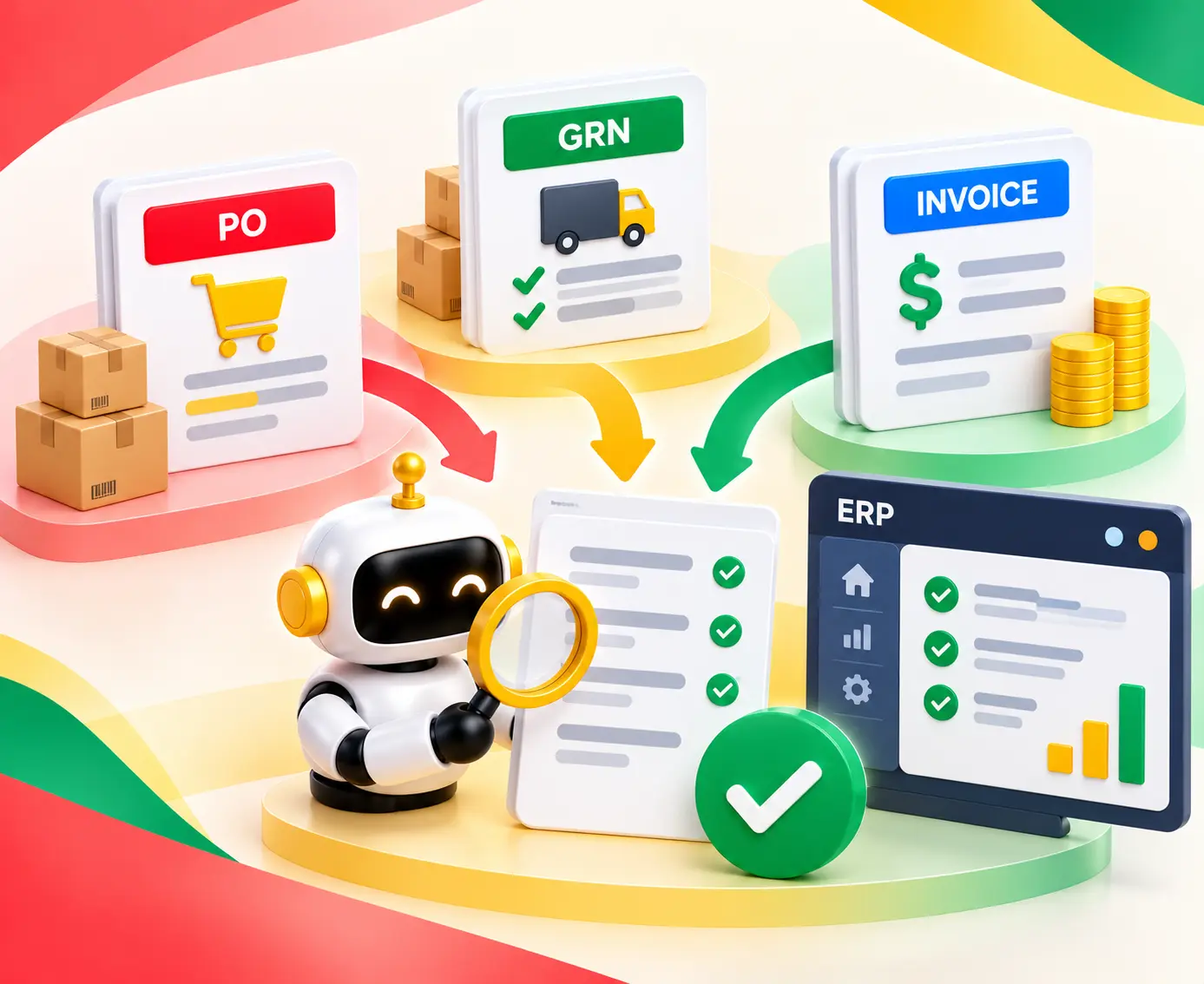
    3 way-matching in accounts payable allows us to compare each invoice to the associated purchase order and goods receipt.

    Using AI will allow us to automate that process - reading the file, running the comparison, and passing exceptions to their owners.

    Which is why this guide covers 3-way matching in accounts payable, how the match works, and how to add AI in your ERP to help with this.

    Table of Contents ▾

      What Is 3-Way Matching in Accounts Payable?

      Three-way matching is an AP control that involves checking the invoice against three documents before the payment can go through.

      This way, the company ends up paying for those items it ordered and received at an agreed price.

      The purchase order (PO) represents what the company has approved, the goods receipt note (GRN) indicates what the company has received, while the supplier's invoice shows what the supplier wants to be paid. This implies that every document provides a different piece of information that is owned by its owner.

      The whole matching process is not done by one team. That explains the reason why it is very difficult to trace any exception.

      Document Who Creates It Fields Compared
      Purchase Order (PO) Purchasing team Supplier, item, quantity, unit price, line totals
      Goods Receipt Note (GRN) Receiving team Item, received quantity, shipment status
      Supplier Invoice Supplier Supplier, item, quantity, unit price, tax, freight, total

      2-Way vs. 3-Way vs. 4-Way Matching

      Not every buy needs the same level of control. Two-way matching checks the PO against the invoice, while Three-way matching adds a check on the goods receipt.

      Meaning, two-way fits services and low-value spend, while three-way fits goods where the count matters.

      Four-way matching adds an inspection or acceptance record. Use it for goods that must pass a check before the firm takes them on. The right method depends on the risk of the buy, not on one firm-wide rule.

      In the grand scheme, our advice is to set the method by spend type and look it over once a year.

      A four-way check on low-value spend adds unnecessary items for verification to the queue. Skipping a receipt check on high-value goods saves time. But by doing this, you leave a gap that the audit team will spot.

      Matching Method Documents Compared When to Use
      Two-Way PO and invoice Services or low-risk buys
      Three-Way PO, invoice, and GRN Goods that need a receipt check
      Four-Way PO, invoice, GRN, and inspection or acceptance record Goods that need inspection and acceptance

      How the 3-Way Match Process Works, Step by Step

      Three-way matching refers to a control where we have to cross-check our invoice with three other 3 documents before making the payment:
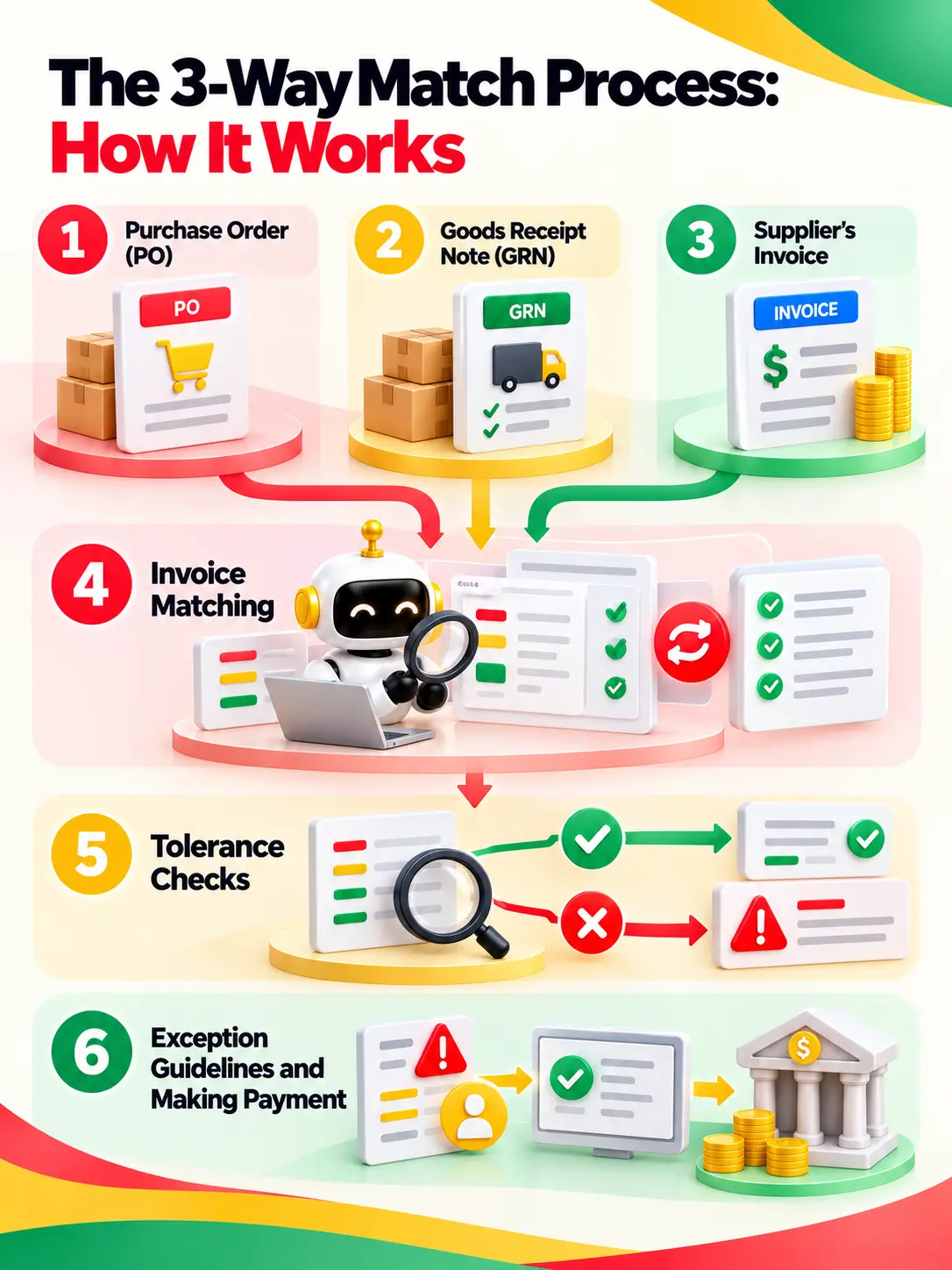
      3-way matching of purchase orders, goods receipts, and invoices
      1. Purchase Order (PO): Shows what the company had approved to receive. 
      2. Goods Receipt Note (GRN): States what the company has received. 
      3. Supplier’s Invoice: Says what the supplier wants to get paid. All these documents contain various pieces of info that belong to their respective owners.
      4. Invoice matching: The ERP matches header data, such as supplier name, then line data, like item, quantity, and unit price.
      5. Tolerance checks: Any minor gap within the limits is accepted, but gaps outside of it are put on hold. 
      6. Exception guidelines and making payment: The owner brings the order to any case of the invoice being stalled, and payment approval is carried out.

      Setting Price and Quantity Tolerances

      Tolerances specify what percentage of discrepancy that you will allow for various parts of your invoices before they are blocked from being processed (e.g., “I will accept up to 2% difference between my unit price and yours” or “I’m willing to pay $5 more per line than you quote”).

      •  Most ERP systems allow tolerances to be specified both per line item on each invoice as well as overall per invoice.
      • They also usually have specific tolerances for different kinds of discrepancies, for example, price variance and quantity variance.
      • This allows companies to make allowances for very small differences while still blocking large deviations from the purchase order price.
      Case PO Value or Quantity Invoice or Receipt Sample Outcome
      Price variance 100 units at $10 Invoice price of $10.50 Check the set price tolerance
      Quantity variance 100 units ordered 80 units received, 100 invoiced Look into goods not yet received
      Within tolerance 100 units at $10 Invoice price of $10.05 Apply set approval rules

      Note: These are sample figures, not sector norms or set approval rules.

      Where 3-Way Matching Runs Into Issues: An Exception Taxonomy

      On the whole, 3-way matching for accounts payable runs into issues or errors in the same few places. An exception is a gap the system finds, while a hold is the flag that blocks payment. 

      Each exception below has a root cause that often sits upstream of AP. So the owner counts as much as the fix.

      Exception Type Usual Root Cause Owner Fix
      Price variance Invoice price differs from PO Procurement / AP Confirm pricing terms
      Quantity variance Invoiced and received quantities differ Receiving / AP Sort out quantities
      Missing GRN Receipt not recorded Receiving Check and log receipt
      Partial receipt Only part of the order arrived Receiving / Procurement Confirm shipment status
      Split shipment Many shipments for one PO Receiving Match up receipt records
      Duplicate invoice Same invoice sent twice Accounts Payable Check past invoices
      Supplier master mismatch Mixed-up supplier records Master Data / AP Check supplier details
      Unit-of-measure mismatch Mixed quantity units Procurement / Master Data Confirm unit ratios
      Non-PO invoice No PO number AP / Buyer Route through backup approval
      Tax or freight mismatch Surprise charges or tax amounts AP / Procurement Check charges and terms

      In the grand scheme, upstream data and hand-off gaps cap your match rate. If receiving posts GRNs late, or supplier and item records don’t line up, even perfect reading of invoices still throws up exceptions.

      An AI invoice and GRN reconciliation case study shows this at work. The platform pulled data out of PDFs, scans, and structured files.

      In doing so, it flagged quantity gaps, price mismatches, missing line items, and supplier errors for review by exception.

      Why Manual Matching Fails at Scale

      Manually handling 2-way or 3-way matching for accounts payable works while volume is low and files are tidy. At scale, neither holds up. The cracks show up fast. In the grand scheme, here is where hand matching gives way:

      • File types: Invoices come in as PDFs, scans, EDI files, and email bodies. Someone has to reread each one.
      • Timing: Receipts post late, and goods arrive in parts. So the match starts before the data is ready.
      • Line items: Matching turns into a side-by-side screen hunt. Most ERP screens are built for posting, not for digging into exceptions.

      For a wider view, read our guide to AI in accounts payable.
      Open Popup

      How AI Automates 3-Way Matching

      With this, AI turns accounts payable automation from fixed rules into sound judgment. Older RPA bots and template OCR follow fixed scripts.
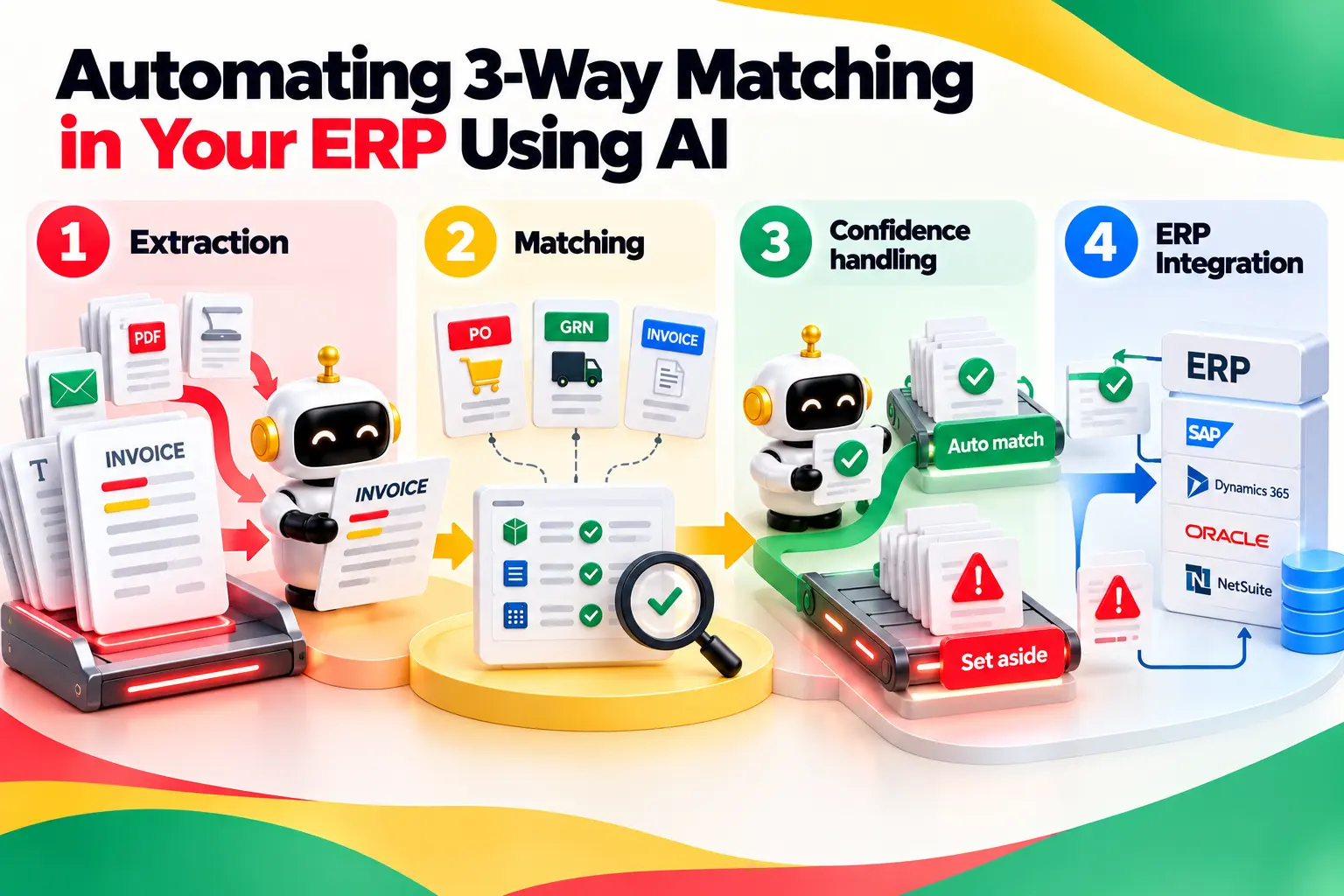
      AI-powered 3-way invoice matching process

      They stop the moment a layout changes. Intelligent document processing (IDP) built on large language models (LLMs) reads context.

      Meaning, 3-way matching for accounts payable using AI can handle unit-of-measure gaps, part shipments, and line items that don’t line up.

      3-way matching for accounts payable using AI does four jobs:

      • Extraction: Reads each invoice and pulls out the header and line fields.
      • Matching: Checks those fields against open POs and GRNs.
      • Confidence handling: Clears high-confidence matches on its own and sets the rest aside.
      • ERP Integration: Reads ERP records and writes the match status back.

      The ERP still owns tolerances, holds, and approvals. The AI does the reading and the checking.

      The AI never decides what a fair variance is, since that stays a business risk call set inside the ERP.

      Instead, it applies your rules faster and more fairly than a worn-out queue of staff can. And it explains why an invoice stopped. In doing so, the next person starts with context, not a blank screen.

      Reading Invoices: LLM Extraction vs. Template OCR

      Template OCR reads set spots on a page. This works until a supplier changes a layout. Then someone has to rebuild the template.

      On the whole, LLM-powered invoice data extraction reads the page structure instead. So it copes with new supplier formats, long line-item lists, tax, freight, and layouts it has never seen.

      • One study found Qwen-2.5-VL-7B hit 87% on field-level extraction for claim files in two languages. In the grand scheme, a second study found MeDocVL scored 82% to 93% Field Match Ratio on noisy health invoices.
      • Field-level confidence scores make this work in daily use. Rather than trust or reject a whole file, the system scores each field, like the invoice number, tax amount, or freight line.
      • So a clean invoice with one blurry total doesn’t need a full recheck.
      • One point matters here. Reading a field right is not the same as passing the match. Meaning, if the AI reads $12.00 just right and the PO says $10.00, the invoice should still fail.

      Matching Logic and Confidence Thresholds

      Good matching stacks a few methods. Exact matching handles PO numbers and item codes. 

      Tolerance-based matching handles price and quantity variance checks. On the whole, fuzzy matching ties supplier names back to the ERP vendor master. Line-item matching links each invoice line to a PO line.

      Each field also gets a confidence score. Recent research on tuned confidence describes a smart setup. In doing so, high-confidence fields pass on their own, while the error rate of that group stays under a set cap, such as 10%. An invoice clears on its own only when all of these hold:

      • The supplier maps to one master record.
      • The PO is open with balance left.
      • A posted GRN covers the billed quantity.
      • Price and quantity sit inside tolerance.
      • No duplicate flag shows up, and every field clears its bar.

      Routing Exceptions to People

      Matching pays off only if exceptions reach someone who can fix them. The AI should name the exception type, like a missing GRN.

      With this, it should send the item to receiving, not to an AP clerk who can’t fix it. Dropping it on the wrong desk only slows things down.

      ERPs back this too. Oracle Fusion Cloud has a Hold Resolution Routing workflow with set wait times and alerts. On the whole, SAP offers Flexible Workflow for Supplier Invoices. A sound setup has four parts:

      • Exception queues: One queue per gap type.
      • Owners and next steps: A named owner, plus a rule for who steps in when the item sits too long.
      • Payment holds: The ERP blocks payment until a person clears the item.
      • Audit trail: Each call is logged with a timestamp and a reason.

      Here, using AI can suggest, route, and remind. Meaning, a person with the right access makes the call. The record shows who made it and why.

      Working on the ERP You Already Have

      Master data, like supplier IDs and open PO schedules, lives in the ERP. A tool that works from old exports can sign off on invoices against closed, used-up, or cancelled POs. In doing so, the tool has to query the ERP live.

      • In practice, the tool reads POs and GRNs, runs the match, and writes the status back. The tool plugs into the ERP workflows you have, not over them. So approvals, holds, and audit logs stay where your audit team looks for them.
      • On the whole, the tool also has to respect each platform’s own setup, like SAP tolerance keys and Oracle holds. A plain add-on won’t do. You keep the system you have and add invoice matching on top.
      • This also speeds up the rollout. In the grand scheme, finance teams keep their access, close schedule, and reports, since the ERP stays the system of record. The project does not turn into a move to a new system.
      • IT checks a short list of approved links and a low-access service account, which is a much quicker yes to get.

      3-Way Matching in SAP, Oracle and NetSuite

      Each platform runs the match its own way - but even with each platform there is still manual work left for informed professionals. That matters because an add-on tool has to write back to these exact setups, not to a plain stand-in.

      I. SAP S/4HANA

      SAP checks invoices through Logistics Invoice Verification (MIRO). With this, tolerance keys, such as PP for price variance, block an invoice when a limit is passed.

      Approved users free it up through MRBR. Flexible Workflow for Supplier Invoices routes the approvals.

      II. Oracle Fusion Cloud Financials

      Oracle supports two-way, three-way, and four-way matching. In the grand scheme, you set the tolerance limits that trigger a hold.

      Holds live in the AP_HOLDS_ALL table. Matching holds create one row per invoice-shipment match. Hold Resolution Routing sends each hold on to the right person. Meaning, each hold has a clear owner.

      III. NetSuite

      NetSuite offers a 3-Way Match Vendor Bill Approval workflow. The workflow routes bills to a team lead when limits are passed. You can set quantity and amount tolerances.

      On the whole, you can also switch off exception rules that don’t apply. The docs list partly received item receipts as a limit.

      Across all three, people still release blocks, sign off on price changes, and key in missing receipts.

      Metrics That Show Whether Matching Works

      Track the current process for at least one full close cycle before go-live. With this, you get a clean baseline. Then track the same numbers after launch.

      Metric What It Tracks Math
      First-Pass Match Rate Invoices matched with no hand touch First-pass matched invoices / Total invoices × 100
      Exception Rate Invoices that need exception handling Invoices with exceptions / Total invoices × 100
      Exception Aging Time an exception stays open Today’s date minus the date the exception opened
      Invoice Cycle Time Time taken to process an invoice Approval timestamp minus invoice receipt timestamp
      Cost per Invoice Mean cost to process an invoice Total AP processing costs / Invoices processed
      Duplicate Payments Caught Duplicate payment attempts spotted Count of confirmed duplicate attempts flagged before payment

      Outside yardsticks help, within limits. APQC puts the midpoint cost per AP invoice at $6.00. On the whole, top firms spend about $0.38 per $1,000 of sales.

      Although there is no published industry benchmark for this, we suggest you create the right one based on peers and what seems ideal based on your operations.

      Where 3-Way Matching Automation Falls Short

      Tools can’t fix a broken buying process. If receiving keeps missing GRNs, the AI will do just what it was built to do. Meaning, the result is a faster flood of alerts. These are the common limits when automating 3-way matching for accounts payable:

      • Non-PO spend: With no PO to match, invoices need their own approval path.
      • Services invoices: With no receipt records, there is nothing to match against.
      • Master data: Poor supplier and item records weaken fuzzy matching.
      • Late goods receipts: These create false exceptions on invoices that are fine.
      • Tolerance owners: When no one owns the limits, they drift or go unchecked.

      Human judgment and sound receiving habits still carry the control in these scenarios. 

      How Entrans Automates Three-Way Matching on Existing ERPs

      On the whole, the Entrans team works side by side with finance ops and ERP teams to build LLM extraction across file formats, match invoices with POs and GRNs, and route flagged gaps to review queues.

      • For one such Enterprise client Entrans worked with, the platform used AWS Bedrock LLM extraction. MongoDB held the free-form data, and PostgreSQL held the structured records.
      • But at the end of developing the solution, hands-on reconciliation effort fell by 80%.
      • Meaning, that is a measured result for one build with free-form, scattered files. Treat it as a result for one rollout, not a promise or a sector norm.
      • That is why the work starts with your data, not a demo. The team looks over your PO, GRN, and supplier records first. With this, the first exceptions it turns up are the receiving and master data gaps that would cap your match rate.

      Learn more about 3-way matching for accounts payable using AI  or other AI-driven automation solutions, or why not book a free 30-minute call?

      Share :
      Link copied to clipboard !!
      Automate Invoice Matching With AI
      Reduce manual work and match invoices faster with AI.
      20+ Years of Industry Experience
      500+ Successful Projects
      50+ Global Clients including Fortune 500s
      100% On-Time Delivery
      Thank you! Your submission has been received!
      Oops! Something went wrong while submitting the form.

      FAQs on 3-way Matching for Accounts Payable

      1. What Is the Difference Between 2-Way and 3-Way Matching?

      Two-way matching checks the PO against the invoice. Three-way matching adds the goods receipt note, to prove the goods showed up. Meaning, two-way suits services, while three-way suits goods where the count matters.

      2. What Is 4-Way Matching?

      Four-way matching adds an inspection or acceptance record to the PO, GRN, and invoice. This proves the goods passed a check before payment. Use it for goods that need inspection and sign-off.

      3. Which Documents Are Needed for a 3-Way Match?

      On the whole, you need the purchase order, the goods receipt note, and the supplier invoice. Buyers make the PO, receiving makes the GRN, and the supplier sends the invoice. The ERP then checks supplier, item, quantity, and price across all three.

      4. What Happens When a 3-Way Match Fails?

      The ERP flags an exception and often puts a hold on payment. In doing so, the ERP sends the invoice to its owner, such as receiving for a missing GRN or the buying team for a price variance. Payment goes out once the issue is fixed or an approved person signs off on the variance.

      5. Can 3-Way Matching Be Automated With AI?

      Yes, though the ERP keeps control. 3-way matching using AI is possible where it reads invoices, checks them against POs and GRNs, and routes exceptions to the right owner. With this, tolerances, holds, and payment approvals stay inside the ERP.

      6. Does SAP Support 3-Way Matching?

      Yes. SAP S/4HANA checks invoices through Logistics Invoice Verification (MIRO), allowing 3-way matching for accounts payable. Tolerance keys, such as PP for price variance, block an invoice, and approved users free it up through MRBR.

      Hire AI and ERP Developers
      Build automated invoice matching workflows with our developers.
      Free Project Consultation
      Trusted by Enterprises & Startups
      Top 1% Industry Experts
      Flexible Contracts & Transparent Pricing
      50+ Successful Enterprise Deployments
      Kapildev Arulmozhi
      Author
      Kapil is the Co-founder and CMO of Entrans, bringing over 20 years of experience in SaaS sales and related industries. He is responsible for creating and overseeing the revenue-driving systems at Entrans. Having collaborated extensively with tech leaders and teams, Kapil possesses a keen understanding of the decision criteria and ROI-justifiable initiatives essential for business growth.

      Related Blogs

      3-Way Matching in Accounts Payable: A Complete Guide

      Automate 3-Way Matching in Accounts Payable with AI. Learn how invoice matching works, common exceptions, ERP integration, and automation benefits.
      Read More ↗

      Data Science Consulting Services: What You Get, What It Costs, and How to Choose a Partner

      Explore data science consulting services, project costs, timelines, use cases, and tips for choosing a partner that delivers measurable business results.
      Read More ↗

      AI in Lending: Loan Approval, Credit Decisioning and Collections That Pass Model Risk Review

      Discover how AI in lending automates loan approvals, credit decisioning, and collections while keeping risk models compliant and scaling safely.
      Read More ↗