> Blog >
AI in Accounts Payable: 2026 Guide for Enterprise Finance
Discover how AI in Accounts Payable automates invoice processing, improves matching, reduces manual work, and helps finance teams measure ROI.

AI in Accounts Payable: 2026 Guide for Enterprise Finance

4 mins
October 16, 2026
Author
Kapildev Arulmozhi
Talk To Our Experts
TL;DR
  • AI in Accounts Payable automates invoice capture, data extraction, matching, GL coding, and exception handling while keeping payment approval under human control.
  • Real-world results include SAP reporting an 80% reduction in document extraction time and a 60% reduction in invoice search time.
  • A 90-day rollout can help finance teams test AI on a narrow invoice workflow, measure results, and validate controls before expanding.
  • Track cost per invoice, cycle time, touchless rate, extraction accuracy, and early-payment discounts to measure business value.
  • Does your AP team still burn its best hours keying invoices and chasing receipts?

    Picture a system that reads and matches for you. In doing so, your people then work on the invoices that need real human insight or judgment.

    Teams that do this free up time for work that matters.

    Not to mention, in doing this, you can also make sure your financial controls stay compliant and human-approved.

    So to help you out, this guide walks through how AI in accounts payable (AP) works at each stage of the AP process. 

    Table of Contents ▾

      What Is AI in Accounts Payable?

      AI in accounts payable (AP) turns messy supplier documents into clean, structured records. Those records are ready for the general ledger. A language model reads an invoice much like a seasoned clerk.

      Meaning, the model can tell a freight charge from a tax line. The model also knows a tax line from a unit price. That holds even when a supplier redesigns its layout.

      Each extracted field gets a confidence score. In doing so, high-confidence results move straight through with no keying. On the whole, the invoice is captured, matched, coded, and waiting for approval.

      AI vs. Rules-Based AP Automation vs. RPA

      There are different ways each technology handles changes. It is this difference that determines where your exceptions land. 

      Rules-based automation works on a set of logic. For instance, it directs small invoices to a specific approver.

      Robotic Process Automation (RPA), however, uses scripts to automate clicks. They both work well until the layout changes. Or worse, your supplier does something unexpected.

      But aside from these two, AI is a layer that reads and interprets. 

      Meaning, a fixed rules engine still holds the line. The engine sets tolerances and approval chains. Your governance demands both.

      • Rules-based automation: fixed rules, predictable invoices, every exception sent up the chain
      • RPA: scripted tasks that break when layouts or screens change
      • AI: best-guess predictions that handle layout changes and suggest fixes for human review

      AI Technologies Behind Modern AP Automation

      Which of these five does your vendor really use? When using AI in accounts payable (AP) there are five technologies that do different jobs. All five show up in a modern invoice workflow. Knowing the difference helps you ask vendors sharper questions.

      1. OCR: spots the characters on a page but does not understand them
      2. IDP: uses deep learning to sort documents and pull out header fields and line items
      3. Machine learning: learns coding patterns from your history and flags odd items
      4. LLMs: read for meaning, so a tax line is not mistaken for a unit price (SAP Document AI, for example, handles up to 8,000 documents per pipeline)
      5. Agentic AI: gives models tools, such as a lookup into a purchase order database, so they can dig into mismatches and draft next steps

      How AI Works Across the Accounts Payable Process

      An invoice moves through seven stages. On the whole, they are capture, extraction, matching, and coding. They also include approval, exception handling, and payment readiness. 

      Each stage using AI in accounts payable (AP) has its own set of AI substeps, where each step leaves an audit record. Later on, when needed, your auditors can then follow the trail.
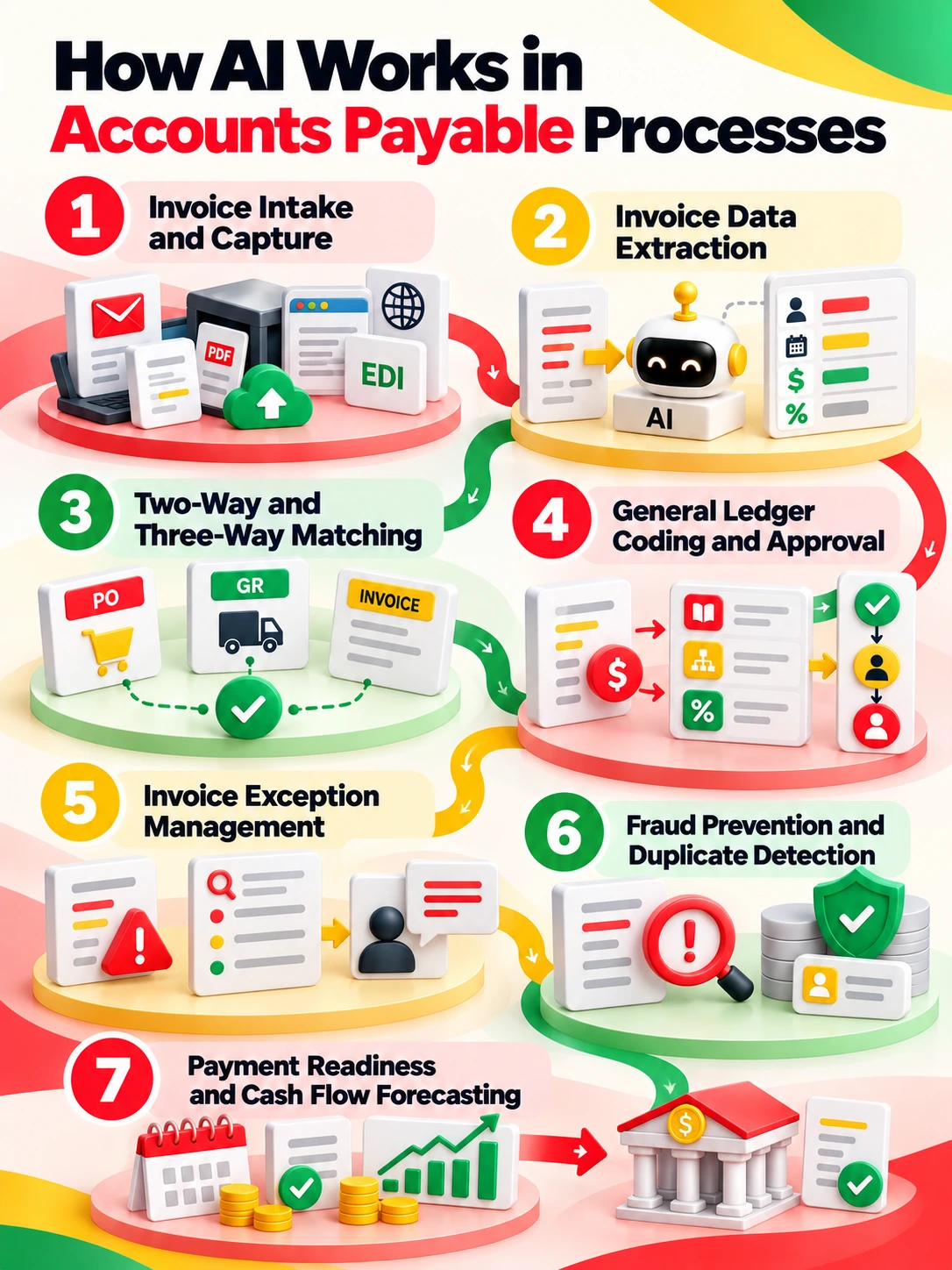
      AI across the seven stages of the accounts payable process

      1. Invoice Intake and Capture

      Invoices arrive by email, supplier portal, or scanned PDF. They also arrive by EDI and structured e-invoice. 

      1. AI first sorts each document. With this, each one is an invoice, a credit memo, or a statement. Then AI checks for duplicates. Only after that does AI pull out any data. 
      2. In Oracle Fusion Cloud Financials, setup matters. Meaning, you set up streams. You also map email aliases by business unit. 
      3. Some countries mandate e-invoicing. There, validated XML flows straight into the ERP. In doing so, that route skips OCR entirely. Capture quality still matters. Every error here carries into every later step.

      2. Invoice Data Extraction: Header and Line Items

      Extraction pulls the supplier name, invoice number, dates, and currency. On the whole, extraction also pulls tax amounts and payment terms. 

      1. The PO reference and line items come along too. Oracle's generative engine needs no upfront templates. The engine labels the fields by itself. In the grand scheme, the engine maps them to supplier details. 
      2. SAP shows confidence in red, orange, and green. Low-confidence fields get a quick check. Nobody has to re-key a whole invoice. With this, Microsoft Dynamics 365 Finance has an Invoice Capture tool. The tool holds extracted data in a workspace. An AP clerk reviews the data and transfers it.
      3. The system then checks each value against supplier master data. Meaning, examples are vendor ID and tax code.

      3. Two-Way and Three-Way Invoice Matching

      Two-way matching compares the invoice to the purchase order. Three-way matching adds the goods receipt. Why add a third document? In doing so, AI speeds up this process.

      AI handles partial deliveries and also handles unit-of-measure differences. Your tolerances still decide the result. 

      On the whole, an invoice is matched, blocked, or sent to exceptions. SAP's matching agent compares extracted data with open POs. The agent confirms exact matches. The agent singles out gaps for people. 

      But with this, anything outside tolerance is held and routed (nothing gets paid just for the sake of it).

      Matching only works when PO formats fit your procurement setup. Clean up your PO data first.

      4. General Ledger Coding and Approval Routing

      With this, some invoices have no purchase order. For those, AI studies past postings and supplier master data. Then AI suggests GL accounts, cost centers, and tax codes. These are suggestions, not decisions. Meaning, approval routing stays fixed and rule-based. 

      Platforms like Oracle use spreadsheet-based workflow rules. The rules uphold segregation of duties and also uphold delegated authority. 

      In doing so, the AI cannot sign off on its own suggestion. Approvers see the proposal and tweak it if needed.

      Then they give the final human sign-off. Over time, accepted suggestions teach the system your coding habits.

      6. Invoice Exception Management

      On the whole, exceptions are where touchless processing most often stops. They usually come from missing POs, price mismatches, or tax gaps. AI sorts the cause.

      • Examples include a missing PO or an unsure extraction. In the grand scheme, AI suggests a fix for review.
      • Reviewers start with a clue, not a blank screen. Oracle gathers these cases in an Invoice List hub.
      • There, the Payables Agent answers questions in plain chat. With this, SAP reports that AI help cuts the time to find invoice details by 60%. Microsoft's Invoice Capture also learns from clerk fixes. Similar cases get easier over time.

      7. Fraud Prevention and Duplicate Invoice Detection

      AI scores every invoice for odd signs. These signs include changed bank accounts and unusual payment patterns. 

      • They also include near-duplicate invoice numbers and fake vendors. Oracle rechecks duplicate holds on its own. Oracle releases them once they clear. 
      • In doing so, vendor guidance says to skip internal suppliers in anomaly checks. That cuts down on false alarms. Every alert still goes to a person. 
      • That person checks the supplier before a flagged payment moves ahead. On the whole, treat AI as an early-warning system. Do not treat it as a judge.

      8. Payment Readiness and Cash Flow Forecasting

      Once an invoice is approved, AI helps treasury plan. AI sorts due dates, spots early-payment discounts, and projects cash outflows.

      •  In the grand scheme, Oracle updates maturity dates on bills payable. Oracle also adjusts payment priority on installments. 
      • Steady scheduling can turn discounts into a routine win. What would that add to your cash flow? With this, the boundary is still firm. 
      • AI prepares the payment batch and the forecast. A person alone releases bank instructions. That step stays locked behind a restricted control.

      Invoice Processing Automation: Where AI Adds the Most Value

      The strongest documented result is on extraction. SAP reports an 80% cut in the time to pull out document details. 

      That figure covers the extraction phase only. What that means is that the figure does not cover the whole approval cycle. Please do not quote it as an end-to-end gain.

      Value shows up in four places.

      • Extraction: less manual keying for high-confidence fields
      • Matching: fewer fixes on partial deliveries and unit differences
      • Coding: faster GL suggestions for non-PO invoices
      • Exceptions: clear context, so reviewers start with the cause instead of a blank screen

      We found no well-supported industry benchmark for straight-through rates. Measure each outcome before and after go-live. 

      Use the same period and the same group of suppliers. In doing so, that keeps the comparison fair.

      Accounts Payable Automation Examples From Real Companies

      These examples come from vendor and customer sources. Each one is labeled by what it can and cannot prove.

      SAP Joule, Document AI, and SAP Ariba

      Lemvigh-Müller (Wholesale and Distribution)

      Lemvigh-Müller used SAP Joule agents. On the whole, the agents automated 100,000 order confirmations. Separate agents sort emails.

      Other agents pull out table data. Others match against open purchase orders. In the grand scheme, the pipeline went from idea to live use in 10 weeks. 

      The company says the goal was to use expertise better. The goal was not to cut headcount. Order confirmations are a stand-in for AP matching. With this, they are not invoices themselves.

      FRoSTA (Food Manufacturing)

      How fast is fast? FRoSTA paired SAP Build Process Automation with Document AI. The company reports an invoice cycle under one minute.

      Meaning, that runs from arrival to final posting. The starting point was not made public. 

      The vendor reported the result. Speed gains need clean inputs. In doing so, they also need a narrow set of document types. Keep that in mind.

      Oracle Fusion Cloud Financials

      Teladoc Health (Telemedicine)

      Teladoc Health used Oracle Fusion Data Intelligence. The tool pulled scattered data together. On the whole, the data spanned payables, receivables, and the ledger. Prebuilt AP KPIs replaced manual spreadsheet upkeep. 

      No numerical before-and-after figures were disclosed. This story is about data, not extraction. In the grand scheme, that matters if your pain is reporting.

      Microsoft Dynamics 365 Finance

      The sources we reviewed cover the Invoice Capture workflow. The workflow learns from clerk fixes. The sources name no customer outcomes. With this, treat the feature as something to test, not a proof point.

      Results are strongest where scope is narrow. Data should also be well structured. Each is a documented outcome for that company.

      Meaning, each is not a promise for yours. None has an independent ROI audit in public view. Ask vendors for a reference customer in your industry. Ask for invoice volumes and baselines you can compare.

      AI in Accounts Payable Benchmarks and KPIs

      In doing so, task-level gains are well documented. Universal averages are not. Pick your KPIs before you build a business case. Measure them before go-live.

      • Cost per invoice and invoices processed per employee
      • Cycle time from receipt to payment-ready
      • Touchless rate and exception rate
      • Error rate and early-payment discount capture
      Metric Measurement Method What It Reveals Common Blind Spot
      Cost per invoice Total cost ÷ invoices Unit processing cost Excluded overhead costs
      Invoice cycle time Receipt to readiness Processing speed Unclear start points
      Touchless rate Invoices without intervention Manual workload avoided Excluded approval steps
      Exception rate Exceptions ÷ invoices Review workload Inconsistent exception definitions
      Extraction accuracy Correct fields ÷ fields checked Data capture quality Unrepresentative test samples
      Discount capture Captured ÷ eligible discounts Cash savings realized Missed discount

      On the whole, early-payment capture deserves a spot on the dashboard. The metric ties AP straight to working capital.

      1. Here are the sourced figures we can stand behind. SAP reports a 60% cut in invoice search time. In the grand scheme, SAP also reports a 10% gain in overall AP productivity. SAP reports an 80% cut in extraction time. Team Liquid reports 10,000 hours saved per year. That covers general financial analysis, not AP alone.
      2. With this, keep vendor-reported results apart from independent benchmarks. Every figure above comes from a vendor or a customer. None has been independently audited. Definitions also differ. Meaning, one company's touchless rate leaves out approvals. Another company counts them. Cost per invoice swings with labor markets and scope.
      3. To make any benchmark comparable, write down its definition. In doing so, state whether approvals count as a touch. Why does that matter? Say where the cycle-time clock starts and stops. Note which labor costs sit in cost per invoice. On the whole, do the same for software and overhead. Measure over the same period, such as a full quarter. That way, month-end spikes do not skew the result. 
      4. A written method makes a number defensible. In the grand scheme, your CFO and your auditors will want that. Anchor your business case on extraction time and cycle time. Your own baseline is the benchmark that matters most.

      Agentic AI in Accounts Payable: What Changes and What Should Not

      Agentic AI adds autonomy. With this, that autonomy stays within the limits of tool access. An agent can watch an inbox. An agent can query your ERP. An agent can draft an email to a supplier. 

      Meaning, the email can ask about a missing goods receipt. Oracle's Payables Agent points this way. So does SAP Joule. So do the AI copilot features in Microsoft Dynamics 365 Business Central. 

      In doing so, think of an agent as a junior analyst. The analyst is fast and never tired. The analyst holds no signing authority. Here is what agents do well.

      • Watch exception queues and dig into causes
      • Suggest fixes and draft supplier follow-ups
      • Ask for missing details
      • Get transactions ready for approval

      On the whole, what they should never do alone matters just as much. Ideally, AI agents in accounts payable must run on least privilege. Every action must be logged. Keep these tasks out of their reach.

      • Changing supplier bank details
      • Releasing payments
      • Approving invoices above delegated limits

      Controls, Compliance, and Risk: Keeping AI in AP Auditable

      AP Stage AI Risk Required Control Audit Evidence
      Invoice capture Duplicate invoices Duplicate detection rules Duplicate review logs
      Data extraction Incorrect field values Confidence-based review Validation records
      Invoice matching False match approvals Configured tolerance limits Match exception logs
      GL coding Incorrect account assignment Human coding approval Override history
      Supplier management Bank detail manipulation Independent change verification Supplier change records
      Payment release Unauthorized fund transfers Separate release authority Payment authorization logs

      Internal Controls and Auditability

      Your auditors will ask who, or what, made each decision. Use role-based permissions. Keep duties split.

      When using AI in accounts payable, you’ll need to keep audit logs that separate machine actions from human actions.

      In doing so, there needs to be a system to protect supplier and bank data. What would a leak cost you? Write down model assumptions. 

      • With this, watch for model drift. Line up the program with COSO and Sarbanes-Oxley (SOX) controls. NIST has also published SP 800-53 control overlays. They cover AI developers and agent systems. Meaning, these give security teams a clear place to start.
      • Explainability matters here. For every AI suggestion, record the inputs. Record the confidence score too. In doing so, record the suggested action too. Record who accepted or overrode it.
      • Share the results with your internal audit team early. That way, nothing catches them off guard at year-end. On the whole, test these controls like any other. Sample transactions. Keep evidence. Keep exceptions open to review.
      • In the grand scheme, a model error should be a caught and documented event. Never let an error turn into a silent posting.

      Tax and E-Invoicing Compliance

      In terms of using AI in accounts payable, the rules for compliance can vary by country. Do not assume one setup fits every entity. 

      • With this, the EU adopted its VAT in the Digital Age (ViDA) package. That happened on 11 March 2025. The rollout is phased through January 2035. Germany did away with paper invoice priority in 2025. Meaning, B2B e-invoicing there becomes mandatory by 2028.
      • India lowered its e-invoicing threshold to five crore rupees. AI must check tax fields against local rules. AI must never make them up. In doing so, AI must also support record-keeping that meets the law.
      • Retention periods and format rules differ by country. Confirm them with your tax advisers for each legal entity. Build checks for each country.
      • On the whole, skip the one global rule set. There is also an upside. As structured e-invoices cut down on extraction, AI's value shifts. The value moves to anomaly detection and cash forecasting.

      Buy, Build, or Layer: How to Choose an AI Accounts Payable Option

      Compare connection effort, workflow coverage, governance, and total cost in setting AI in accounts payable automation. Native tools suit simpler ERP setups, while multi-ERP environments may need a custom layer.

      Buy: Native ERP Automation

      Native tools share ERP data and security. Oracle Fusion offers Document IO, SAP supports invoicing and Document AI, and Microsoft Dynamics 365 Finance includes Invoice Capture. Check availability, licensing, and upgrade requirements.

      Specialist AP Platforms

      Specialist platforms offer deeper workflow customization but may require multiple API connections. Compare pricing, security, maintenance, and integration costs.

      Layer: A Custom AI Overlay

      An AI layer connects existing ERPs to LLMs through APIs. It suits legacy systems lacking native AI, but your team owns maintenance and governance. Explore AI system connection services when planning connections.

      Before choosing, assess:

      • Invoice volume and exceptions
      • Country coverage and tax rules
      • ERP licensing and existing spend
      • Setup effort and vendor support

      Ask vendors for customer references and a breakdown of licensed, configured, and custom components.

      How to Roll Out AI in Accounts Payable: A 90-Day Plan

      A 90-day rollout for using AI in accounts payable is realistic for narrow use cases. That said, your supplier data must be clean and structured first. On the whole, you need one for finance, one for IT, and one for controls.

      Days 1 to 30: Assessment

      Map the AP process, record baseline KPIs, and clean supplier data. Select a narrow use case, such as PO-backed invoices from top suppliers. Configure intake streams, define success criteria, and assign control owners.

      Days 31 to 60: Pilot

      Run AI on shadow data alongside live processing. Compare outputs against manual results for identical invoices. Log errors, test extraction accuracy, matching, and exception routing, then tune confidence thresholds and tolerances. Ask internal audit to review controls.

      Days 61 to 90: Controlled Rollout

      Deploy to a limited supplier group. Monitor false positives and exceptions daily. Review results weekly with finance, IT, and audit. Set rollback rules before launch.

      Expand only when all five gates pass:

      1. Extraction accuracy meets agreed thresholds.
      2. Match rates hold across samples.
      3. Exceptions meet resolution targets.
      4. Audit approves compliance controls.
      5. Ledger reconciliation shows no unexplained variance.

      Document thresholds with audit and sample exceptions weekly. If any gate fails, extend the stage before expanding.

      Where AI in Accounts Payable Falls Short

      Where does AI fall short? With this, AI is strong, but you should plan for its limits. Most failures trace back to inputs and scope. 

      The models are rarely the cause. Know where the weak points sit before you commit budget. Meaning, then you can plan around each one.
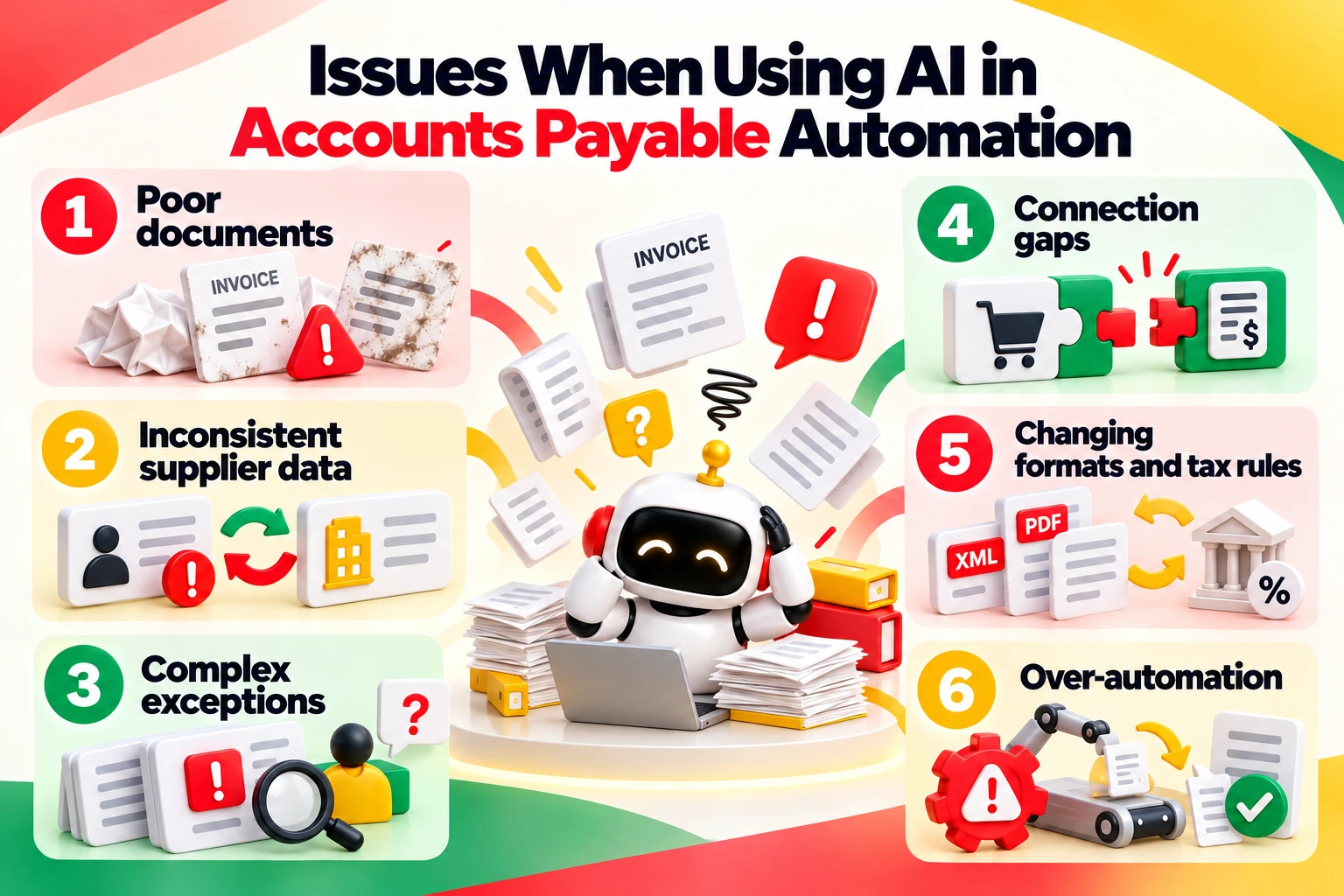
      Six issues with AI in accounts payable automation
      • Poor documents: worn or highly messy files can produce made-up explanations, so keep source checks in place
      • Inconsistent supplier data: mislabeling happens, such as internal suppliers flagged as odd, until you leave them out
      • Complex exceptions: edge cases need people, and that review work never fully goes away
      • Connection gaps: procurement and AP setups must line up exactly, or matching suffers
      • Changing formats and tax rules: models need steady tuning as invoice layouts and mandates shift
      • Over-automation: pulling out review too early weakens controls and makes rollback harder

      How Entrans Helps Finance Teams Apply AI to Accounts Payable

      Standard ERP features get you started. Connecting AI safely to legacy finance systems and ERP platforms takes experienced engineering.

      These systems are often regulated. Finance teams rarely have spare engineers for that.

      Which is why Entrans connects AI agents to your ERP and data. Access controls, audit logs, and testing come built in. How this helps is that Entrans does not sell a packaged AP software product.

      The team builds custom connections. The work fits around your existing systems. These verified Entrans services matter for AP.

      In doing so, the value for finance leaders is in the boundaries. Advisory support covers workflow assessment and design. Custom development covers connections and workflow builds.

      With this, the scope of using AI in accounts payable is defined by documented use cases and clear pass marks.

      Book a consultation call to scope yours.

      Share :
      Link copied to clipboard !!
      Connect AI to Your Accounts Payable Workflows
      Integrate AI with your ERP and finance systems using secure connections, audit trails, and controlled workflows.
      20+ Years of Industry Experience
      500+ Successful Projects
      50+ Global Clients including Fortune 500s
      100% On-Time Delivery
      Thank you! Your submission has been received!
      Oops! Something went wrong while submitting the form.

      Frequently Asked Questions

      1. How Is AI Used in Accounts Payable?

      AI helps across the whole invoice life cycle. That covers capture and extraction. Meaning, that also covers matching and coding. Exceptions, fraud checks, and payment prep are covered too. Each step produces checked data or a flag for people to review.

      2. Is AI Replacing Accounts Payable Jobs?

      Not entirely. AI is taking over manual data entry. Human resources are moving toward owning exceptions. Accountants and procurement teams will handle supplier conversations and financial oversight. Humans keep accountability for decisions. On the whole, humans also authorize payments. Early users like Lemvigh-Müller want to use expertise better. They do not want to cut headcount.

      3. What Is the Difference Between AP Automation and AI in Accounts Payable?

      Legacy AP automation follows set rules and scripts. AI, on the other hand, adds extraction, sorting, prediction, and advice. These handle variable documents. AI in accounts payable outputs here are at best guesses, so they still need to go through human review and fixed controls.

      4. Can AI Be Used for Invoice Processing?

      Yes. AI handles PDFs, scanned invoices, and structured e-invoices. AI pulls out and checks fields. AI matches them and routes approvals. Meaning, some tools need image files prepped first. Approvals still follow your delegated authority.

      Hire AI Integration Developers
      Build custom AI workflows that connect ERP platforms, automate invoice processes, and support enterprise finance controls.
      Free Project Consultation
      Trusted by Enterprises & Startups
      Top 1% Industry Experts
      Flexible Contracts & Transparent Pricing
      50+ Successful Enterprise Deployments
      Kapildev Arulmozhi
      Author
      Kapil is the Co-founder and CMO of Entrans, bringing over 20 years of experience in SaaS sales and related industries. He is responsible for creating and overseeing the revenue-driving systems at Entrans. Having collaborated extensively with tech leaders and teams, Kapil possesses a keen understanding of the decision criteria and ROI-justifiable initiatives essential for business growth.

      Related Blogs

      AI in Accounts Payable: 2026 Guide for Enterprise Finance

      Discover how AI in Accounts Payable automates invoice processing, improves matching, reduces manual work, and helps finance teams measure ROI.
      Read More ↗

      AI Agents Examples: 30 Real-World Use Cases Businesses Are Running in 2026

      Explore 30 AI agents examples across business functions and industries, with real-world results, practical use cases, and tips to choose your first project.
      Read More ↗

      The AI Implementation Roadmap That Ends in Production, Not a Slide Deck

      Build an AI implementation roadmap that moves projects from idea to production with a step-by-step guide, timelines, costs, and measurable business results.
      Read More ↗