> Blog >
How to Migrate from SSRS to Power BI: A Complete Guide for 2025
How to Migrate from SSRS to Power BI: A Complete Guide for 2025Explore the step-by-step process for SSRS to Power BI migration, ensuring seamless data integration, security, and improved reporting performance.
3 mins
April 11, 2025
Author
Aditya Santhanam
TL;DR
  • Migrating from SSRS to Power BI produces better data visuals and interactive dashboards. A case study showed a 30% drop in report creation time and a 50% increase in user satisfaction.
  • The five-step method for SSRS to Power BI migration includes assessing old reports, rebuilding them, and moving the data models. A large part of the work is rewriting old SQL queries into Power BI’s DAX language.
  • A common difficulty is that Power BI does not natively support paginated reports like SSRS does. Power BI Report Server can be used as a workaround for this issue.
  • For a good outcome with SSRS to Power BI, large datasets, we suggest using features like DirectQuery and Power BI Premium. It is also important to give your team proper training with the new system.
  • Migrating from SSRS to Power BI modernizes business reporting, enhancing interactive visualizations, real-time analytics, and self-service capabilities. This migration allows businesses to integrate diverse data sources, streamline reporting, and reduce infrastructure costs. Power BI’s scalability, security, and cost-effectiveness offer significant benefits over SSRS, enabling organizations to improve decision-making and empower users with intuitive, AI-powered insights. By automating report conversions and supporting both paginated and interactive reports, Power BI provides a comprehensive solution for businesses looking to optimize their data analytics and reporting infrastructure.

    What is SSRS to Power BI Migration?

    SSRS to Power BI migration is the process of transferring data models, reports, and dashboards from SQL Server Reporting Services (SSRS) to Power BI, Microsoft's modern business analytics tool. SSRS, traditionally used for pixel-perfect, paginated reports, lacks the interactive and user-friendly design elements that Power BI offers. Migrating to Power BI enables businesses to take advantage of its interactive features, cloud capabilities, and better integration with a variety of data sources.

    The migration process typically involves reworking SSRS reports to fit Power BI’s report structure, as well as transitioning the underlying data models and queries to be compatible with Power BI’s design standards.

    Why Migrate from SSRS to Power BI?

    The world of business intelligence is evolving rapidly, and organizations need tools that offer more flexibility, better performance, and enhanced user experience. Below are the key reasons why businesses are making the shift from SSRS to Power BI:

    • Better Visualizations and Interactive Dashboards: Power BI offers visually engaging, interactive dashboards that are impossible with SSRS. Businesses can generate reports with interactive filters and drill-down capabilities, improving decision-making.
    • Cloud Integration: With Power BI, users can leverage cloud integration for real-time access to data, which SSRS cannot match in its traditional on-premise format.
    • Scalability and Flexibility: Power BI is designed for large-scale deployment and is more scalable compared to SSRS. As your business grows, Power BI can handle larger datasets, provide better performance, and support cross-platform collaboration.

    Key Benefits of Migrating to Power BI

    Improved Visualizations

    One of the most significant advantages of Power BI over SSRS is the ability to create visually appealing and interactive reports. Unlike SSRS, which is focused on static, paginated reports, Power BI offers a wide variety of charts, graphs, and data visualization tools that are easy to implement and use. This enables users to quickly grasp key insights and make better-informed decisions.

    Better Data Integration

    Power BI offers superior integration with a wide array of data sources, both on-premises and cloud-based. Whether you're pulling data from SQL Server, Azure, Excel, or third-party sources like Salesforce, Power BI makes it simple to connect, blend, and analyze data. This seamless integration is a significant upgrade from SSRS's more rigid data connectivity options.

    Enhanced User Experience

    Power BI is built with the user in mind. It has a modern, intuitive interface that allows users with minimal technical knowledge to build and customize their own reports and dashboards. With Power BI’s self-service BI capabilities, even non-technical users can interact with their data to uncover valuable insights.

    Open Popup

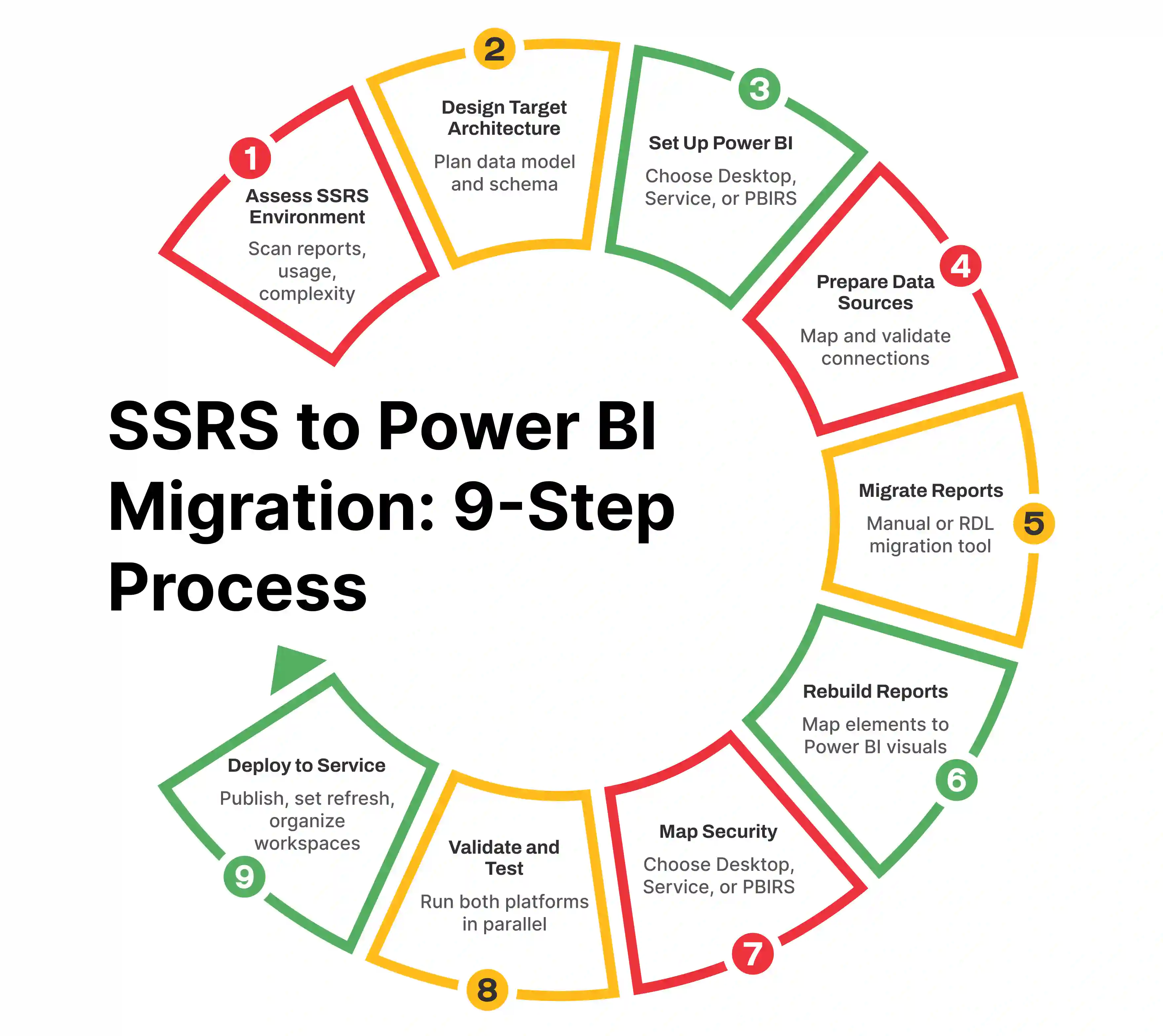
    The Step-by-Step Process of Migrating from SSRS to Power BI

    Step 1: Assess Your Current SSRS Reports

    Before diving into migration, take a detailed inventory of your SSRS reports. Identify which reports are essential and need to be recreated in Power BI. Evaluate each report’s complexity, as some may require more work to migrate due to intricate formulas or custom coding.

    Step 2: Choose the Right Power BI Environment

    Power BI offers different deployment options, such as Power BI Desktop (for local report creation) and Power BI Service (for cloud-based sharing and collaboration). Determine which environment suits your business needs.

    Step 3: Recreate Reports in Power BI

    This step involves rebuilding your SSRS reports using Power BI’s built-in features. Take advantage of Power BI’s drag-and-drop interface to recreate report visuals and apply the appropriate filters and interactivity.

    Step 4: Migrate Data Models and Queries

    Next, focus on migrating the underlying data models and SQL queries. Power BI utilizes its own query language, DAX, so complex SQL queries and stored procedures from SSRS may need to be rewritten or restructured.

    Step 5: Test and Validate the Migration

    Once the migration is complete, test the Power BI reports for accuracy and performance. Compare the results with your original SSRS reports to ensure that all data is correctly represented and that the performance meets expectations.

    Common Challenges During SSRS to Power BI Migration

    Handling Paginated Reports

    While Power BI is designed for interactive reports, it does not natively support paginated reports like SSRS does. For businesses that rely heavily on printing or distributing detailed reports, this can pose a challenge. However, Power BI Report Server can offer a workaround for paginated reports.

    Reworking Complex SQL Queries

    SSRS reports often involve complex SQL queries and stored procedures that may not be directly transferrable to Power BI. This requires reworking the queries to use Power BI’s query language, DAX.

    Data Compatibility Issues

    Power BI is more flexible with data sources than SSRS, but some legacy data sources may require additional work to integrate smoothly. Ensuring that data models are compatible with Power BI’s architecture is crucial to a successful migration.

    Best Practices for a Smooth SSRS to Power BI Migration

    • Standardize Your Data Models: Ensure that your data models are consistent across reports and that any business logic is properly migrated into Power BI's data model structure.
    • Leverage Power BI Features for Scalability: Take advantage of Power BI’s advanced features like DirectQuery and Power BI Premium for large datasets.
    • Ensure Adequate User Training: Power BI’s interface is user-friendly, but it’s still important to train your users on how to use the tool effectively. This will help ensure a smooth adoption process.

    Case Studies of Successful SSRS to Power BI Migrations

    Case Study 1: Migrating a Financial Reporting System

    A global financial institution successfully migrated its SSRS reports to Power BI, resulting in a 30% reduction in report generation time and a 50% improvement in user satisfaction. By transitioning to Power BI, they were able to offer real-time reporting and better visual insights, allowing for quicker decision-making.

    Case Study 2: Transitioning from SSRS to Power BI in Healthcare

    A large healthcare organization migrated their SSRS-based reporting systems to Power BI, improving operational efficiencies and reducing the cost of report maintenance. By adopting Power BI, they improved their patient data analytics and streamlined reporting workflows.

    How to Measure the Success of SSRS to Power BI Migration

    User Adoption Metrics

    Track how frequently reports are accessed, how many users are creating or interacting with reports, and whether users are finding the reports useful.

    Performance and Accuracy Metrics

    Measure the time it takes to load reports, the accuracy of the data presented, and how responsive the reports are under varying data loads.

    Cost Savings and ROI

    Track the cost savings from reduced report generation time, maintenance, and infrastructure costs, along with the ROI from increased decision-making speed and accuracy.

    Future Trends in BI Tools and the Evolution of Power BI

    Power BI is continuously evolving, with upcoming features like AI-powered analytics, deeper integration with cloud services, and more advanced visualization options. As business intelligence continues to grow, Power BI will remain at the forefront of data-driven decision-making tools.

    Key Takeaways

    • Migrating from SSRS to Power BI offers significant improvements in data visualization, integration, and user experience.
    • A successful migration requires careful planning, reworking of reports, and ensuring data models are compatible with Power BI.
    • Organizations can benefit from increased scalability, flexibility, and cost savings by adopting Power BI.
    Share :
    Link copied to clipboard !!
    Seamless SSRS to Power BI Migration with Entrans
    From report redesign to data modeling and AI-powered dashboards – we make your migration fast, accurate, and hassle-free.
    20+ Years of Industry Experience
    500+ Successful Projects
    50+ Global Clients including Fortune 500s
    100% On-Time Delivery
    Thank you! Your submission has been received!
    Oops! Something went wrong while submitting the form.

    Why Work With Entrans for SSRS to Power BI Migration?

    SSRS may no longer meet the growing needs of your business when it comes to interactive, real-time reporting. Migrating to Power BI offers enhanced flexibility, cloud integration, and powerful features designed for self-service analytics and decision-making.

    At Entrans, we have a dedicated team of Power BI experts, BI migration specialists, and data professionals who will support you throughout the entire process—from redesigning your reports to optimizing data models and improving workflows.

    Ready to make the switch? Our team is here to ensure a smooth and successful SSRS to Power BI migration. Contact us today for a free consultation!

    Hire Expert Power BI Developers
    Skilled in DAX, Power Query, and BI migrations to accelerate your SSRS to Power BI transition.
    Table of content

    Heading 1

    Heading 2

    Heading 3

    Heading 4

    Heading 5
    Heading 6

    Lorem ipsum dolor sit amet, consectetur adipiscing elit, sed do eiusmod tempor incididunt ut labore et dolore magna aliqua. Ut enim ad minim veniam, quis nostrud exercitation ullamco laboris nisi ut aliquip ex ea commodo consequat. Duis aute irure dolor in reprehenderit in voluptate velit esse cillum dolore eu fugiat nulla pariatur.

    Block quote

    Ordered list

    1. Item 1
    2. Item 2
    3. Item 3

    Unordered list

    • Item A
    • Item B
    • Item C

    Text link

    Bold text

    Emphasis

    Superscript

    Subscript

    Free project consultation + 100 Dev Hours

    Trusted by Enterprises & Startups
    Top 1% Industry Experts
    Flexible Contracts & Transparent Pricing
    50+ Successful Enterprise Deployments

    Aditya Santhanam
    Author
    Aditya Santhanam is the Co-founder and CTO of Entrans, leveraging over 13 years of experience in the technology sector. With a deep passion for AI, Data Engineering, Blockchain, and IT Services, he has been instrumental in spearheading innovative digital solutions for the evolving landscape at Entrans. Currently, his focus is on Thunai, an advanced AI agent designed to transform how businesses utilize their data across critical functions such as sales, client onboarding, and customer support

    Related Blogs

    Top 10 Java Application Development Companies in 2025

    Top Java application development companies in 2025 delivering secure, scalable, and high-performance enterprise applications.
    Read More

    Top 10 Django Development Companies in 2025

    Top Django development companies for 2025. Compare expertise, services, pricing, and choose the best Django partner for secure and scalable web applications.
    Read More

    Top 10 JavaScript Development Companies in 2025

    Discover the top JavaScript development companies in 2025 and learn how to choose the best partner for building fast, scalable, and modern digital applications.
    Read More
    Load More