> Blog >
Best Cloud Data Warehouse in 2026: Snowflake, BigQuery, Redshift, Databricks, and Fabric Compared
Compare the best cloud data warehouse options in 2026. Explore real costs, performance, and features across Snowflake, BigQuery, Redshift, and Databricks.

Best Cloud Data Warehouse in 2026: Snowflake, BigQuery, Redshift, Databricks, and Fabric Compared

4 mins
November 6, 2026
Author
Aditya Santhanam
Talk To Our Experts
TL;DR
  • The best cloud data warehouse depends on your workload: Snowflake suits multi-cloud analytics, BigQuery supports serverless SQL, Redshift fits AWS environments, Databricks serves lakehouse and AI workloads, and Fabric works well with Microsoft tools. 
  • Compute pricing models vary dramatically across vendors, meaning unmanaged concurrency, idle cluster minimums, and inter-region data egress often cost far more than raw storage.
  • Open table formats like Apache Iceberg and Delta Lake are now critical to avoid vendor lock-in and enable cross-engine querying across warehouse and lake environments.
  • Successful migrations require upfront schema translation and pipeline discovery, since rewriting legacy SQL logic and running parallel systems represent the largest hidden project costs.
  • With so many different cloud data warehouse solutions, what is the difference between them?

    It is not a matter of being able to query data. What we require is a platform that will fit well in our context. The best choice of cloud data warehouse depends on the performance of the query vs. cost vs. ecosystem.

    In this blog, we will analyze the best cloud data warehouses based on their features, pricing, and functionality.

    Table of Contents ▾

      Quick answer: The best cloud data warehouse by situation

      No cloud data warehouse is best suited for everyone. They are all evaluated depending on their effectiveness in achieving their intended functions.

      • Snowflake: In case your needs are multi-cloud, data integration among various entities, and infinite scalability without any management, go for Snowflake.
      • Google BigQuery: In case your environment is hosted on Google Cloud, and your needs are serverless SQL queries for big data, go for Google BigQuery.
      • Amazon Redshift: In case your data is hosted on AWS, and you can afford SQL predictability, go for Amazon Redshift.
      • Databricks SQL: If your firm wants an open lakehouse solution for the combination of machine learning and analytics with your data engineers, then go with Databricks SQL.
      • Microsoft Fabric: For those who use Microsoft tools and need SaaS-based management and Power BI reports rather than OneLake, select Microsoft Fabric.
      • ClickHouse / Neon (Lean): Select ClickHouse for sub-second queries of your event logs in real time or Neon for lean and serverless Postgres.

      What is a cloud data warehouse?

      Cloud data warehouse is basically a place where big amounts of business data are stored and analyzed within the cloud computing environment rather than storing the data physically on the servers that you have in your office. The unique thing about this cloud computing model is that it separates computation and storage.

      You can carry out fast searches without affecting your business. Enterprises can scale up storage and computation and generate reports without setting up any hardware at all.

      How a cloud data warehouse works

      The data is centralized and hence accessible for reporting, analysis, and AI through the cloud data warehouse.

      How a cloud data warehouse collects, stores, transforms, and analyzes business data
      1. Data retrieval from business systems - The data could be retrieved from the CRM system, ERP systems, applications, databases, or even external sources.
      2. Data intake and preparation - The data is then extracted, cleansed, and integrated.
      3. Store data in the cloud - The cleansed data is stored in a central warehouse that is scalable in terms of storage and computing.
      4. Transformation of data into information - Standardization, integration, and structuring of data for analysis take place. For instance, sales transactions can be transformed into sales reports.
      5. Data Analysis and its application - Business intelligence software, data dashboards, data analysts, and AI applications assist in the analysis of the available data in the data warehouse.

      Cloud vs. On-Premises Data Warehouse

      Feature On-Premises Data Warehouse  Cloud Data Warehouse 
      Scaling  Hard and expensive to add physical servers  Instant and elastic on-demand scaling 
      Cost Model  High upfront hardware and maintenance fees  Pay-as-you-go subscription and usage pricing 
      Maintenance  Managed entirely by your internal IT team  Managed and updated automatically by the vendor 

      Example: E-commerce Business

      An e-commerce firm could collect order details from its website, customer information from its CRM, and inventory details from its ERP. The data warehouse then uses all of these to provide answers to questions like:

      • What products are earning the most money?
      • Which customers are likely to purchase again?
      • What products have low inventory?

      The data warehouse does not actually place an order or change the inventory itself. It merely collates the data for the use of the business.

      How we compared the platforms (transparent method)

      Choosing the right cloud data warehouse is never about blindly trusting vendor marketing claims. To build a truly objective cloud data warehouse comparison, we evaluated the leading cloud data warehouse platforms using a transparent, weighted scoring method. 

      Our scoring framework weighs eight critical pillars: 

      1. Workload fit

      We evaluated the support provided by each platform for various workloads such as business intelligence, data analytics, real-time computing, and data engineering at scale. We also evaluated whether the platform is suitable for either traditional data warehousing or lakehouses.

      2. Pricing model and Predictability

      Compute, storage, data processing, and consumption-based pricing were all examined. The ease of cost estimation and the ability to avoid surprise costs were both analyzed.

      3. Raw performance and Concurrency

      The areas we analyzed include speed of query processing, workload optimization, scalability, and multi-user query execution. We also took into account heavy workloads.

      4. Ecosystem integrations

      We considered integrations with BI tools, cloud services, ETL engines, data engineering tools, and enterprise applications. The presence of an established ecosystem makes the process of integrating with existing systems simpler.

      5. Governance and Security

      We looked at access controls, encryption, auditing, data masking, compliance, and governance. These capabilities are important when companies deal with confidential data in different settings.

      6. AI and Machine Learning Readiness

      We looked into machine learning functionalities, AI functionalities, machine learning using SQL and machine learning using AI frameworks, and also the ease of use of warehouse data in AI applications.

      7. Openness(like Iceberg and Delta Lake)

      We have studied support for open table formats like Apache Iceberg and Delta Lake. It will help organizations understand how portable, interoperable, and flexible their data is across various platforms.

      8. Skills availability 

      Our consideration was the availability of platform specialists like developers, data analysts, administrators, and so forth. More manpower will make the recruitment and management of the platform easier.

      The platforms in detail

      The choice of a cloud data warehouse will impact the speed at which you transform raw data into insights. With many choices that vary from serverless engines to unified lakehouses, the decision on the most appropriate cloud data warehouse depends on your ability to select engines that suit your working environment.

      Below is an in-depth look at the major cloud data warehouse products along with data warehouse software.
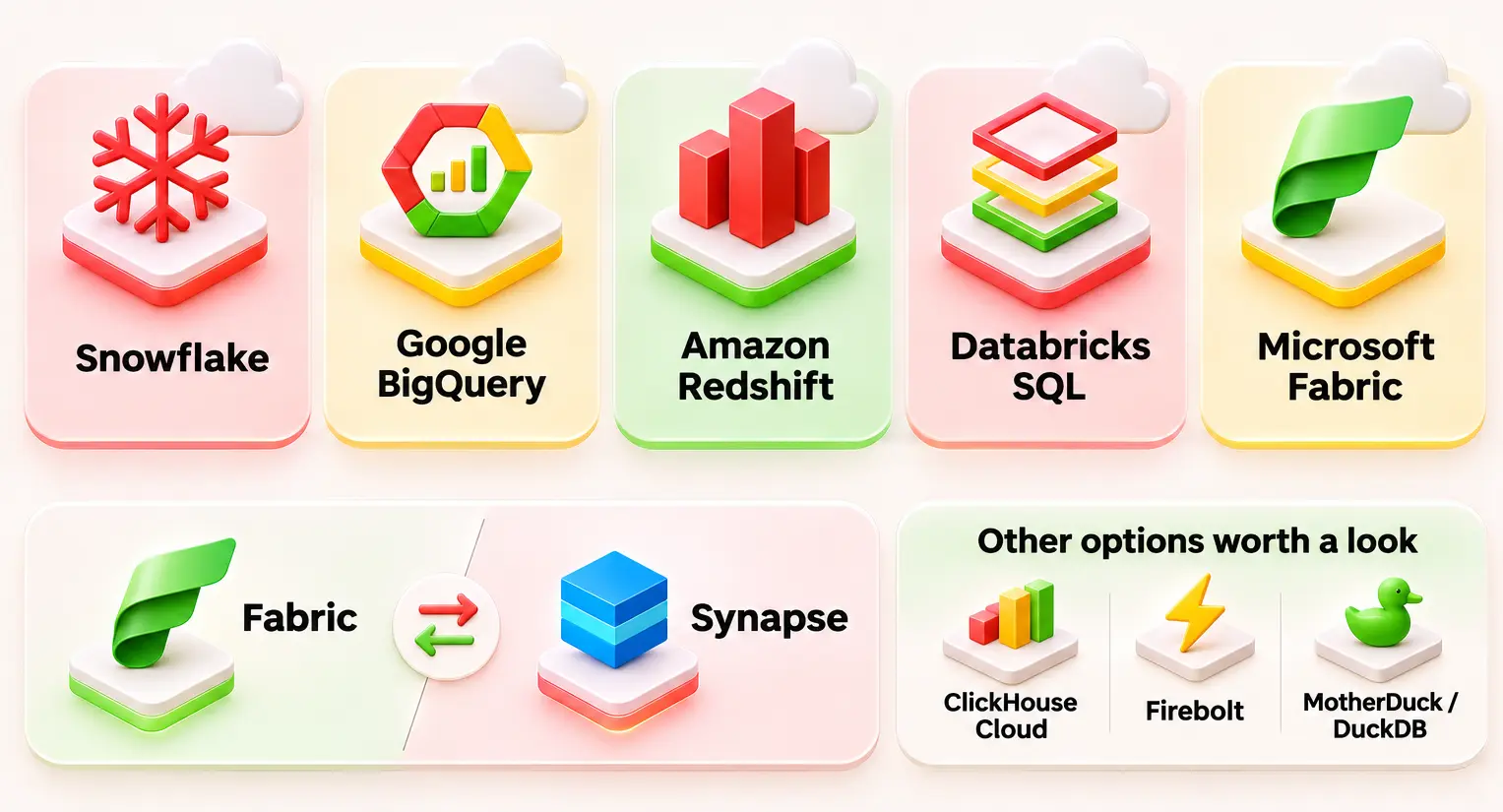
      Overview of major cloud data warehouse platforms and their features

      Snowflake

      Best for

      Analyzing multi-cloud organizations with multi-cloud support, no data replication, and little to no management effort.

      Architecture

      Snowflake’s architecture takes a multi-cluster approach wherein storage, compute, and cloud computing are separate. Query processing happens through virtual warehouses that are separate from the storage of the data.

      Pricing model

      Consumption-based pricing model. Per-second compute credits depending on the virtual warehouse size and usage period, together with flat storage pricing per terabyte per month.

      Strengths

      Compatibility across several cloud platforms, like AWS, Azure, and GCP; ease of governance management with role-based and account-based access control; scalability.

      Limits

      Expenses increase rapidly during high and consistent concurrency without proper management of the warehouse.

      Governance

      Comprehensive native governance with object-level tag policies, dynamic data masking, and centralized access policies.

      When not to choose it

      Avoid if your architecture relies heavily on deeply integrated native cloud services or if your workloads involve persistent streaming without analytical pausing.

      Google BigQuery

      Best for

      Data Analytics, Exploratory Queries, and ML Model Integration without Servers on Google Cloud Platform.

      Architecture

      The serverless computing model of BigQuery involves storage and computation separated into two different layers, and it is Google that takes care of resource management.

      Pricing model

      Option for scanning on a pay-as-you-go basis per terabyte versus slot-based capacity reservation.

      Strengths

      Zero infrastructure provisioning, effortless scale to petabytes, and embedded BigQuery ML capabilities.

      Limits

      Unpredictable costs on pay-per-query models if users execute unoptimized, full-table scan queries.

      Governance

      Deep integration with Dataplex and Google Cloud IAM for column-level, row-level, and tag-based access control.

      When not to choose it

      Skip if your team prefers traditional cluster-level resource isolation or operates primarily outside the Google Cloud ecosystem.

      Amazon Redshift

      Best for

      Organizations embedded in AWS seeking high-performance SQL analytics with tight infrastructure controls.

      Architecture

      Redshift utilizes column-oriented databases, massively parallel processing, and managed storage technologies. Redshift is available in provisioned and serverless cluster forms.

      Pricing model

      Hourly node-based pricing for provisioned clusters (eligible for reserved instance discounts) or Redshift Processing Units (RPUs) for serverless capacity.

      Strengths

      Excellent cost-efficiency for sustained enterprise workloads and seamless integration with AWS Glue, Lake Formation, and S3.

      Limits

      Manual tuning (distribution/sort keys) may still be required to maximize performance on provisioned instances.

      Governance

      Governed natively via AWS Lake Formation, providing fine-grained access control across data lake tables and Redshift instances.

      When not to choose it

      Avoid if your enterprise runs predominantly outside of AWS or needs multi-cloud compute independence.

      Databricks SQL (lakehouse)

      Best for

      Data engineering teams combining advanced AI/ML capabilities with open-format lakehouse analytics.

      Architecture

      Databricks' lakehouse architecture is composed of cloud object storage, Delta Lake, and independently scaled SQL compute warehouses. Data engineering and analytics become one, thanks to eliminating the need for a distinct storage system.

      Pricing model

      Pay-as-you-go Databricks Unit (DBU) usage-based pricing model for computing, along with raw costs for cloud object storage.

      Strengths

      Better performance for ML/BI workloads without proprietary lock-in through open standards.

      Limits

      Requires higher data engineering expertise compared to turnkey cloud-based data warehouse platforms.

      Governance

      Centralized governance through Unity Catalog, providing end-to-end lineage, audit logs, and granular access controls.

      When not to choose it

      Not for organizations that need only simple SQL-based business intelligence and lack data engineers.

      Microsoft Fabric (and the Synapse transition) 

      Best for

      Microsoft-centric data estates requiring unified SaaS analytics, direct Power BI integration, and low-friction governance.

      Architecture

      Multi-engine SaaS architecture built over OneLake storage, utilizing shared Delta Parquet formats.

      Pricing model

      Single-capacity pricing (F-SKUs) which includes a single pool of resources that will handle data integration, data warehousing, and BI operations.

      Strengths

      No more data silos via OneLake shortcuts, zero-copy Direct Lake mode for Power BI, and unified tools in one workspace.

      Limits

      F-SKU capacity throttling impacts all integrated workloads simultaneously if resource usage spikes.

      Governance

      Unified data governance integrated directly with Microsoft Purview and workspace-level roles.

      When not to choose it

      Avoid if your architecture requires granular Azure PaaS network configurations or relies heavily on non-Microsoft environments.

      Fabric vs. Synapse: Clarifying the Transition

      When considering comparisons between Microsoft Fabric and Snowflake, Azure Synapse is frequently mentioned. This is because there is a fundamental distinction between Azure Synapse and Microsoft Fabric, as seen below:

      • Azure Synapse (Platform as a Service): An ecosystem designed for provisioning, configuration, scaling, and billing of individual resources (Dedicated SQL Pools, Spark Pools, Data Factory pipelines). 
      • Microsoft Fabric (Software as a Service): A single platform wherein the infrastructure is managed by Microsoft. Rather than provisioning separate resources on Azure, all workloads (Pipelines, Lakehouses, Warehouses, Power BI) consume compute dynamically from a common capacity pool based on the OneLake storage layer.

      Even though Azure Synapse is still supported in the existing infrastructure, the focus of future innovations in Microsoft will be entirely on Fabric.

      Ultimately, the choice depends on what is better for your data architecture, skills, governance, and workload cost estimation. A comparison of cloud data warehouses should be carried out in light of the above aspects, rather than purely through performance metrics and vendor ratings.

      Other options worth a look 

      In case of comparison of cloud-based data warehousing, the following may apply to leaner teams or special instances:

      • ClickHouse Cloud: Designed for fast aggregations on queries in event stream and log telemetry data.
      • Firebolt: Created for those that require concurrency, sub-second latency, and efficiency in its uses.
      • MotherDuck (DuckDB): Serverless Analytics with a DuckDB in-process database engine, optimal for smaller teams.

      Side-by-side comparison table

      The following is the side-by-side matrix indicating how these leading platforms handle various operational aspects:

      Feature / Dimension Snowflake Google BigQuery Amazon Redshift Databricks SQL Microsoft Fabric
      Pricing unit Per-second compute credits + storage (TB/mo) On-demand per TB scanned OR flat-rate slot capacity Hourly node-based pricing (Provisioned) or RPUs (Serverless) DBUs (Databricks Units) per second + underlying storage Unified capacity-based pricing (F-SKUs)
      Serverless option Yes (Snowflake Serverless Tasks / Managed compute) Fully serverless by default (On-demand tier) Redshift Serverless (RPU scaling) Databricks SQL Serverless Fully managed SaaS capacity pools
      Concurrency Excellent (Multi-cluster virtual warehouses scale out automatically) High (Managed automatically via slots and autoscaling) Moderate to High (Requires concurrency scaling configuration) High (Photon-accelerated serverless endpoints) High (Shared OneLake capacity pools)
      Semi-structured data Native VARIANT column type with automatic optimization Native JSON support with repeated/nested records Native SUPER data type for schema-less data Delta Lake native schema evolution & JSON support Native Delta Parquet handling via OneLake
      Open table formats Supported via Apache Iceberg external tables Native support for Iceberg and Delta formats Supported via Redshift Spectrum & Lake Formation Native open lakehouse format (Delta Lake) Native support for Delta Parquet on OneLake
      ML/AI features Snowflake Cortex AI functions (SQL-native LLMs and models) BigQuery ML (train/deploy models using standard SQL) Amazon SageMaker integration and ML functions Databricks Mosaic AI & MLflow integration Azure Machine Learning & integrated Copilot
      Data sharing Secure Data Sharing, Data Clean Rooms, and Snowflake Marketplace Analytics Hub and cross-project/cross-org sharing AWS Lake Formation and Redshift Data Sharing Unity Catalog secure sharing (Delta Sharing protocol) OneLake shortcuts and cross-workspace sharing
      Compliance attestations SOC 1/2, HIPAA, FedRAMP, PCI-DSS, ISO 27001 SOC 1/2, HIPAA, FedRAMP, PCI-DSS, ISO 27001 SOC 1/2, HIPAA, FedRAMP, PCI-DSS, ISO 27001 SOC 1/2, HIPAA, FedRAMP, ISO 27001 SOC 1/2, HIPAA, FedRAMP, PCI-DSS, ISO 27001, GDPR
      Best fit Multi-cloud enterprise BI, cross-org sharing, and low-ops SQL analytics Zero-ops serverless analytics, ad-hoc queries, and GCP estates AWS-native data stacks with predictable workloads Combined data engineering, ML, and open lakehouse analytics Microsoft-centric shops leveraging Power BI and OneLake

      Pricing models explained, with a worked monthly cost example.

      Navigating a cloud data warehouse comparison often reveals that the hardest part isn't choosing between a data lake vs. a data warehouse; it is deciphering how different cloud data warehouse platforms actually bill you. Every piece of data warehouse software speaks its own financial language, making it tricky to determine which is the best cloud data warehouse for your budget.

      Understanding how the cloud-based data warehouse you select charges for compute keeps nasty surprises off your monthly invoice. Whether you are weighing Snowflake vs Redshift or reviewing Snowflake vs BigQuery, cost predictability depends entirely on your usage patterns.

      A Normalized Monthly Cost Example

      Consider an average midmarket workload from all of November 2026 with 100 GB of stored data, 50 TB of scanned data across all queries every month, and 200 hours of analytical computation.

      Platform Compute Pricing Model Storage Cost (100 GB) Estimated Monthly Total
      Snowflake ~200 hours on an X-Small warehouse (1 credit/hr @ $2.50/credit) = $500 $23 / TB/mo ($2.30) $502.30
      Google BigQuery 50 TB scanned @ $5.00 per TB = $250 $20 / TB/mo ($2.00) $252.00
      Amazon Redshift 200 RPU-hours @ $0.36 per RPU-hour = $72 $24 / TB/mo ($2.40) $74.40
      Databricks SQL 200 serverless DBU hours @ $0.22/DBU = $44 Standard cloud blob storage ($2.30) $46.30
      Microsoft Fabric F2 Capacity SKU subscription = $260 flat rate Included in OneLake capacity pricing $260.00

      Hidden Costs to Watch Out For

      No matter which cloud data warehouse you land on, keep an eye out for sneaky line items that can inflate your bill:
      • Data Egress: Moving data out of your cloud region or provider (e.g., querying AWS data from a Snowflake instance in GCP) incurs steep transfer fees.
      • Idle Minimums: Platforms like Snowflake bill a minimum of 60 seconds every time a warehouse spins up, even if your query runs for two seconds.
      • BI-Driven Queries: Unoptimized dashboards that auto-refresh every time a user clicks a tab can quietly generate massive streams of runaway queries.
      Open Popup

      Snowflake vs Databricks, Snowflake vs Redshift, Fabric vs Snowflake

      These are the three comparisons that will guide you to pick the best data warehouse in the cloud with respect to your technology architecture.

      Snowflake vs. Databricks

      Verdict: Snowflake for SQL analytics; Databricks for lakehouse workloads

      • Choose Snowflake if your primary goal is fast, low-maintenance SQL analytics, native data sharing, and robust multi-cloud governance without managing underlying infrastructure. 
      • Choose Databricks if your organization relies heavily on data science, heavy machine learning pipelines, and open table formats like Delta Lake or Apache Iceberg on a single collaborative platform. 

      Snowflake vs. Amazon Redshift

      Verdict: Snowflake for multi-cloud flexibility; Redshift for AWS workloads 

      • Choose Snowflake if you operate across multiple clouds (AWS, Azure, GCP) or want seamless, zero-copy data sharing with external partners outside your infrastructure. 
      • Choose Redshift if your enterprise data stack is deeply anchored in AWS, leveraging services like S3, Glue, and IAM, and you want predictable pricing for sustained, predictable workloads.

      Microsoft Fabric vs. Snowflake

      Verdict: Fabric for Microsoft ecosystems; Snowflake for independent cloud analytics

      • Choose Microsoft Fabric if your organization is heavily invested in the Microsoft ecosystem, uses Power BI extensively, and wants a unified SaaS workspace where data engineering, warehousing, and BI share a single pool of capacity over OneLake. 
      • Choose Snowflake if you require a dedicated, decoupled data warehouse platform with enterprise-grade multi-cloud isolation and independent scaling away from any single vendor's productivity suite. 

      Data warehouse vs. Data lake vs. Lakehouse: Which One Wins for Large-Scale Analytics? 

      The selection of the right approach among the data warehouse, the data lake, and the lakehouse will be determined by the kind of data you deal with. The three serve different functions in analytics.

      1. Data Warehouse - Best for structured analytics

      A data warehouse keeps structured data that has been cleaned and organized. It is used for writing SQL queries, business intelligence, financial reporting, and dashboards.

      • When to choose a data warehouse: Go for a data warehouse if your business requires reliable reporting and consistent metrics with fast SQL queries.

      2. Data Lake - Best for storing diverse data

      Data lakes hold structured, semi-structured, and unstructured data in their native format. They use cloud object storage and enable data science, machine learning, and big data processing.

      • When to choose a data lake: Select a data lake when you have to deal with large amounts of raw data, such as logs, images, videos, and streaming events.

      3. Lakehouse - Best for combining analytics and AI

      A lakehouse is the combination of the flexibility of a data lake and the management and query capabilities of a data warehouse. The tools like Delta Lake and Apache Iceberg can help to manage data reliably from an open storage platform.

      • When to choose a lakehouse: You should go for a lakehouse in case you have use cases like SQL analytics, data engineering, machine learning, AI, etc.

      In highly regulated sectors, adopting a data lakehouse for banking can be helped by establishing open storage formats that align with strict compliance and fraud detection requirements. 

      Best cloud data warehouse for startups and small teams

      Finding the right cloud-based data warehouse for small companies and startups means evaluating options that eliminate heavy administration, letting small teams build without dedicated data engineers. 

      • Google BigQuery: A great starting point for startups looking for serverless analytics, easy setup, and minimal operations overhead. Pay-as-you-go pricing can help control costs as your usage grows.
      • MotherDuck: A good fit for small teams requiring simple SQL analytics and a light cloud-based data warehouse.
      • Snowflake: Good for startups that require scaling workloads, data sharing, and better governance.
      • ClickHouse Cloud: Great for SaaS startups that need fast analytics of live application data.

      Switch to a bigger cloud data warehouse when your queries increase, many people require access, dashboards become slow, or governance issues become complicated. Start with what is possible now.

      Governance, security, and compliance checklist

      Security and governance ought to factor into all decisions about cloud data warehouse usage. The ideal cloud data warehouse should ensure that all confidential information is safe, as well as ensuring data access rights for the respective team members.

      When assessing which data warehouse software to select, the following need to be considered:

      • Data cataloging: Is it possible to identify the data sets and owners?
      • Data lineage: Is it possible to track data from the data sources through to reports and dashboards?
      • Row and Column security: Is it possible to control access to sensitive records and columns?
      • Compliance: Check out vendor trust sites and ensure there is SOC 2, HIPAA, and FedRAMP compliance.
      • Access controls: Look for role-based permissions, encryption, audit logs, and data masking.

      Migrating to a new cloud warehouse: Effort and Pitfalls

      Migration to a cloud data warehouse involves more than just moving data. It also includes moving the data pipelines, business logic, reports, security settings, and integration connections. Having a good migration strategy will help prevent downtime and additional costs.

      Typical Migration Phases

      The complexity of migrating legacy ETL workflows can be reduced through automated data platform modernization pipelines that maintain end-to-end data integrity across environments. A structured migration minimizes business disruption through clear, iterative stages:

      1. Discovery & Inventory: Audit all existing data pipelines, stored procedures, and BI dashboards to triage essential workloads.
      2. Schema & Code Translation: Convert DDL statements and rewrite legacy SQL functions to fit the destination cloud data warehouse platforms.
      3. Data Ingestion & Wave Migration: Execute backfills of historical data and run active validation checks to confirm data parity between environments.
      4. Parallel Run & Cutover: Run old and new systems concurrently until performance SLAs and compliance checks are fully satisfied.

      Key Risks and How to Avoid Them

      • Query Refactoring Costs: Dialects differ significantly across data warehouse software. Expect manual tuning when refactoring complex queries, for example, converting Snowflake SQL into open Delta tables.
      • Runaway Dual-System Costs: Operating parallel environments inflates total cost of ownership (TCO) if validation takes too long.
      • Data Discrepancies: Mismatched data types or subtle execution differences across platforms can silently break downstream business reports.

      Explore Entrans ’ ETL Migration to Cloud Guide and Data Platform Modernization Services for migration solutions, architecture design, and pipeline modernization.

      How Entrans helps you choose and implement

      It is not just about selecting from features and pricing when it comes to choosing the right data warehouse in the cloud. Entrans’ engineers begin with a vendor-agnostic analysis of your data, the workloads, existing systems, and your business objectives. Designing a scalable data warehouse architecture can be improved by utilizing comprehensive enterprise cloud solutions tailored to your organization's multicloud and security ecosystem. 

      • We help you evaluate Snowflake vs. Databricks, Snowflake vs. Redshift, or Microsoft Fabric vs. Snowflake based on your specific cost, performance, and governance requirements. We bring battle-tested engineering experience across Snowflake, Databricks, Redshift, Azure Synapse, and Microsoft Fabric. 
      • Depending on your requirements, we plan the architecture, migration, data pipelines, security, and testing for your data warehouse in the cloud. Whether you are migrating a legacy data warehouse or implementing a new one in the cloud, Entrans will help you out.

      For detailed, step-by-step methodologies on handling complex transitions, such as executing a Snowflake to Databricks migration, Hadoop to Databricks, Amazon Redshift to Snowflake, Teradata to Synapse,  or navigating broader cloud data engineering frameworks, see our guides.

      Learn how we match your unique data workloads, cost models, and ecosystem to the right engine. Book a consultation call.

      Share :
      Link copied to clipboard !!
      Build the Right Cloud Data Warehouse
      Get expert help choosing and building a cloud data warehouse that fits your business.
      20+ Years of Industry Experience
      500+ Successful Projects
      50+ Global Clients including Fortune 500s
      100% On-Time Delivery
      Thank you! Your submission has been received!
      Oops! Something went wrong while submitting the form.

      FAQs

      1. What is the best cloud data warehouse?

      Snowflake, Google BigQuery, Databricks, Amazon Redshift, and Microsoft Fabric are common choices. The best option depends on your data needs, budget, existing tools, and workloads. Snowflake typically wins for multi-cloud flexibility, cross-company data sharing, and low administrative overhead.

      2. What is the best cloud data warehouse for a startup?

      Google BigQuery or lightweight tools like MotherDuck serve as the best cloud data warehouse for early-stage teams because they require zero server provisioning and offer low-ops maintenance. 

      3. Snowflake vs Databricks: which should you choose?

      Choose Snowflake for managed SQL analytics, reporting, and secure data sharing. Choose Databricks for data engineering, machine learning, and AI workloads on a lakehouse. 

      4. What is the cheapest cloud data warehouse?

      Serverless options like Google BigQuery or Amazon Redshift Serverless are the most cost-effective cloud-based data warehouse choices for low or spiky query volumes since you only pay for actual queries run. 

      5. Is a data lake or a data warehouse better for large-scale analytics?

      A data warehouse wins for fast, highly structured business reporting, whereas a data lake or lakehouse is better for unstructured file storage, petabyte ingestion, and raw data science workloads. 

      6. How do Snowflake credits compare to BigQuery pricing?

      Snowflake charges credits for compute usage, plus storage and data transfer. BigQuery charges by data scanned under on-demand pricing or by reserved compute capacity. 

      7. Which cloud data warehouses support HIPAA workloads?

      Leading cloud data warehouse platforms like Snowflake, Google BigQuery, Amazon Redshift, and Microsoft Fabric all support HIPAA compliance under a signed Business Associate Agreement (BAA). Check each vendor's trust page and sign the required Business Associate Agreement (BAA) before handling protected health information.

      Hire Cloud Data Warehouse Developers
      Get skilled Snowflake, BigQuery, Redshift, and Databricks developers for your project.
      Free Project Consultation
      Trusted by Enterprises & Startups
      Top 1% Industry Experts
      Flexible Contracts & Transparent Pricing
      50+ Successful Enterprise Deployments
      Aditya Santhanam
      Author
      Aditya Santhanam is Co-founder & CTO of Entrans Technologies, spearheading AI-driven cloud and data solutions. A 13-year tech veteran, he leads innovation in generative AI, AI agents and MLOps. He also co-founded Infisign (identity security) and Thunai.AI (enterprise AI agents)

      Related Blogs

      Best Cloud Data Warehouse in 2026: Snowflake, BigQuery, Redshift, Databricks, and Fabric Compared

      Compare the best cloud data warehouse options in 2026. Explore real costs, performance, and features across Snowflake, BigQuery, Redshift, and Databricks.
      Read More ↗

      Prior Authorization Automation: Architecture, Build, and Accuracy Metrics

      Explore prior authorization automation using AI, OCR, and payer rules. Learn about system architecture, accuracy metrics, EHR integration, and implementation.
      Read More ↗

      AI Prior Authorization: How It Works, Where It Helps, and What Clinics Must Decide

      Build smarter AI prior authorization workflows with OCR, LLMs, and FHIR APIs. Explore automation benefits, compliance requirements, and implementation options.
      Read More ↗