Explore 25 enterprise AI automation examples across 9 functions with real performance results, 3 end-to-end workflow breakdowns, and a quick-win framework.

Agentic Unconference 2026 - September 19, Chennai
View Event →




AI automation sounds promising. But what happens after the workflow goes live?. Searching for enterprise-ready AI automation examples often leaves you with a frustrating gap. We bridge that gap with 25 proven enterprise use cases across 9 operational departments, complete with validated performance results. Inside, you'll find three step-by-step workflow breakdowns.
This blog looks at AI automation examples through that real-world lens. Each example connects the workflow to a measurable result or a KPI worth tracking.
AI automation uses artificial intelligence, such as machine learning, large language models, and AI agents, to complete work that needs judgment. It can read documents, classify requests, make routine decisions, and take action across systems.
Rule-based automation operates on structured data and manages exceptions, while people check suspicious actions. Therefore, rule-based automation systems work best in cases of repetitive, predictable data input, whereas the new type of AI workflow automation works on automatic processing of unstructured tickets and invoices and creating personalized responses.
Some AI automation examples include multistep reasoning and cross-system actions, which make it possible to enhance the pace of operations without lowering their quality or supervision.
In traditional automation, there is a predetermined logic, meaning that whenever X occurs, Y should be done. However, in AI automation, the system is able to understand the unpredictable data and determine what should be done next.
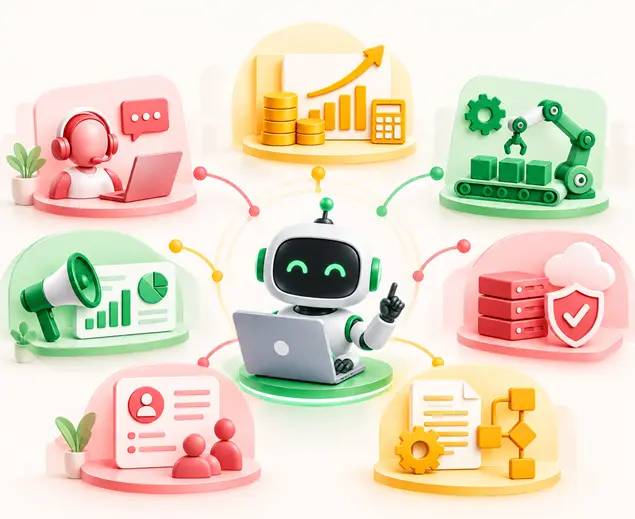
AI automation is not limited to one type of task. To identify transformation opportunities across operations, AI automation for business generally falls into four core functional capabilities. According to this classification, the team will be able to evaluate the suggestions of using AI for automation and implement an efficient workflow as follows:
All these categories embrace AI automation examples in practice.
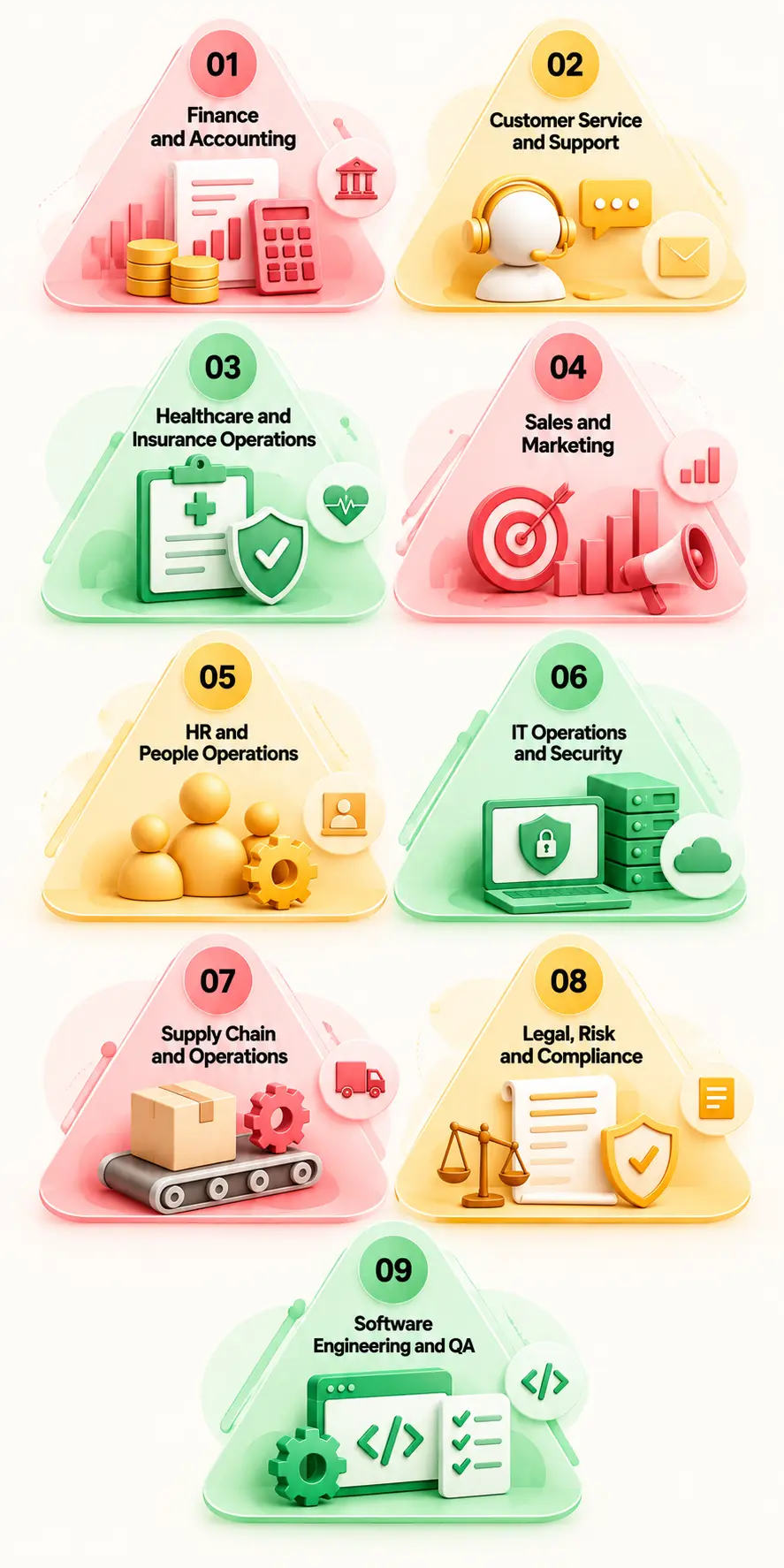
Across enterprise operations, AI automation for business is shifting teams from manual task handling to high-throughput, agent-assisted workflows.
The examples below use the same format so teams can quickly spot an AI automation use case in their own workflows. Where a measured result is available, it is included; otherwise, the KPI shows what to track.
Finance teams manually compare three documents. Manual matching of complex multi-page invoices against purchase orders and receipts in existing ERPs causes clearance bottlenecks and late payment fees.
AI models obtain line-item information from unstructured invoices, compare POs and goods receipt documents, and post automatically.
80% less manual reconciliation effort and 2X faster payment clearance per Entrans case study metrics, with automated flagging of quantity, price, and supplier mismatches.
First-pass match rate and invoice processing cycle time.
Finance specialists review flagged price or quantity discrepancies before final payment approval.
High-volume debt collection and follow-ups stretch banking operations, leading to delayed outreach and inconsistent customer communication.
An n8n workflow sends configured follow-ups. These automated workflows evaluate delinquency tiers, select optimal communication channels, and trigger personalized follow-up sequences.
100% automated delinquency follow-ups across banking clients with zero manual intervention post-configuration
Roll-rate reduction and collection recovery rate.
Credit officers step in for complex loan restructuring requests or high-value accounts.
Manually sampled expense reports open up the firm to overspending, multiple reporting, and even fraudulent activity.
AI flags unusual expenses and drafts variance commentary. Parses receipts, validates items against corporate spend rules, flags suspicious line items, and auto-approves compliant entries.
Achieves 100% expense coverage while lowering exception audit times.
Exception rate and average days to close month-end accounts.
Auditors conduct manual spot-checks on high-risk or flagged out-of-policy expense submissions.
Processing hundreds of thousands of customer emails manually results in slow resolution times(backlogs) and depressed CSAT scores.
AI classifies email intent, retrieves relevant context from knowledge bases, drafts context-aware replies, and routes complex requests.
An Entrans insurance workflow handling 200,000+ emails annually cut manual effort by 60%, brought common-query responses below two minutes, and raised CSAT by about 25%.
First Response Time (FRT) and CSAT score.
Support reps verify drafted responses for edge-case coverage or sensitive claims.
Backlogged customer support queues delay critical responses and overload tier-1 support agents with repetitive queries.
Analyzes inbound ticket content, resolves common issues autonomously using connected tool sets, and updates ticket status.
Otter.ai auto-solved over 1,000 support tickets in 3 months using Zapier and AI workflows.
Ticket deflection rate and Mean Time to Resolve (MTTR).
Escalates complex or low-confidence tickets to human agents with full context summaries.
Support agents lose substantial productive time taking notes and searching internal knowledge bases during and after calls.
Listens to customer interactions live, suggests accurate KB answers, and instantly generates structured call notes inside the CRM.
Significantly cuts Average Handle Time (AHT) while ensuring standardized CRM record logging.
After-call work time (ACW) duration and agent concurrency.
Agents review and approve AI-generated call summaries before saving them to the CRM.
Manual prior-authorization processing creates care delays, data errors, and heavy administrative overhead for medical operations.
Extracts clinical metrics from inbound fax/PDF requests, validates criteria against medical policy rules, and submits pre-checks.
Entrans delivered 3X faster processing, a 70% reduction in manual effort and errors, and achieved 95%+ extraction accuracy.
Turnaround time per prior authorization and claim denial rate.
Medical directors review flagged denials or ambiguous clinical files before final determinations.
Healthcare organizations struggle to securely digest unstructured clinical notes, lab reports, and intake forms into cloud EHR databases.
AI extracts information and sends it to the EHR. Then deploys HIPAA-compliant document AI inside the client's cloud infrastructure to parse, anonymize, and index incoming clinical documentation.
Entrans moved the clinical document AI implementation workflow into production with human review and audit trails.
Document extraction error rate and cloud processing latency.
Clinical staff perform systematic verification on lower-confidence data fields.
Manual FNOL entry delays claims processing, driving up operational costs and causing customer friction after loss incidents.
Reads submitted loss reports, images, and sensor logs, estimates immediate severity, detects potential fraud indicators, and assigns claims.
Decreases initial claim registration times from hours to minutes.
Claims cycle time and claims leakage percentage.
Insurance adjusters inspect flagged high-value claims or suspected fraud cases.
Sales representatives spend hours manually researching prospects and qualifying leads instead of closing deals.
An AI agent workflow gathers public web intelligence, enriches prospect profiles, scores sales readiness, and updates the CRM.
Real estate group Rush Home qualified and scored 11,000+ leads automatically using an AI agent built on Zapier.
Lead-to-opportunity conversion rate and response velocity.
Account Executives determine final outreach strategies for high-priority Tier-1 leads.
Meeting notes and contact updates are entered manually. Outdated CRM contact records and missing sales notes degrade pipeline visibility and accurate forecasting.
AI extracts actions and updates CRM records. Scans recorded sales meetings and post-call transcripts, extracts action items, identifies stakeholders, and updates CRM fields.
Ensures up-to-date CRM records while reclaiming hours of manual logging time for sales teams.
CRM data completeness score and rep productivity metrics.
Sales reps approve proposed deal stage movements and contact edits.
Teams repeatedly answer similar questions.
AI retrieves approved information and drafts responses.
Expands content output volume multi-fold without increasing baseline headcount.
Drafting time.
Brand managers and local linguists review all assets before publishing.
HR teams are overwhelmed answering repetitive internal policy questions and setting up accounts for new hires.
Conversational AI assists new employees through document submission, provisions system accounts, and provides instantly verified policy answers.
Minimizes onboarding administrative overhead while accelerating time-to-productivity for new hires.
Onboarding completion time and internal HR ticket volume.
People partners handle sensitive personnel requests and conduct structured onboarding check-ins.
Employees repeatedly ask HR the same questions
AI answers from approved policies
Minimizes onboarding administrative overhead while accelerating time-to-productivity for new hires.
Resolution rate.
Handles sensitive cases.
Recruiter bandwidth is consumed by manually skimming thousands of resumes for open positions.
Extracts skills, experience, and certifications from resumes to match candidate profiles against standardized job requirements.
Reduces initial screening time by over 70% while surfacing top candidate profiles instantly.
Time-to-interview and candidate-to-hire ratio.
Recruiter decisions govern every advancement; AI acts strictly as a ranking tool with explicit bias safeguards.
Common IT requests like password resets and routine application access permissions create support queues and disrupt operations.
Parses inbound requests, verifies user identity against directory roles, and triggers automated access provisioning scripts.
Remote.com auto-resolved 28% of internal IT tickets using AI workflows via Zapier.
Auto-resolution percentage and Mean Time to Respond (MTTR).
IT administrators review requests for elevated administrative access privileges.
Security Operations Center (SOC) analysts suffer from alert fatigue caused by thousands of low-priority security logs and false positives daily.
Aggregates, deduplicates, and enriches security telemetry with threat intelligence before prioritizing alerts based on organizational risk.
Eliminates false-positive noise, allowing analysts to focus on real security threats.
Mean Time to Detect (MTTD) and false positive reduction rate.
Cybersecurity analysts lead all investigation, containment, and threat remediation actions.
Supply chain disruptions, shipping delays, and inventory mismatches require time-consuming manual coordination with vendors.
Detects shipping anomalies in real time, drafts multi-party inquiry emails to logistics partners, and updates delivery schedules across systems.
Cuts resolution times for order exceptions while improving inventory visibility.
Order fill rate and exception resolution time.
Operations managers step in to negotiate freight re-routing or high-cost vendor claims.
Demand changes faster than manual forecasts.
AI analyzes historical and current signals.
Accurate forecasting.
Forecast accuracy.
Reviews major planning changes.
Unplanned equipment downtime leads to expensive production halts and missed delivery SLAs.
Analyzes IoT sensor telemetry (vibration, temperature) to detect failure patterns and auto-schedule preventive maintenance tasks.
Reduces unscheduled downtime while extending overall equipment lifespans.
Overall Equipment Effectiveness (OEE) and maintenance costs.
Maintenance technicians validate sensor anomalies before initiating physical equipment service.
Legal teams spend hundreds of hours manually reviewing commercial agreements to flag non-standard terms and liability risks.
Extracts key legal clauses, checks obligations against corporate playbooks, and highlights potential compliance deviations.
Speeds up contract negotiation cycles while maintaining legal risk standards.
Contract review turnaround time and compliance exception rate.
Corporate counsel reviews all flagged deviations and retains sole authority for final contract approval.
Policy changes are difficult to track across workflows.
AI identifies relevant changes and flags affected processes.
Accelerates customer onboarding from days to minutes while lowering compliance overhead.
Review completion time.
Interprets and approves changes.
Onboarding enterprise clients requires meticulous manual checks of identity papers, registry filings, and watchlists.
Extracts details from identity documents, verifies authenticity, and runs automated cross-checks against global compliance databases.
Accelerates customer onboarding from days to minutes while lowering compliance overhead.
Customer onboarding time and false positive identity match rate.
Compliance officers evaluate high-risk flag alerts before account approval.
Creating and maintaining manual test scripts for evolving web and mobile applications consumes extensive engineering time.
Reads feature specifications, automatically generates robust edge-case test scripts, and executes automated regression suites.
Expands test coverage across complex application paths without increasing manual testing burden.
QA test coverage percentage and bug leakage to production.
Quality Assurance leads validate generated test suites and confirm application release readiness.
Manual regression slows releases.
AI-assisted tests run through CI/CD and flag failures.
Entrans reports an 80% reduction in manual regression time in a higher-education platform case study.
Regression cycle time.
Investigates failed tests.
These examples of workflow patterns in AI automation give us a good place to start: Start by looking for repetitive tasks, measurable results, and human review points, instead of trying to automate the whole process at once.
Most of the current applications of AI workflow automation end with a tool template in which one application is connected to another and an action is taken. In enterprise workflows, however, AI reasoning, business rules, human input, system updates, and tracking are required. The three examples below show how an AI automation workflow can be wired from start to finish.
Trigger → AI step → Business-rule check → Human approval → System update → Logging
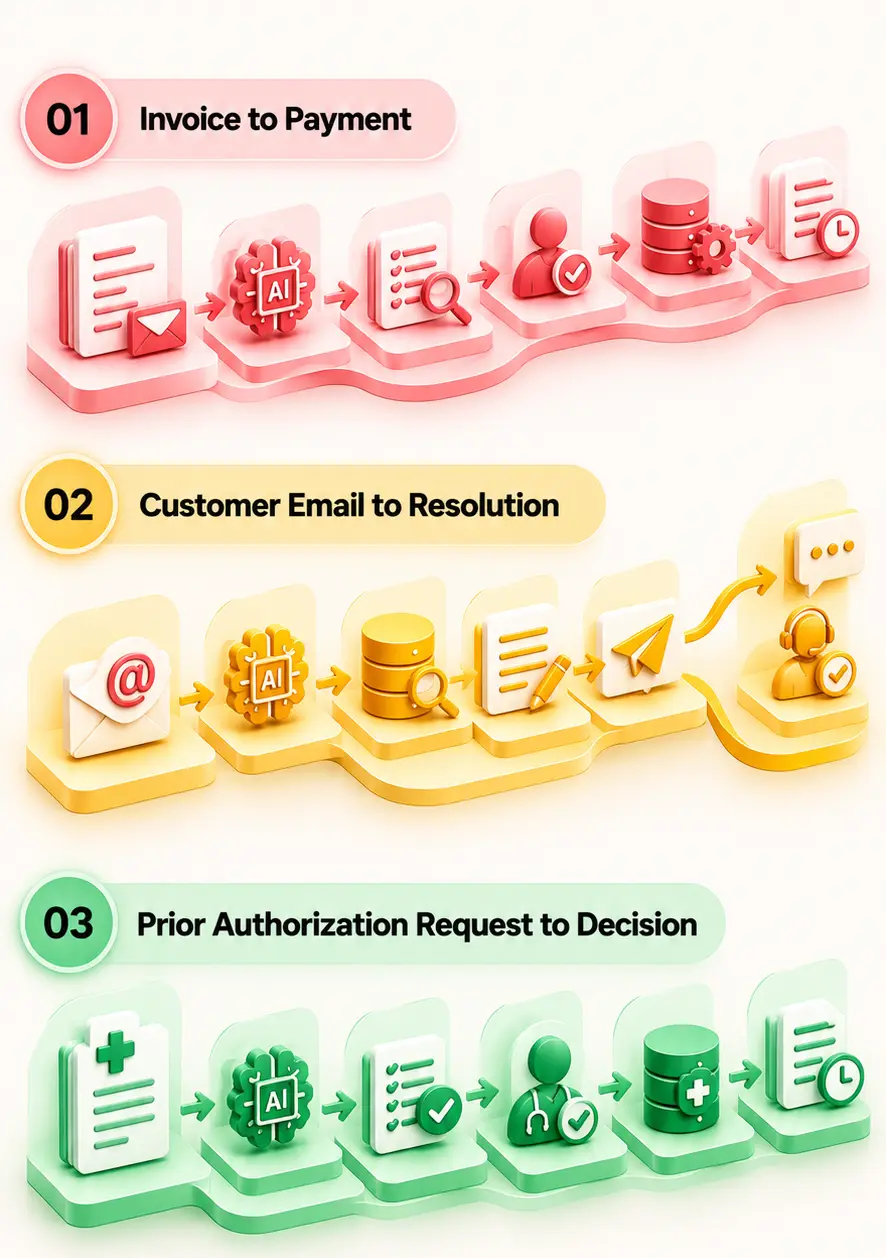
Not every AI project needs to start with a complex agent. Some of the best AI automation ideas for business involve repetitive work that teams already understand and measure.
Using a Value vs. Effort framework helps isolate quick wins from complex multi-departmental builds.
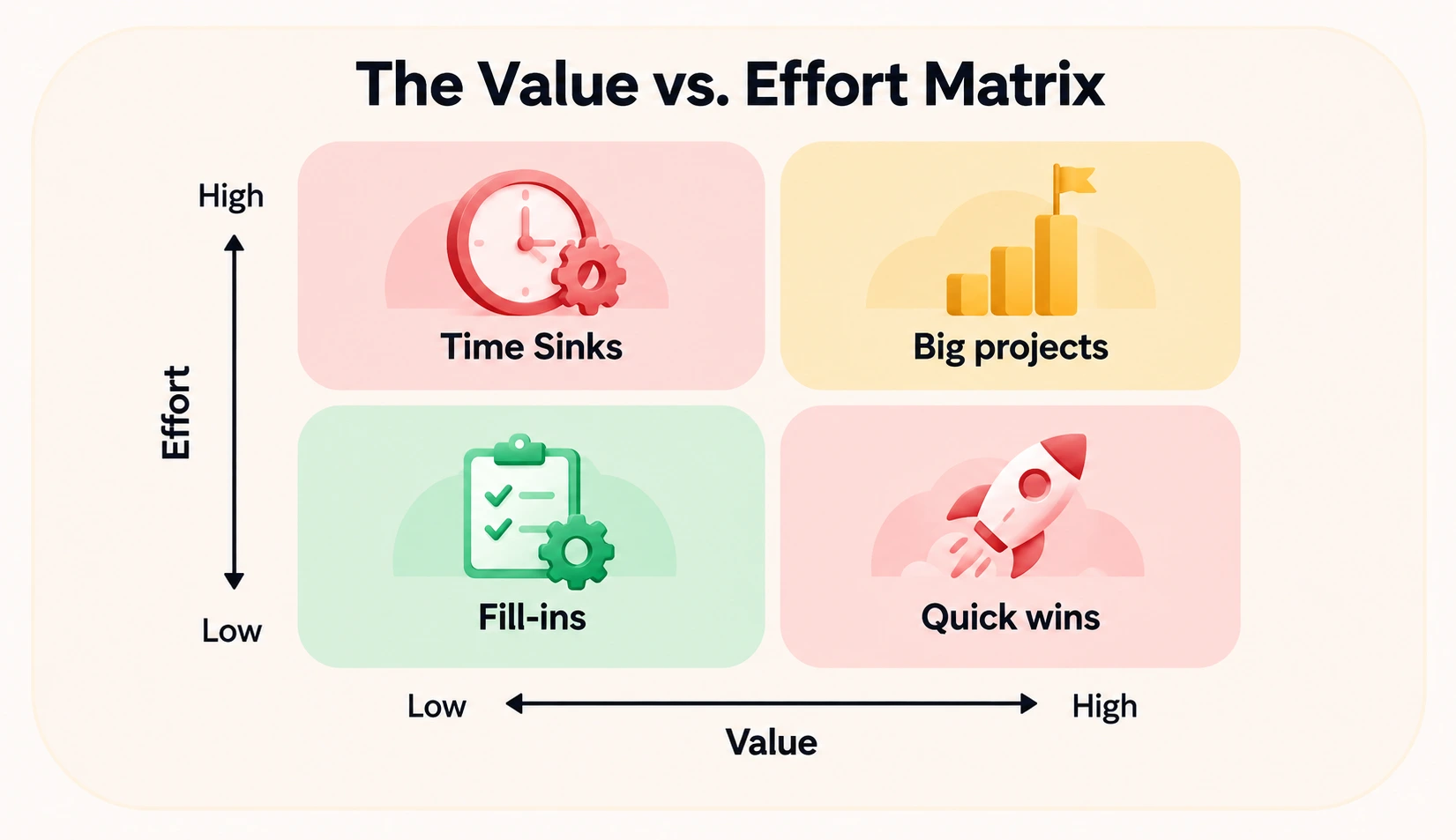
Evaluating potential AI automation ideas for business requires a structured evaluation method to filter out noise and target high-value deployments.
Score each candidate from 1–5 on volume and frequency, process clarity, data availability and quality, cost of an error, integration effort, and measurability. High-volume workflows with clear SOPs, usable data, manageable risk, and measurable outcomes are easier to assess. To rank candidate examples of automation in the workplace, score each process across six criteria:
According to research from MIT Sloan in 2026, the greatest benefits of AI will be achieved by altering the workflow process itself rather than automating single processes.
When selecting your initial use case, look beyond individual point solutions. Focus on end-to-end operational streams that connect extraction, classification, generation, and system updates into a unified process.
Designing scalable automation requires linking technical capabilities directly to business goals. Explore Entrans workflow-mapping methodology and our comprehensive guide to enterprise automation strategy to align technology investments with core business objectives.
Automated processes via AI may seem simple during a demonstration but much more difficult when implemented within an actual organization. It is not because of the AI; it might be due to a lack of clarity in the workflow, lack of documentation, or lack of controls.
Field experience from enterprise operations teams consistently confirms one reality: AI automation yields its most reliable, transformative wins when applied to unglamorous, highly structured back-office work.
Success relies on embedding intelligent models into clearly defined, SOP-driven processes with strict human-in-the-loop fallback rules.
To safeguard your initiatives, review why automation without purpose fails and explore strategies for building resilient legacy-to-AI workflows.
AI automation needs more than a working workflow. Deploying production-grade AI automation for business requires strict enterprise governance and outcome-driven ROI tracking.
Start by setting human-in-the-loop thresholds based on risk. Low-risk actions may run automatically, while financial, healthcare, access, or legal decisions can require human approval.
Input, output, decision, and approval audits should be kept. Access should be on a role-by-role basis, and sensitive data, such as PII and PHI, should be protected. Monitoring of model performance is necessary to detect any drift.
Choosing the right implementation approach depends on your workflow complexity, compliance requirements, and existing technical stack. For simple AI automation use cases, no-code tools may be enough. But complex workflows may need custom builds.
Finding the right partner to build or scale your enterprise AI workflows can make a big difference when an AI automation project moves from pilot to production. To help narrow down your options, check out our curated guide on the best AI automation companies use to evaluate top implementation partners for your technology stack.
Looking for AI automation examples is easy, but when turning it into a working enterprise workflow, there comes the real problem. Entrans partners with leadership teams to turn complex AI workflow automation examples into resilient, measurable operational systems.
Before moving an AI automation idea into production, an AI Readiness Assessment can help you understand whether your data, systems, workflows, and governance are ready. This gives leadership teams a clearer starting point before investing in a larger automation project.
Backed by a deep history in enterprise digital transformation, our team delivers predictable, high-impact outcomes for global organizations:
Ready to Move From an AI Idea to a Working Workflow? Start with one process, measure the baseline, and build from there. Book your strategic workflow mapping session with Entrans.

Common real-life examples include matching invoices to purchase orders, triaging and answering customer emails, processing prior authorization requests, scoring and enriching sales leads, resolving routine IT tickets, onboarding new employees, reviewing contracts, and summarizing meetings into the CRM. The best ones remove high-volume manual work and keep humans on exceptions.
AI Automation uses artificial intelligence to perform complex tasks with human input. It combines traditional automation with artificial intelligence, machine learning, and automation tools. intervention.
Traditional automation and RPA follow fixed rules on structured data and break when inputs change. AI automation can read unstructured content like emails and PDFs, handle variation, and make probabilistic decisions. The main difference of AI automation is that it learns, handles unstructured data, adapts, and improves over time without human intervention.
Start with repetitive, high-volume work such as email triage, invoice processing, document classification, or meeting summaries. Choose workflows with clear rules, good data, and measurable results.
An end-to-end example is Automated Accounts Payable Processing: an inbound PDF invoice arrives via email, an LLM extracts line-item fields, and business rules perform a 3-way match against purchase orders in your ERP.
Clean matches automatically post for payment, while price or quantity discrepancies route to a human specialist's queue for approval, keeping every step logged in an audit trail.
Start by mapping a repetitive workflow, identifying where AI can read, decide, generate, or act, and setting clear human review points. Then measure the results before expanding the workflow to other processes.
Popular options include Zapier, Make, n8n, UiPath, Automation Anywhere, and Microsoft Power Automate. The right tool depends on your workflow complexity, existing systems, security needs, and level of customization.
Processes requiring high empathetic nuance, critical strategic judgment, or non-negotiable legal accountability, such as final hiring/firing decisions, crisis PR responses, and high-value contract negotiations, should never be fully automated.

-1.svg)