Learn how to build AI agents and automate workflows with n8n in 2026. Covers architecture, LLM integration, memory, and 10 real-world enterprise use cases.

Agentic Unconference 2026 - September 19, Chennai
View Event →


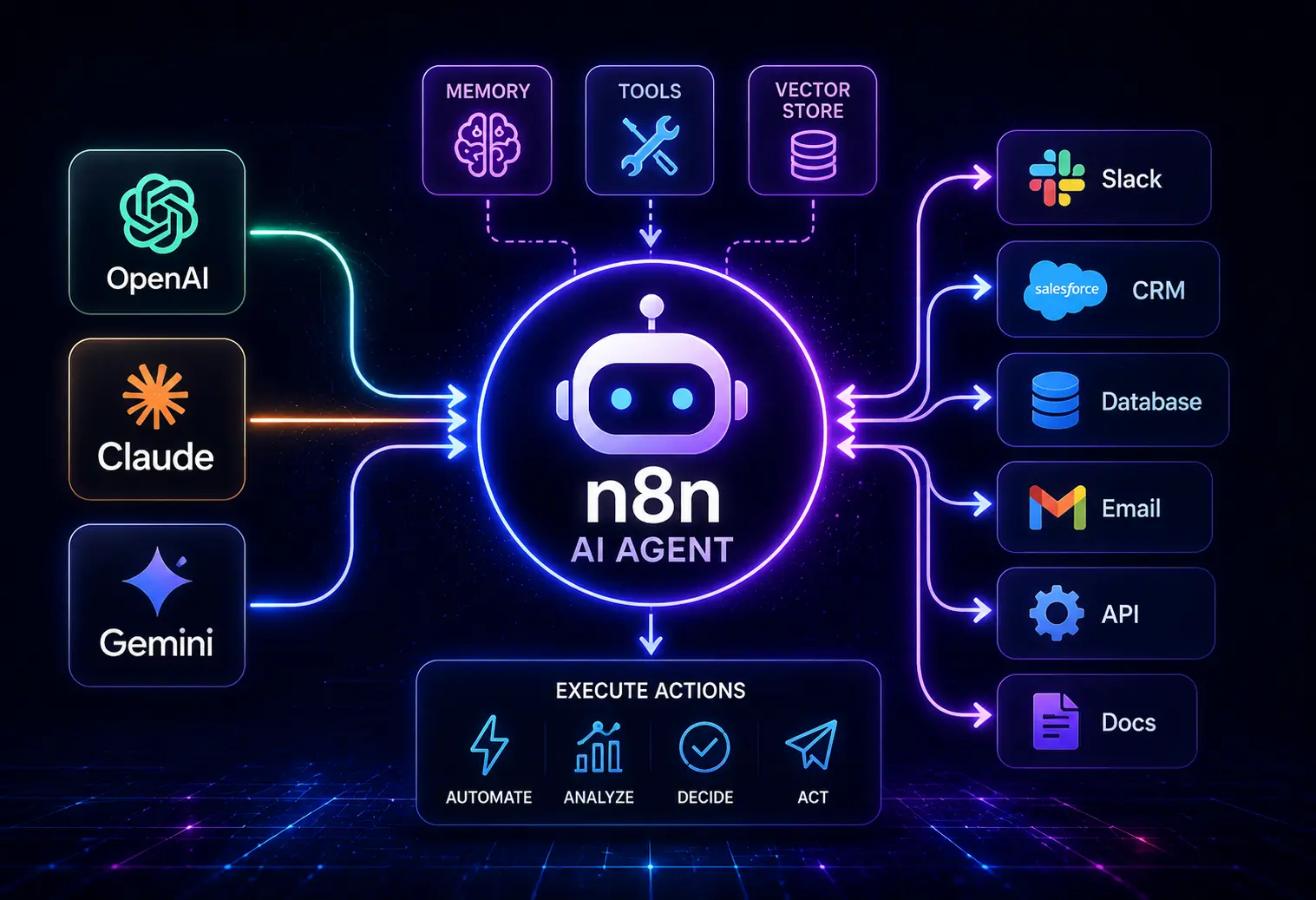


It's time to stop building fragile chatbots. Start deploying operational AI agents that execute business logic. n8n bridges the gap between autonomous AI and backend automation. Organizations can build AI automation with n8n to connect applications, analyze information, make decisions, and execute actions across systems.
In this post, we will see in detail how to build AI agents and automate workflows with n8n to improve efficiency, cost reduction, and accelerate business outcomes.
AI agents in n8n are intelligent and advanced workflow nodes that go beyond traditional automation. An AI agent can analyze information, perform actions using a Large Language Model (LLM), and make independent decisions. The key features of n8n are
They bridge the gap between AI and tech stack by mainly the core components, such as
Combining the automation capabilities and flexibility approach, the n8n has emerged as a popular platform for AI agent development. n8n helps the user to use the workflow builder to design, test, and deploy AI-powered processes much faster. Below are reasons why n8n is an ideal platform for developing and deploying AI agents.
Moving on from a simple, prompt-and-response text generation to true autonomous systems makes us think about the underlying architecture on a different level.
n8n features an advanced, hierarchical node system that is built natively on top of the LangChain framework. Its modular architecture visually separates the main agent logic from sub-nodes like language models, memory management, and tool execution. This design splits the system into distinct, manageable parts: the Brain (Reasoning), the senses (Inputs/Memory), and the Hands (Tools/Actions).
A typical n8n AI agent architecture consists of several interconnected layers.
Using n8n, businesses can build AI agents using a visual workflow builder, reducing the need for executive custom development. Needed tools for automating customer support, lead qualification, document processing, or internal operations are provided by n8n. Complex integration bottlenecks can be helped by choosing to hire dedicated n8n developer resources to oversee custom JavaScript node injections.
Before building an AI agent, ensure you have an
First, create an n8n workspace with an instance and a workflow. You can get an n8n instance from the n8n Cloud, self-host it, use Docker, or Kubernetes. Most businesses prefer self-hosting as it lets them control security, compliance, and privacy.
Then, head to the credentials section and connect systems such as CRMs, databases, Slack, email services, and internal APIs.
This credential management ensures secure communication between your workflow and connected systems. So, once the environment is ready, create a new workflow and add a trigger node. This trigger serves as the entry point for your AI agent.
The Reasoning engine (Brain) is supported by a Large Language Model.
Some use cases for OpenAI Integration are content generation, customer support, data extraction, and classification.
To create an intelligent agent, first, we need to plug in a “brain”. n8n interfaces directly with all major foundation model providers.
Anthropic models are used for long-context processing, knowledge retrieval, complex reasoning tasks, and enterprise AI applications. Internal recruiting processes can be improved by vetting specific n8n developer skills roles, and hiring criteria to match your team’s exact tech stack.
Gemini can be used for text processing, multimodal applications, data analysis, and workflow automation.
The right model can be considered based on response quality, context window size, latency requirements, cost, and security needs.
Now the AI agent does reasoning( brain), you need to define its intake system, its identity, and the tools it can use.
The Intake
On clicking the input connector on the left side of your AI Agent node, add the On Chat Message trigger. This native node automatically sets up a web-based chat interface inside n8n, allowing you to converse with your creation directly. Now, click back into your AI agent node and change the prompt type. This is where you outline its behaviour boundaries.
A basic AI agent workflow may look like:
Input → Analyze → Decide → Act
Add nodes that handle data collection, AI processing, conditional logic, external tool usage, and action execution.
This is one of the important features of the advanced AI agents: they can maintain context. If memory is not there, the agent will think it is a new interaction. With memory, the agent can remember previous conversations, track workflow history, maintain session context, and reference past actions.
So, how the context is stored in n8n is by databases, vector databases, external memory services, internal workflow variables, and CRM records.
Before sending a prompt to the AI model, retrieve relevant context and include it in the request. This step will help to generate more accurate answers, personalize responses, and make better decisions.
For any product to be launched, testing is very important. So before deploying an AI agent to production, testing is essential. Validate the functionality, API connections, AI responses, database interactions, and how errors are handled. Simulate real-world scenarios and verify that the agent behaves as expected.
When deciding to build production-ready AI agents, developers usually face a choice: deploy a visual workflow automation platform like n8n or choose between traditional frameworks like LangChain, CrewAI, Autogen, or raw Python. Future-proofing your systems can be helped by analyzing n8n workflow automation trends to anticipate upcoming shifts in generative AI model node integrations.
n8n AI agent uses a hybrid approach of wrapping open-source Langchain primitives inside a visual, node-based flowchart interface.
This approach involves building agents directly in code, using raw API calls or frameworks like LangChain, CrewAI, and Microsoft AutoGen.
n8n workflows make AI agent development more accessible by providing a visual workflow builder, extensive integrations, and support for leading AI models. Security, scalability, compliance, and operational reliability are critical factors that determine whether an Agent can successfully move from a pilot project.
Security is one of the critical factors to be noted when deploying AI agents in enterprise environments. Unlike closed-source, cloud-only automation platforms, n8n offers a robust self-hosted deployment model. Organizations should clearly define what data an AI agent can access and process, and it should follow best practices.
Instead of saving API keys directly within the database, n8n Enterprise integrates with credential managers such as HashiCorp Vault or AWS Secret Manager to keep production keys rotating and secure.
An enterprise AI agent is useless if a sudden spike in traffic crashes the system. Building for scalability and resilience from the beginning helps avoid performance bottlenecks as adoption grows. As AI agent usage increases, workflows need to scale up to handle thousands of requests daily, large document volumes, multiple concurrent users, and complex multi-step processes.
AI agents operate in dynamic environments where failures can occur. Some common issues include API outages, timeout errors, missing data, authentication failures, and model response errors.
Businesses need to ensure that AI agents operate within applicable legal, regulatory, and industry standards. n8n supports GDPR compliance by data minimization, purpose limitation, user content management, data retention policies, right-to-access requests, and right-to-deletion requests.
The same is the case even in healthcare organizations deploying AI agents. They must ensure compliance with HIPAA requirements. Requirements include protection of patient information, secure data transmission, access controls, audit logging, and data encryption.
SOC2 focuses on security, availability, and processing integrity, confidentiality, and privacy.
AI agent deployments should support security monitoring, access management, incident response procedures, and audit trails.
At Entrans, we bridge the gap between volatile AI capabilities and predictable business operations. We help enterprises design, develop, and deploy AI-powered workflows using n8n and leading AI models.
Starting from customer support automation and intelligent document processing to sales operations, staff augmentation, and internal knowledge assistant, we bring in tailored solutions for your business. Our skilled n8n developers handle architectural blueprinting, modular build, cluster design, system integration, AI model implementation, testing, deployment, and optimization.
Learn more about how we unlock the full potential of AI-driven workflows. Book a consultation call with us.

Yes. n8n supports multi-agent collaboration by allowing the connection of multiple AI Agent nodes or using sub-workflows. n8n can share information, perform separate tasks, and coordinate actions within a single workflow.
Yes. n8n can connect to self-hosted or private AI models. This allows you to process sensitive data entirely with the help of your own infrastructure.
n8n supports a wide range of models, including OpenAI (GPT), Anthropic (Claude), Gemini, and AWS Bedrock. Many open-source models are also supported through APIs and self-hosted deployments.
n8n AI agents can automate customer support, lead qualification, email management, document processing, meeting summaries, CRM updates, and internal knowledge management retrieval.
n8n AI agents’ memory retains conversation history, user context, and workflow state, helping them deliver more relevant and consistent responses over time.

-1.svg)