> Blog >
AI Agents for ERP Invoice Processing Automation Guide
AI agents for ERP invoice processing automate data extraction, invoice matching, and approvals across SAP, Dynamics 365, and NetSuite.

AI Agents for ERP Invoice Processing Automation Guide

4 mins
October 23, 2026
Author
Arunachalam
Talk To Our Experts
TL;DR
  • AI agents for ERP invoice processing are not just OCR and RPA - they provide context about invoices, suggest what action to take, and manage exceptions instead of just extracting text.
  • SAP S/4HANA requires OData and Deep Create. The invoice data should be checked well before submission because of the wrong tax code, which may make the process fail.
  • Different paths of automation are followed by Microsoft Dynamics 365 and Oracle NetSuite. The first one uses OData and business events, whereas the second uses its Payables Agent and SuiteTalk APIs
  • Do not keep your financial controls outside the ERP, but have the AI agents extract data, match invoices, suggest coding, and draft documents while keeping ERP rules and staff approval in charge.
  • The month-end experience for an accounts payable team is almost universal.

    Invoices in shared inboxes while teams wait on missing receipts.

    There’s also somebody retyping line items from a PDF to make sure the costs are formatted just right.

    But luckily, AI agents for invoice processing work differently, because they read the context of a document before they decide what to do with it. 

    Which is why this guide will walk you through using AI invoice processing automation for SAP S/4HANA, Microsoft Dynamics 365 Finance, and Oracle NetSuite. 

    Table of Contents ▾

      What Are AI Agents for Invoice Processing?

      An AI agent for processing invoices is one that understands the task, determines the appropriate course of action, and executes this action through software utilities. 

      As far as using AI in accounts payable goes, an AI agent would open up an invoice, analyze its contents, and determine what to do next.

      In doing so, the agent asks the ERP to do the part it's allowed to do.

      In the grand scheme, agentic AI for finance automation adds three abilities:

      • Reading context, like the difference between a billing address and a shipping address on a messy email.
      • Choosing an action, whether that's a PO match, a GL code suggestion, or a flag for review.
      • Running the allowed task, from setting up a draft to routing an approval through a supported connection.

      Why are AI Agents Better Than RPA or OCR for Invoice Processing?

      AI agents for ERP invoice processing automate the full process based on their understanding of the outcome. How is this different from OCR?

      Well, OCR is a different animal - all it does is turn pixels into text. Not to mention, OCR can't tell a tax amount from a PO number.

      And in the case of RPA bots, such as those built on UiPath, they follow fixed if-then scripts and stop the moment a layout or a screen changes.

      How AI Agents Automate ERP Invoice Processing

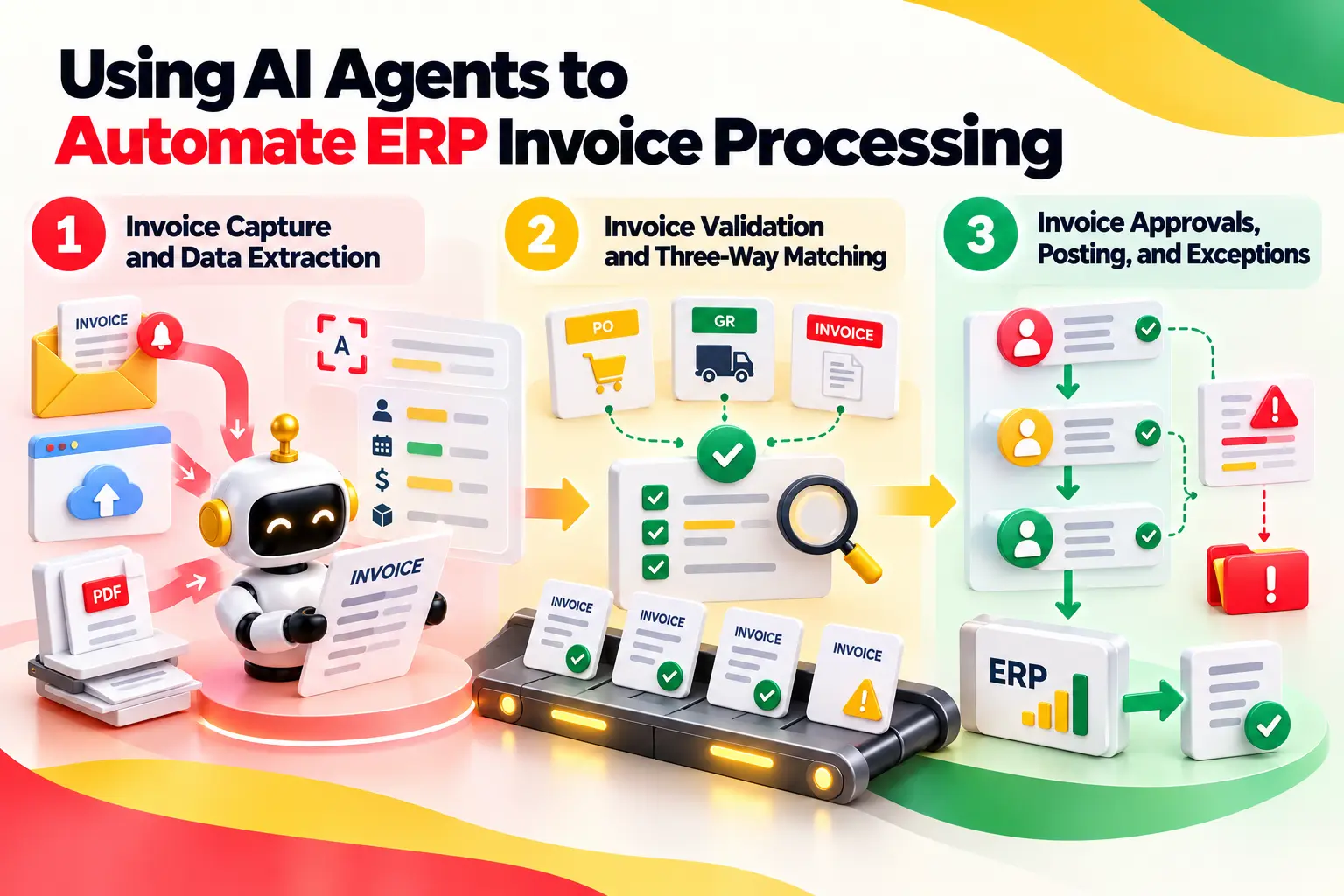
      The invoice processing workflow runs from document receipt to ledger entry. This means even early on, the AI agent does most of the work.

      Meaning, as money gets closer to being transacted, the ERP takes over. Here's how each stage plays out.
      How AI Agents Automate ERP Invoice Processing

      1. Invoice Capture and Data Extraction

      Capture begins as soon as a new document arrives in a mailbox or portal.

      The agent uploads and processes it, and then the extractor engine, like SAP Document AI, Azure AI Document Intelligence, or ABBYY, scans the document. 

      Broad LLM extraction does a good job, although not perfect. In a Microsoft Learn discussion, it was stated that Content Understanding cannot break down an address yet, while ERPs need these details. 

      In general, almost all organizations require the same field set:

      • Invoice number, date, currency, and amounts.
      • Supplier name and tax ID linked to a supplier record.
      • Items with quantity and price per item.
      • During this process, the agent also gets the amounts of tax and payment terms.

      2. Invoice Validation and Three-Way Matching

      In a three-way match, the vendor invoice must match both the purchase order and the receiving document line by line according to the tolerances defined in the ERP.

      • The agent can detect duplicate invoice numbers, absence of receipts, and inconsistencies in total amounts. The agent can propose a way to divide a PO line if the goods are received partially.
      • This means that the ERP system retains the overall calculation. Infor CloudSuite is good at displaying the split since the POCostMessageService agent generates a message when the invoice unit cost is not equal to the PO unit cost.
      • After this, the invoice will be shown in the InvoicesOutOfBalance widget for manual check.

      3. Invoice Approvals, Posting, and Exceptions

      This is where the control starts, and the task is created for this purpose.

      • Coding: As a rule, the agent provides recommendations on accounting and cost center accounts and justifies the decision.
      • Routing: Route invoices to appropriate approvals based on the amount, cost center or supplier.
      • Posting: Create a non-posted draft. Have it approved manually or by the workflow within ERP to the accounting journal.
      • Exceptions: And in this way, the agent will route exceptions to invoices into the exception queue or ServiceNow ticket with an exception included.

      Invoices that will satisfy all the requirements will be routed automatically - this is known as straight-through processing of invoices.

      Processing stage Input data Agent action ERP output Human review
      Capture and ingestion Emails, PDFs, portal files Monitors the mailbox and reads varied layouts Staged invoice document Unsupported or oversized files
      Data extraction Headers, lines, tax, payment terms Extracts fields and identifies the supplier Structured invoice data Low-confidence or unusual fields
      Validation and matching Invoice, PO, goods receipt Compares lines, checks tolerances, flags duplicates Match result or hold Out-of-tolerance cost, missing receipt
      Approval routing Amount, cost center, supplier Routes to the approver and suggests GL coding Approval request Approver confirms coding and amount
      Posting and reconciliation Approved invoice draft Prepares an unposted draft and matches totals Posted supplier invoice and GL entry Person or ERP workflow finalizes posting
      Exception resolution Failed or held invoices Explains the cause and escalates Exception queue entry Owner resolves and closes

      How to Implement AI Agents for Invoice Processing

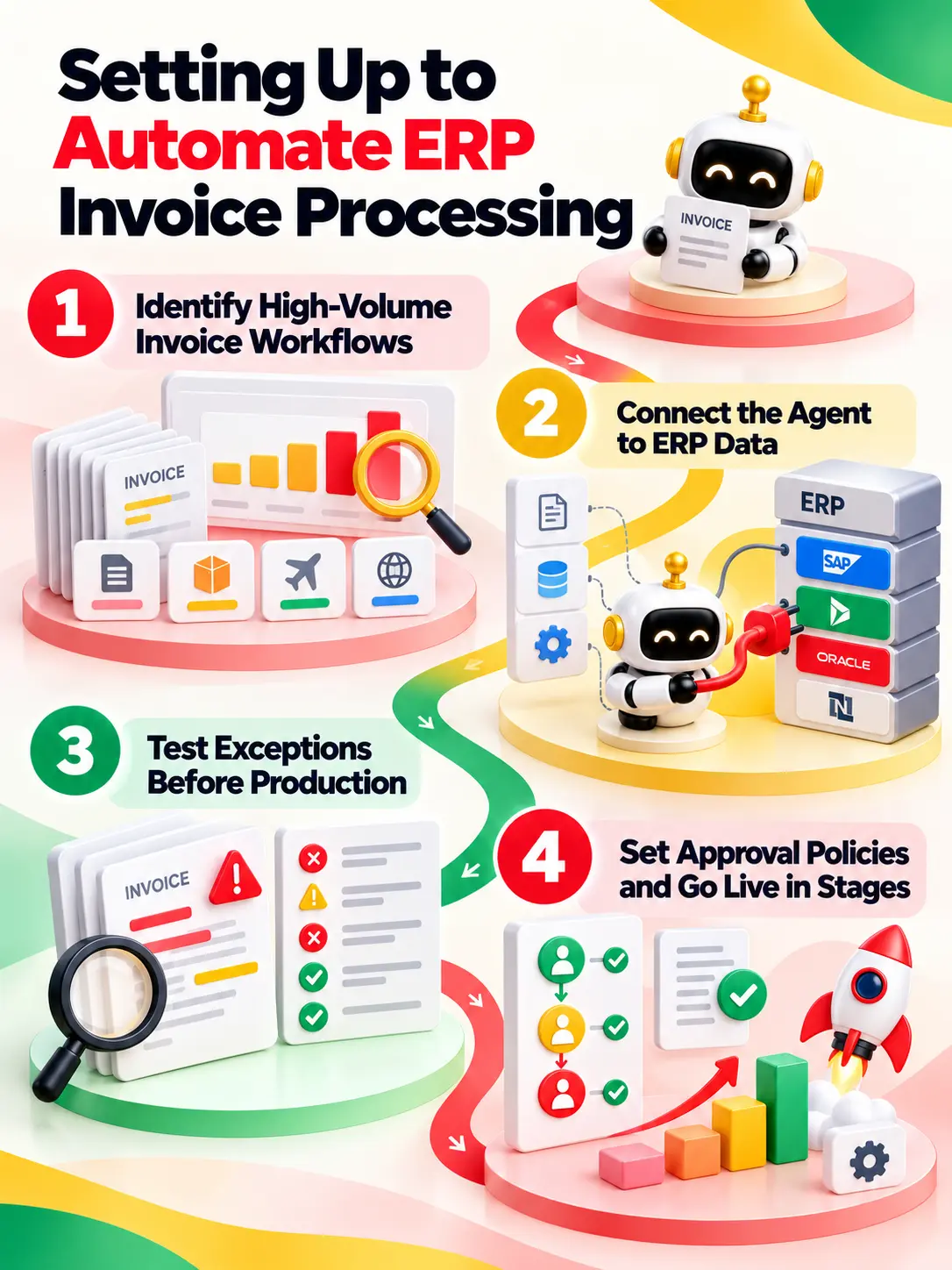
      Just like with any agentic AI process automation, a phased approach helps mitigate risks since one starts small, shows how accurate the process is.

      Then, after you do this, gradually expand the scope after confirming the results.

      The following phases apply to SAP S/4HANA, Microsoft Dynamics 365 Finance, and Oracle NetSuite without any problems. 
      Phased implementation of AI agents for invoice processing

      1. Identify High-Volume Invoice Workflows

      ​​On a larger scale, not all invoices should be prioritized at the start. Classify invoice types based on volume, complexity, exception rate, and match difficulty. 

      To begin with, count invoice types, number of suppliers, and number of POs, along with average time spent on an invoice and reasons for exceptions.

      PO-based invoices are a good choice to start the automation process as the data and matching criteria are very clear. Non-PO, multi-currency, and freight invoices can be postponed for now.

      2. Connect the Agent to ERP Data

      Map all fields that are read from and written to by the agent. Map extraction using Azure AI Document Intelligence and workflow control using UiPath if your stack supports that. There are four jobs in this step:

      • Using this, map supplier fields, purchase order fields, receipt fields, tax fields, and GL fields.
      • Choose supported connections, such as SAP OData, Dynamics 365 OData and business events, or NetSuite SuiteTalk, and avoid writing to the database.
      • Limit the agent to only reading supplier and purchase order fields, and also creating drafts.
      • Include any custom fields needed by your ERP, because custom development can create new requirements.

      3. Test Exceptions Before Production

      Tests done on invoices that are clean and error-free show almost nothing in the big picture, so let's intentionally make the process fail. Send invoices that have duplicates, missing entries, pricing discrepancies, wrong tax information, and failed API calls to be processed.

      In doing this, make sure that each failure is properly assigned to an owner. Verify platform restrictions as well, since Business Central has limitations on file size, number of pages, and daily volume of invoices.

      Our recommendation is to start with the shadow mode of the agent first. The agent will create codes and matches while your team continues to work normally, and you can then compare results with your staff submissions.
      Open Popup

      4. Set Approval Policies and Go Live in Stages

      Approval criteria should be defined in advance because creating issues due to hasty policies or rules is definitely not good.

      • In this connection, establish restrictions in terms of quantity, risk of supplier, and type of invoice.
      • Make the release in phases, beginning with the least risky suppliers.
      • Consider exceptions once a week and increase the number of restrictions depending on patterns discovered.
      • Remember also to have a possibility to turn the agent off and do everything manually on the very next day.
      • All in all, AP specialists should also be trained to understand the logic of the agent and override its decisions.

      AI Invoice Processing Across ERP Platforms

      ERPs aren't built the same way. Meaning, each has its own terms, tools, and limits, so an agent design that works in one won't carry over untouched. Here's how the main platforms line up.

      I. SAP S/4HANA Invoice Processing Automation

      Supplier invoices are processed through invoice verification within SAP S/4HANA by matching the document against purchase orders and goods receipts, creating accounting documents.

      • From a bigger perspective, external agents usually connect through SAP Business Technology Platform, while SAP Document AI extracts the information.
      • The API to keep in mind is API_SUPPLIERINVOICE_PROCESS_SRV, which is an OData service for creating supplier invoices.
      • This service allows only Deep Create requests, which means that the agent should provide the header together with all lines in a single payload.
      • In SAP S/4HANA, one incorrect tax code will destroy the entire request, and in general, it is better to create the entire payload in middleware.

      II. Microsoft Dynamics 365 Invoice Processing Automation

      Since Dynamics 365 Finance and Business Central have their own approaches, please consider them as two distinct designs.

      In this case, the automation cost is calculated differently because Business Central charges Copilot Credits for agent operations, which amounts to 50 credits per invoice and 5 per invoice line.

      • Dynamics 365 Finance Design: Based on Data Management, OData endpoints, business events, and Power Automate, with Azure AI Document Intelligence responsible for document capture. There is no fixed number of calls per day for OData endpoints.
      • Business Central Design: In terms of the overall architecture, Business Central provides a native Payables Agent that checks the specified mailbox, extracts data using Azure AI Document Intelligence, and generates unposted purchase drafts.
      • Limits: This agent can process up to 100 emails and 500 invoices per day. PDFs more than 10 pages or 5 MB in size will not be processed.
      • Vendor Control: All the vendors generated by the agent are initially blocked until they are manually approved.

      III. Oracle NetSuite Invoice Processing Automation

      NetSuite defines a supplier invoice as a vendor bill. In this tool, automation takes place using SuiteTalk REST and SOAP APIs as well as SuiteScript (Companies can also use third-party software like UiPath).

      In general, the right approach is to create vendor bills using the information extracted, ideally based on an authorized purchase order.

      Purchase orders, item receipts, and vendor bills comprise the matching process. Bill approvals must occur within NetSuite, so the audit trail remains centralized.

      IV. Oracle Fusion Cloud ERP Invoice Processing Automation

      The Payables application of Oracle uses Intelligent Document Recognition (IDR) for the process of invoice ingestion.

      According to Oracle, the system learns from user corrections, meaning that it uses the corrections to improve its extraction capabilities for this specific supplier over time.

      Incomplete invoices will appear in the Scanned Infotile, and their incompleteness will lock out posting. The holds require a manual review and approval by the manager.

      V. Workday, Infor, and Sage Invoice Processing Automation

      Overall, these are three tools that distinguish themselves mainly in how the agents access them

      Workday Financial Management

      Agents will be accessing them via the Custom Object REST APIs such as the supplierInvoices API, within the security domains and integration system user limits.

      In other words, we have identified no existing AI agents for payables within Workday.

      Infor CloudSuite

      The Infor Document Management is compatible with the ION Grid, and the invoices pass through the PayablesInvoice business class. 

      In the process, exceptions are raised using Mingle widgets, which is good for queues of humans.

      Sage Intacct

      Sage comes with its own AP automation under the name Sage Intacct with Artificial Intelligence and pre-built API connectors.

      With these, Sage states its reduced close time by 79% on average and return on investment by 250%.

      ERP platform Invoice terminology Native features Agent integration Approval controls
      SAP S/4HANA Supplier invoice Invoice verification, PO matching SAP Document AI, OData with Deep Create Goods receipt checks, role-based access limits direct posting
      Dynamics 365 Finance Vendor invoice Matching, exception holds Azure AI Document Intelligence, Power Automate, OData Batch design needed for high volumes
      Dynamics 365 Business Central Purchase invoice Unposted drafts, vendor card blocking Native Payables Agent 500 invoices per day, 5 MB per file, drafts only
      Oracle NetSuite Vendor bill Vendor bills, item receipts, PO matching SuiteTalk REST and SOAP, SuiteScript Not verified in the sources reviewed
      Oracle Fusion Cloud ERP Payables invoice Import, validation, Scanned and Holds Infotiles Intelligent Document Recognition, REST and SOAP Incomplete status blocks posting, holds need approval
      Workday Financial Management Supplier invoice Supplier accounts, ledger coding Custom Object REST APIs Security domains, integration system user limits
      Infor CloudSuite Payables invoice Invoice matching, PO cost messages IDM, ION Grid, ION API Exception queues use Mingle widgets
      Sage Intacct AP bill AP ledger, multi-entity support Prebuilt API connectors User-defined reconciliation workflows

      How AI Agents Integrate With ERP Systems

      Ultimately, integration determines whether the agent will be productive or hazardous. In this regard, the agent requires information it can understand and actions that are safe to perform.

      Both have to be provided using connections that exist in the ERP. Direct database writing is not an option here.

      1. ERP APIs, Connectors, and Workflow Orchestration

      Connect the AI invoice processing agent with invoice receipt, matching failure, or approval instead of polling the mailbox on a daily basis.

      This is the pattern of Dynamics 365 Finance business events and Power Automate flows, where the logging of each and every step becomes very simple.

      Similar to any ERP or S/4Hana migration process, if you are working with AI agents, then the field mapping has to be accurate. The Indian GST e-invoice portal requires INV-01 JSON schema and provides an IRN along with a QR code.

      The agent can build that payload for you, but the submission will have to be done by ERP or middleware.

      An agent works through a short loop with the ERP:

      • With this, the agent pulls supplier masters, purchase orders, and goods receipts.
      • Check invoice fields against those records before anything gets written.
      • Start the approval workflow, or open a ServiceNow ticket when an exception shows up.
      • Create drafts or bills through supported APIs.

      2. Permissions, Audit Trails, and Human Approvals

      On the whole, give the agent the access a careful new hire would get, and nothing extra. Four controls do most of the work.

      Set approval thresholds inside the ERP rather than in the agent prompt. A prompt can be misread, but a system rule can't - but even here AI agent guardrails prevent any major issues from arising. 

      • Role-based permissions: The agent gets its own service account with only the reads and writes it needs.
      • Segregation of duties: The agent drafts, a person approves, and payment approval stays with finance staff.
      • Thresholds: Meaning, high-value invoices, new suppliers, and bank detail changes go to a human.
      • Audit logs: Every read, write, and decision gets recorded with its reason.

      AI Agents vs. Traditional Invoice Automation

      AI agents don't replace every older tool. They sit on top of them. Extraction engines still read documents, and the ERP still checks and posts. 

      In the grand scheme, what the agent adds is judgment in the gaps, such as what to do when an invoice doesn't fit a rule.

      Technology Primary function Decision-making Exception handling ERP actions
      OCR Converts images to text None Fails and needs manual entry None without middleware
      Intelligent document processing (SAP Document AI, Azure AI Document Intelligence, ABBYY) Extracts structured fields with trained models Field-level confidence only Routes low-confidence fields to review None, passes data downstream
      RPA (UiPath, Automation Anywhere) Repeats scripted steps Fixed if-then rules Halts and alerts an exception queue Hard-coded posting, breaks when screens or endpoints change
      Rule-based workflows Routes invoices by set conditions Threshold and condition rules Sends to a fixed queue Approval routing inside the ERP
      AI agents Reads context, picks actions, calls tools Reasoning within set limits Explains the issue and escalates Prepares drafts, checks tolerances through the ERP

      How to Measure Invoice Automation Performance

      Measure the current process for at least one full close cycle before go-live, then track the same numbers after launch.

      With this, add processing time from receipt to posting, since faster cycles help you catch early payment discounts and dodge late fees.

      Benchmarks give you something to compare against.

      The APQC benchmark, as cited by industry sources, puts median manual cost at about $6.00 per invoice and best-in-class automated cost at about $0.60.

      Treat those as reference points.

      KPIs for AI-Powered ERP Invoice Processing

      KPI Definition Measurement method Baseline Target
      Cost per invoice Total AP cost per invoice processed (Software and labor cost) / invoices processed Your current cost. APQC median cited at $6.00 Move toward the $0.60 benchmark
      Straight-through processing rate Invoices posted with no human touch (Auto-posted invoices / invoices received) x 100 Pre-launch rate by PO and non-PO mix Set per invoice type
      Extraction accuracy Fields parsed with no correction (Correct fields / required fields) x 100 Pre-launch sample audit Above 80% after retraining in one reported case
      Exception rate Invoices that fail a check Exceptions / invoices received Pre-launch exception log Falling trend by cause
      Exception resolution time Time to clear a held invoice Hold removed time minus hold created time Pre-launch average Shorter with agent explanations

      Straight-Through Processing Rate

      This rate shows how many invoices reach the ledger with no human touch. The hard part is deciding what counts as a touch. 

      Any edit, coding change, or exception fix counts. Meaning, required approvals are policy, so report the rate with and without them, and split PO from non-PO invoices because the mix moves the result.

      Invoice Accuracy and Exception Rates

      Accuracy needs more than one number, so track each failure type on its own:

      • Extraction errors: wrong fields divided by total required fields.
      • Matching discrepancies: invoices that fail the PO or receipt match, grouped by cause.
      • Duplicates and bad postings: In doing so, the team tracks duplicates caught, plus posted invoices later reversed or corrected.
      • Resolution outcomes: how long each exception stays open and how it closes.

      Common Challenges and Financial Controls

      AI invoice processing fails in predictable places. The usual causes are messy inputs, old integrations, heavy ERP custom work, weak security, and agents that act on wrong conclusions. In the grand scheme, controls reduce those risks, though none remove them.

      1. Poor Data Quality and Supplier Variations

      Agents are only as good as the records they match against. A missing supplier record is the classic case. In Business Central, a new vendor is blocked until a person approves it, which protects the ledger. But by doing this, the block also adds a queue.

      Formats cause trouble as well. Prebuilt models can miss local ones, and Swedish Bankgiro numbers are one reported example.

      With this, clean up supplier masters and open POs before go-live, and use custom models in Azure AI Document Intelligence where prebuilt ones miss local formats.

      2. Financial Controls and Incorrect ERP Actions

      An agent can be wrong and still sound sure, so plan for that. Four safeguards cover most of the risk:

      • Payments: Agents should never approve a payment, and that step stays with finance staff.
      • Postings: In the grand scheme, ERP checks, tolerances, and draft approval catch bad data before the general ledger.
      • Duplicates: Run ERP duplicate checks on supplier, invoice number, amount, and date.
      • Open exceptions: Give each exception an owner and a due date, track them in a ServiceNow ticket or ERP queue, and report aging each week.

      Setting Up ERP Invoice Processing Automation With AI Experts at Entrans

      On the whole, specialists who know ERP APIs, extraction engines, and control design can shorten the path to production.

      Which is exactly why Entrans is an ideal partner for automating your ERP invoice processing - besides having built AI platforms that solve GRN and PO reconciliation all automatically.‍

      With both Fortune100 and startup clients, the Entrans team builds AI and data solutions for enterprise systems, and that work covers ERP integrations.

      Want to learn more about this?

      Why not book a free 30-minute consultation call?

      Share :
      Link copied to clipboard !!
      Automate ERP Invoice Processing With AI Agents
      Connect AI-powered invoice workflows with your ERP to reduce manual work, improve matching, and manage exceptions securely.
      20+ Years of Industry Experience
      500+ Successful Projects
      50+ Global Clients including Fortune 500s
      100% On-Time Delivery
      Thank you! Your submission has been received!
      Oops! Something went wrong while submitting the form.

      Frequently Asked Questions

      1. Can AI Agents Process Invoices Across Different ERP Platforms?

      On the whole, yes, though only with some limits in place. Agents built on middleware such as Azure AI Document Intelligence or UiPath can serve several ERPs, but the ERP side changes each time. SAP S/4HANA needs Deep Create payloads, Dynamics 365 Finance uses OData and business events, and NetSuite uses its SuiteTalk APIs. Native agents, such as the Business Central Payables Agent, work only inside their own platform.

      2. What Is the Difference Between AI Agents and AP Automation Software?

      In the grand scheme, AP automation software captures, matches, and routes invoices by fixed rules, which works well when invoices look alike. AI agents reason over context, so they handle new layouts, suggest coding, explain exceptions, and call ERP tools. Vendors like UiPath, ABBYY, and Automation Anywhere cover parts of this range, and most teams end up using a mix of both.

      3. Can AI Agents Perform Three-Way Invoice Matching?

      Yes, in an advisory role. In doing so, the agent compares the supplier invoice to the purchase order and goods receipt, suggests line allocations, and flags variances. Out-of-tolerance items go to a person. The ERP still runs the final calculation and applies the tolerance rules.

      4. Can AI Agents Post Invoices Directly Into an ERP?

      In most cases, the answer is no. Meaning, ERP permissions, approval policies, and validation rules decide what an agent can do. In SAP S/4HANA, Oracle NetSuite, and similar systems, the safe pattern is a draft that a person approves. Direct posting for low-risk invoices that pass every check is possible as a policy choice, but it isn't a default.

      5. How Do You Measure ROI From AI Invoice Processing?

      Start with your baseline cost per invoice. With this, a simple formula is (invoices x manual cost) minus (invoices x automated cost, plus platform fees), where platform fees can include Copilot Credits in Business Central. Add the labor hours saved on coding, matching, and exception work. Track exception rates as well, since a high rate can wipe out the savings.

      Hire AI Developers for ERP Invoice Automation
      Work with experienced AI engineers to build invoice automation workflows, integrate ERP APIs, and strengthen financial controls.
      Free Project Consultation
      Trusted by Enterprises & Startups
      Top 1% Industry Experts
      Flexible Contracts & Transparent Pricing
      50+ Successful Enterprise Deployments
      Arunachalam
      Author
      Arun S is co-founder and CIO of Entrans, with over 20 years of experience in IT innovation. He holds deep expertise in Agile/Scrum, product strategy, large-scale project delivery, and mobile applications. Arun has championed technical delivery for 100+ clients, delivered over 100 mobile apps, and mentored large, successful teams.

      Related Blogs

      AI Agents for ERP Invoice Processing Automation Guide

      AI agents for ERP invoice processing automate data extraction, invoice matching, and approvals across SAP, Dynamics 365, and NetSuite.
      Read More ↗

      RPA in Healthcare: Use Cases, Where AI Agents Take Over, and What It Costs

      Discover how RPA in healthcare automates administrative tasks, cuts costs, and boosts efficiency. Explore real use cases, AI integration, and ROI models.
      Read More ↗

      AI Proof of Concept: How to Design a PoC That Can Ship to Production

      Learn how to design an AI proof of concept that successfully moves to production. Avoid pilot purgatory with clear goals, real data, and pre-signed scorecards.
      Read More ↗