RPA remains essential for deterministic workflows: While AI agents capture headlines, rule-based RPA continues to deliver the fastest ROI for high-volume, repetitive tasks across legacy systems.
The future is hybrid, not replacement: Modern hyperautomation combines RPA for backend system execution with AI agents to handle unstructured data, complex reasoning, and edge cases.
Fit criteria dictate automation success: High transaction volumes, structured inputs, low exception rates, and an absence of native APIs indicate ideal candidate processes for RPA bots.
Governance prevents program failure: Scaling beyond basic scripts requires establishing a Center of Excellence, transitioning brittle UI connections to APIs, and setting clear ROI baselines.
AI bots dominate the discourse; does RPA still have relevance? The easy answer would be yes, but this needs some context. What’s really fascinating about this is figuring out where RPA still makes sense and where AI needs to be used instead.
Here’s how to quickly figure out the use of RPA, along with the ultimate triage map that will help you determine which processes are suited to RPA, which processes need AI help, and which can be totally taken over by the agency.
This guide looks at 30 impactful RPA use cases per industry along with their proven outcomes.
Table of Contents▾
What Is RPA?
Robotic process automation (RPA) involves the use of computer bots to undertake repetitive, rule-based activities within business applications such as logging in to applications, copying information from one application to another, filling forms, and undertaking certain activities.
The tool performs best when there is structured digital data in stable processes and when there is no API available in the systems.
Need for RPA
RPA can be considered a software robot designed to perform repetitive tasks. What a bot does during its operation includes transferring data from one application to another, modifying the data, notifying, and making transactions based on pre-set conditions. This shows the significance of RPA in the field of finance, banking, health care, insurance, manufacturing, and more.
What Are the Three Types of RPA?
Attended RPA: A bot assists a person on their desktop. It could perform repeated steps, and the employee performs the entire task.
Unattended RPA: The bot runs by itself in the background based on a scheduled timeline or a trigger, doing batch processing of files during nighttime.
Hybrid RPA: A combination of methods wherein unattended bots handle the back-end data manipulation, and any complicated exception is passed on to human beings or attended bots.
Some common RPA applications include data entry, invoicing, reporting, account management, and transferring data between systems. Most examples of RPA in practice will be processes that have the same set of steps all the time.
This technology is not designed to read unstructured data or make decisions on its own. This distinction also matters when comparing RPA vs. AI agents. The former is rule-based, whereas the latter are able to reason about what steps to take. Organizations seeking tailored implementation strategiescan be helped by modern AI-driven automation solutions.
Understanding RPA is crucial. RPA cannot comprehend unstructured data or make its own decisions; this is where IDP, artificial intelligence (AI), and agents come into play. In today’s world, companies utilize bots that have cognitive capabilities in order to make use of hyperautomation scenarios.
The RPA Fit Test: Is This Task Right for a Bot?
Before writing any code, determine what steps could be taken in order to prevent expensive errors in automation. Not all boring processes need a robot.
The 6-Point RPA Fit Checklist
Six characteristics are normally possessed by a perfect fit for implementing an RPA solution:
Rule-based: Deterministic and requires no subjective judgment at all.
Structured digital inputs: This requires dealing with structured inputs, which can be in spreadsheet form or databases.
High volume: Frequent enough to cause a bottleneck in processing by humans.
Stable screens and processes: Involves processes that involve legacy screens/ports or desktop interfaces which do not vary much.
Low exception rate: Works with very low exception rates, which can be managed manually by humans.
No reliable API: Does not have any native integration available.
Book a Free Consultation
Share your details and our experts will reach out to discuss your goals.
Process Fit Matrix
Process Trait
Good RPA Fit
Poor RPA Fit
Better Alternative 
Rules
Fixed, deterministic steps
Complex, subjective reasoning
AI Agents
Data
Structured CSVs, Excel, databases
Scanned PDFs, handwritten forms
IDP (Intelligent Document Processing)
Volume
Hundreds or thousands of transactions
Occasional tasks
Manual work
Process
Stable Workflow
Constantly changing screens
API or iPaaS
Exceptions
Standardized, low variance
Frequent edge cases
AI Classification + Human-in-the-loop
Connectivity
No reliable API
Reliable API already exists
API or iPaaS integration
In practical RPA usage scenarios, bots are usually combined with SAP systems, databases, web portals, and legacy systems. This is what RPA is good at: bridging systems and performing certain repetitive actions whenever direct integration is not possible.
What matters here is not whether RPA is obsolete or not. What is important is whether RPA is a proper solution for the problem at hand. Robotic process automation may prove to be a useful solution for some tasks, while for others, such as document-oriented ones, decision-making ones, or multi-step exception handling ones, IDP, AI, and agents are more appropriate.
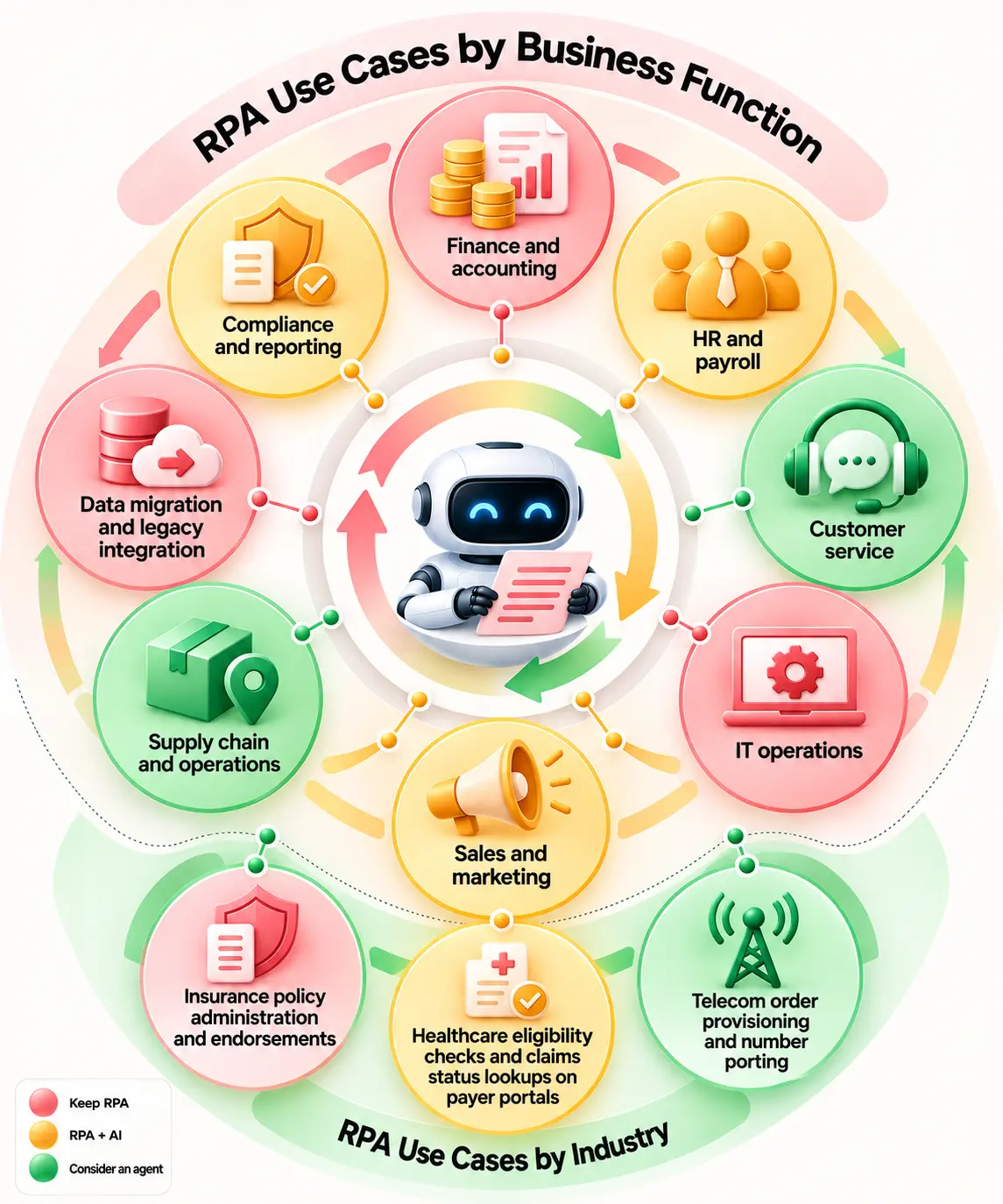
RPA Use Cases by Business Function
The most effective application of RPA is where the process in question involves identical tasks, structured data, and multiple business applications. The examples of RPA use cases below represent situations where bots would still be practical in 2026 and where the use of AI/agents would be more appropriate.
Finance and accounting
1. Bank and account reconciliations
Task: Match transactions across bank statements against general ledger entries.
Why RPA Fits: The matching process is relatively easy to define and repeat. All the robot needs to do is log in, match, report, and reconcile without doing anything else.
Example or result: This is an example of robotic process automation since the high volume of transactions makes the checking process very costly.
KPI: Matching Time, Matching Rate, Exception Rate, and Man-Hours Saved.
Label: Keep RPA
2. Journal entry posting from approved templates
Task: Submit the approved entries from standardized forms to the ERP system.
Why RPA Fits: After the approval process and after acceptance, all the robot will do is feed the predefined information into the predefined slots.
Example or result: We will use RPA, which will enable us to process our recurring accruals/allocations without losing out on approval from our financial team.
KPI: Number of entries processed per hour, posting errors, time taken, manual labor.
Label: Keep RPA
3. Payment transfers and remittance entry
Task: Extract payment schedule information and initiate a clearinghouse transaction.
Why RPA fits: The process can have consistent validation and entry phases but leave authorization for a human.
Example or result: Thanks to RPA, the Co-operative Bank managed to lower the CHAPS transaction processing time from 10 minutes to 20 seconds.
KPI: Processing time of transactions, errors in transactions, throughput, exceptions.
Label: Keep RPA
4. Vendor master data updates
Task: Syncing vendor profile changes across ERP and procurement portals.
Why RPA Fits: Repeatable field mapping across stable database screens.
Example or result: 80% reduction in vendor data processing backlog.
KPI: Update time, duplicate records, data errors, and transactions processed.
Label: Keep RPA
5. Month-end report compilation and distribution
Task: Collecting information from financial systems and producing reports for distribution to the right people.
Why RPA fits: Because the process of doing the task is repetitive and occurs at certain intervals.
Example or result: The bot can access multiple apps, collect reports, compile documents, and deliver the content without downloading it manually.
KPI: The bot can access multiple apps, collect reports, compile documents, and deliver the content without downloading it manually.
Label: Keep RPA
Invoice processing note: Invoices can be received in multiple formats and styles. Using RPA alone would not be sufficient for reliable extraction. IDP would be more suitable for varying formats, while RPA will be used for downstream data input into systems. Check out our IDP use cases.
HR and payroll
6. New hire account and system setup
Task: Set up approved user accounts for employees and put new hire data into HR, payroll, and business systems
Why RPA fits: Once the employee profile is established, the process to set up the system is relatively straightforward.
Example or result: The robot can set up accounts, duplicate employee IDs, set up typical permissions, and update HR profiles in multiple systems.
KPI: Setup time, number of accounts set up, error rate, and first-day readiness.
Label: Keep RPA
7. Payroll changes and benefits enrollment updates
Task: Synchronize any changes regarding salary, deductions, benefits, and personal data between HR and Payroll applications.
Why RPA Fits: The robot will use defined input fields and logic after the approval of the change.
Example or result: RPA can eliminate the need for redundant data entry across separate HR systems without compromising the decision-making processes within HR.
KPI: Processing time, number of payroll correction items, data entry errors, and changes processed.
Label: Keep RPA
8. Leave and time-off processing
Task: Transfer approved leaves from HR database to payroll and benefit providers’ systems
Why RPA fits: There are many processes related to leave that are predefined and executed in bulk.
Example or result: Walgreens applied Blue Prism for RPA in its HR shared service and observed a productivity increase of 73%; its case study also includes the processing of 2,000 leaves of absence per day.
KPI: Number of leaves processed, time taken, error rate, HR hours saved.
Label: Keep RPA
9. Offboarding and access removal
Task: Terminating credentials across systems immediately upon HR trigger.
Example or result: The bot will be able to update the HR record, start the process of account closure, disable regular access, and notify once it is completed. However, human intervention will still be required for high-risk access.
KPI: Offboarding time, missed accounts, access removal ratio, and exceptions.
Label: Keep RPA
Customer service
10. Customer profile considerations
Task: Obtaining customer history from CRM, billing, and ticketing systems for instant support.
Why RPA fits: This automation technology can extract structured data from disparate systems lacking a common user interface.
Example or result: CXP employed bots to extract customer data, resulting in a 35% reduction in average call time and 13,200 man-hours saved.
KPI: Average handling time, data extraction time, number of calls made, and man-hours saved.
Label: RPA + AI
11. Order status and account balance lookups behind chatbots (Celonis)
Task: Retrieve known information from backend systems and return it through a chatbot or service interface.
Why RPA fits: The lookup process can be predicted easily.
Example or result: RPA can be applied to the backend process, while the conversational AI will be able to take care of the conversational part.
KPI: Speed of response, self-service completion, rate of escalation, and accuracy of the lookup.
Label: RPA + AI
12. Address and contact detail changes across systems
Task: Update customer contact details in the CRM, billing, and service systems.
Why RPA fits: The fields and update sequence are generally fixed.
Example or result: A bot can perform copying of validated data and confirmation of the update without forcing employees to enter the same data repeatedly.
KPI: Time of update, accuracy of data, errors, number of requests processed.
Label: Keep RPA
IT operations
13. User provisioning and password resets
Task: Generate standard accounts, modify passwords, and profile user data according to an authorization request.
Why RPA fits: Standard requests can have workflow paths and access rules defined.
Example or result: RPA is able to integrate legacy systems with no API capabilities while maintaining privileged actions under authorization control.
KPI: Completion of a request, number of tickets processed, number of failed requests, and manual work of IT employees.
Label: Keep RPA
14. Batch job and system health monitoring with alerts
Task: Monitor job scheduling, system dashboards, and routine status screens, and issue alerts based on certain conditions.
Why RPA fits: The robot knows the exact schedule for monitoring.
Example or result: RPA can gather status data even from legacy systems and alert the IT team if a certain job fails or the condition is met.
KPI: Alert detection time, missed alerts, number of alerts found, and number of man-hours spent manually.
Label: Keep RPA
15. Software license and asset reconciliation
Task: Identify similarities and differences between assets and licenses in IT management solutions.
Why RPA fits: It’s a repeatable process that is based on structured data.
Example or result: The robot will gather data such as serial number, assigned to, license count, and system data to identify differences.
KPI: Time taken to reconcile, unmatching assets, licenses, and records.
Label: Keep RPA
16. Scheduled report generation
Task: Log in, generate repeat reports, extract data, and deliver the information to authorized recipients.
Why RPA fits: Process timing and order remain largely consistent.
Example or result: RPA allows the analyst to be free from doing repetitive report extractions by hand, especially when the old software used lacks an API interface.
KPIs: Number of reports, time taken for preparation, accuracy of delivery, and time saved.
Label: Keep RPA
Sales and marketing
17. CRM and ERP Data Synchronization
Task: Transfer customer, order, or account information from CRM or ERP systems.
Why RPA fits: The task involves structured field mapping that makes it an easy job for the bot, especially in the absence of an API.
Example or result: The task can help to avoid duplication of data entry and maintain synchronization in legacy business applications.
KPIs: Records transferred, duplication, synchronization, and processing time.
Label: Keep RPA
18. Lead routing and list uploads
Task: Upload lead lists, allocate leads per predefined rules, and update CRM data.
Why RPA fits: It’s easy to predict routing based on territory, product, or any other predefined field.
Example or result: A bot can route leads to proper queues without salespeople having to download, clean, and upload the lists multiple times.
KPIs: Time of lead routing, errors during uploading, number of leads, response time.
Label: Keep RPA
19. Price and product catalog updates across channels
Task: Price and product information updates in e-commerce, ERP, and sales software.
Why RPA fits: This robot performs a predefined step-by-step procedure for making updates.
Example or result: RPA is useful in situations where multiple old or non-integrated systems require the same approved update.
KPI: Update duration, price errors, number of systems updated, and exceptions.
Label: Keep RPA
Supply chain and operations
20. Purchase order entry into ERP
Task: Input data for approved purchase orders into the ERP or procurement system.
Why RPA fits: After getting all the needed values, inputting them becomes repetitive and well-defined.
Example or result: The bot can automatically enter all data from suppliers, products, quantities, costs, and deliveries into the legacy screen.
KPI: Number of processed POs, duration of input, errors made, and labor saved.
Label: Keep RPA
21. Shipment tracking updates from carrier portals
Task: Obtain shipment statuses from carriers’ websites and update the internal system.
Why RPA fits: RPA is a suitable approach because the carrier websites and status codes should remain the same. AI will come in handy when status messages differ.
Example or result: The robot can monitor tracking pages periodically and update ERP and customer service systems automatically.
KPI: Tracking time update, number of shipments recorded, number of outdated statuses, and exception rate.
Label: Keep RPA + AI
22. Inventory reconciliation between WMS and ERP
Task: Comparison of inventory details from the warehouse management system and ERP system.
Why RPA fits: Inventory quantities, item codes, and location codes are standardized data items that can be compared against set criteria.
Example or result: RPA can perform comparison and highlight differences automatically rather than through manual export and comparison of spreadsheets.
KPIs: Comparison time, number of discrepancies found, inventory accuracy, and manual intervention
Label: Keep RPA
Data migration and legacy integration
23. Legacy Record Migration
Task: Move structured records from older applications into newer systems when APIs are unavailable.
Why RPA fits: RPA can mimic the steps employees already use to open records, copy values, and enter them into the target system.
Example or result: AccentCare automated patient-record migration for 10,000 patients, processed 337,000 records, and reported $100,000 in first-year savings and 5.6 FTE saved annually.
KPI: Records migrated, migration time, data errors, and cost per record.
Label: Keep RPA
24. Mainframe and green-screen data entry
Task: Input/extract structured data from mainframe and green-screen applications.
Why RPA fits: These interfaces might not have modern APIs, but they use well-defined screen-based processes.
Example or result: RPA can act as an intermediate solution while the company is thinking about a strategy to modernize its processes. For strategic modernization, see Entrans mainframe-to-cloud migration services. Additionally, the transitioncan be improved by examining best practices for migrating legacy processes to AI-driven workflows.
KPI: Transactions, keystrokes, processing time, and errors.
Label: Keep RPA
Compliance and reporting
25. Regulatory report assembly from multiple systems
Task: Retrieve approved information from various systems and create standardized regulatory reports on an ongoing basis.
Why RPA fits: The activities of retrieving and organizing are generally repetitive and follow a predefined reporting calendar.
Example or result: The robot can collect the information, fill in standardized templates, and then send out the package for approval.
KPI: Time taken for report preparation, submission timing, data mistakes, and manual work hours.
Label: Keep RPA
26. Audit evidence collection and control testing
Task: Collect necessary evidence for recurring controls.
Why RPA fits: RPA can collect evidence from predefined sources based on a certain schedule. After that, the collected evidence could be classified by means of AI.
Example or result: Collection is done by the bot, whereas the auditor or owner of the control performs exception and conclusion validation.
KPIs: Collection time, tested controls, missing evidence, effort of review.
Label: Keep RPA + AI
27. Sanctions and watchlist screening data preparation
Task: Gather data from customers and transactions, prepare the screening files, and direct potential matches for screening.
Why RPA fits: The data gathering and preparation activities are highly structured; however, determining if the potential match is suspicious involves judgment or an AI screening model.
Example or result: RPA will prepare and pass on the data, while screening decisions will be made by the person or the AI screening model.
KPI: Screening throughput, preparation time, false positives, and review time.
Label: Keep RPA + AI
RPA Use Cases by Industry
RPA varies by industry, but there is one thing that they all have in common: repetitive processes, structured data, multi-systems, and defined processes. Here are some examples of RPA use cases in which bots are still applicable.
Industry
Top RPA use cases
Typical systems
KPI
Banking
KYC data validation, loan application pre-screening
Patient eligibility verification, claims status lookups
EHRs (Epic, Cerner), Payer Portals
50% reduction in claim denials
Retail & E-commerce
Order processing, inventory updates across channels
ERPs, Shopify, Warehouse Management Systems
Zero out-of-stock discrepancies
Telecom
Service provisioning, SIM swap & number porting
Billing systems, CRM, OSS/BSS portals
90% faster order fulfillment
Manufacturing
Bill of Materials (BOM) updates, PO entry
SAP, Oracle ERP, Supply Chain Platforms
100% data entry accuracy
Public Sector
License processing, FOIA request logging
Legacy government portals, Databases
Thousands of staff-hours saved
Real Estate
Tenant screening, lease data extraction to ERP
Property management software, Portals
4x faster tenant onboarding
28. Insurance policy administration and endorsements
Task: RPA can transfer any approved policy modifications from the policy administration system to the billing system and the customer’s system.
Why RPA Fits: The rules are normally pretty straightforward after an endorsement is approved.
Example or result: Bots can change fields, create standard documents, and send notifications.
KPI: Achieved 85% straight-through processing for standard policy endorsements.
Label: Keep RPA
29. Healthcare eligibility checks and claims status lookups on payer portals
Task: An example use case for bots is when they log into payer portals, validate membership status, check claims status, and then send back structured information.
Why RPA Fits: Emulates human browser navigation to log into disparate payer web portals.
Example or result: Replaced 15 minutes of manual web navigation per patient with 30-second automated background checks.
Task: RPA can move approved order information across CRM, billing, and OSS/BSS systems and handle routine provisioning steps.
Why RPA Fits: AI can step in when orders contain unclear information or exceptions require interpretation.
Example or result: Cut line-activation turnaround times from hours to under 2 minutes.
KPI: activation time, order errors, and exception rate.
Label: Keep RPA + AI
What RPA Looks Like in the Public Sector
For real-world proof of government scale, explore the U.S. Federal RPA Use Case Inventory on Digital.gov. Managed by the federal RPA Community of Practice, this repository details over 300 deployed government automations with performance metrics and annualized capacity gains.
Real RPA Examples and Results
Robotic Process Automation is a proven engine for digital transformation across global enterprises. While discussions around RPA vs AI agents and hyperautomation use cases often prompt companies to ask Is RPA outdated, or is AI replacing RPA, real-world implementations prove that traditional software bots remain essential for high-volume, rule-based operations. Businesses looking to understand practical applicationscan be helped by reviewing detailed AI automation examples.
The RPA use cases below show where bots and automation have delivered a clear operational change, from faster banking transactions to fewer manual hours.
Organization
Industry
Process
Result
Source
The Co-operative Bank
Banking
Excess queue procedure & payment reviews
80% processing cost savings; daily deadline completed by 11 AM instead of 3 PM
Blue Prism Case Study
Walgreens
Healthcare/Retail
HR and employee administrative workflows
Streamlined HR operations across retail footprint
IBM / Blue Prism Joint Announcement
CXP
Customer Service / BPO
Pre-fetching customer profiles & data loading during live support
18% reduction in average handling time; 13,200 hours saved
UiPath Case Study
AccentCare
Healtcare
Medical records handling, patient transitions, and eligibility validation
$100,000 in immediate cost savings and streamlined compliance
Automation Anywhere Case Study
The Loan Store
Financial Services
Mortgage audit classification, disclosures, and loan document processing
Multi-departmental operational inventory (over 300 federal RPA use cases)
Reclaimed annualized capacity and standardized agency security metrics
Digital.gov Federal RPA Inventory
What These RPA Examples Tell Us
The trend is quite evident. RPA is still relevant for processes that are repetitive and rule-based and are distributed across systems that require manual intervention in other ways.
In the Co-operative Bank case study, the importance of speed becomes obvious.
The AccentCare case illustrates how RPA can be beneficial for large-scale legacy data handling.
The story of The Loan Store is also an important illustration that modern automation cannot solely be considered RPA. RPA was one of the technologies used by The Loan Store.
RPA vs AI Agents: Which Use Cases Stay With RPA?
The rise of AI agents has raised a fair question: Is AI replacing RPA? While generative systems capture headlines, the reality is that robotic process automation use cases remain the bedrock of enterprise efficiency.
Understanding RPA vs. AI agents comes down to predictability versus adaptability. Teams comparing these technological paradigms can be helped by reviewing the key distinctions between agentic AI and generative AI. RPA is not outdated; rather, it provides the deterministic execution that modern intelligent workflows rely on.
The difference in one paragraph
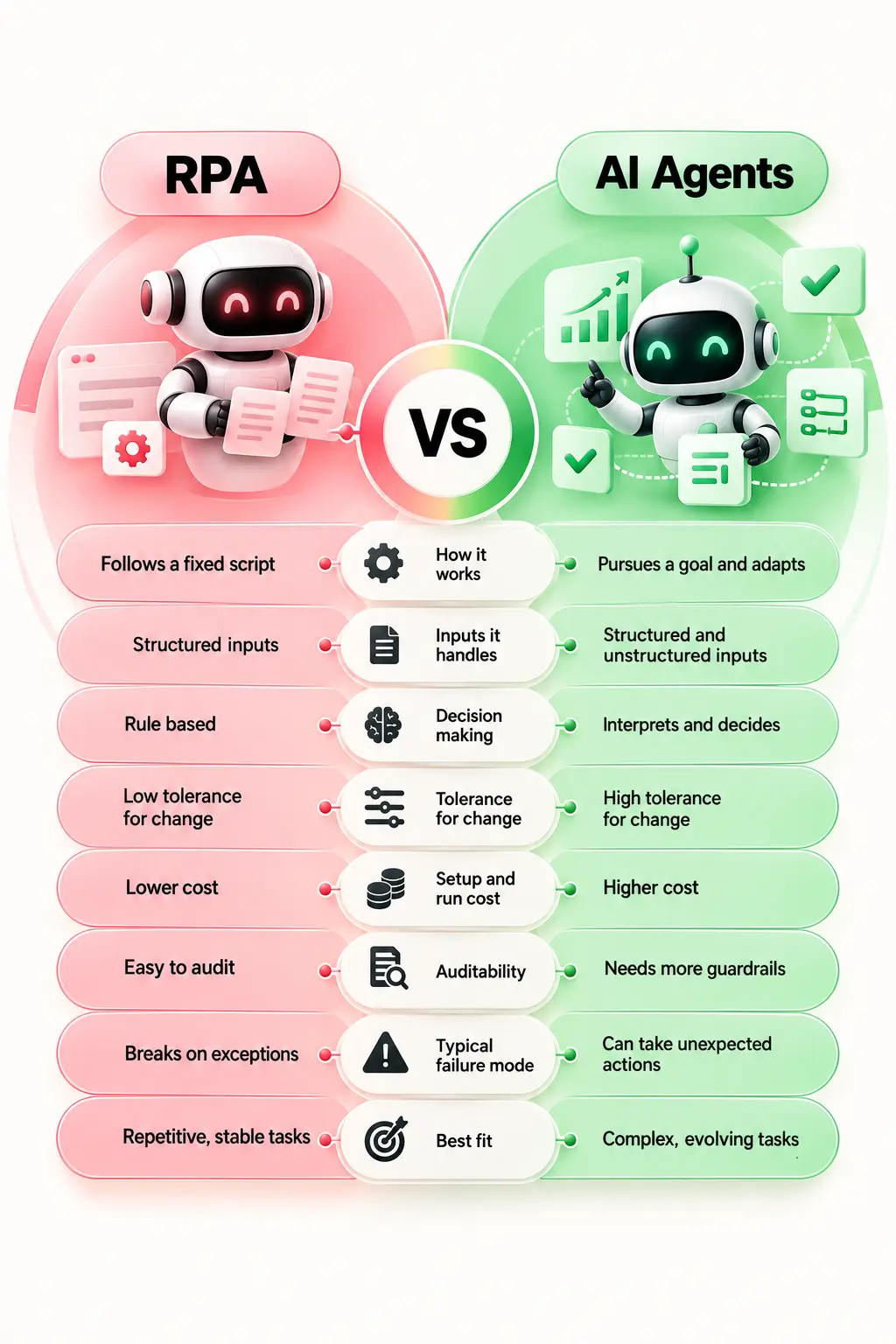
RPA executes a fixed script and does the same thing every time. An AI agent works toward a goal: it interprets inputs, decides what to do next, calls tools, and adapts when something changes.
RPA is predictable and usually cheaper to run. Agents are more flexible, but they need stronger guardrails, monitoring, and cost controls. So, is RPA outdated? No. For stable, rule-based RPA use cases, it can still be the simpler choice.
Side-by-side comparison table
The decision map for the 30 use cases
A simple rule to keep in mind
Keep RPA - for tasks that are stable and rule-based.
RPA + AI - if the input or classification is hard.
Move to Agent - for tasks that involve judgment and adaptability
Use an API - where the system connection is reliable.
S.no
Enterprise Use Case
Industry
Decision
1
Payroll batch extract & distribution
HR / Cross-industry
Keep RPA
2
Shift worker attendance tracking
HR / Operations
Keep RPA
3
Employee onboarding provisioning
HR
Keep RPA
4
Password reset & credential requests
IT Service Desk
Replace with API Integration
5
General ledger journal entry posting
Finance & Accounting
Keep RPA
6
Accounts Payable 3-way matching
Finance & Accounting
RPA + AI
7
Bank statement reconciliation
Banking & Finance
Keep RPA
8
Credit card dispute resolution
Banking
Move to AI Agent
9
Mortgage application audit classification
Financial Services
RPA + AI
10
KYC document collection & validation
Banking / Insurance
RPA + AI
11
Insurance claims intake & extraction
Insurance
RPA + AI
12
Complex insurance underwriting intake
Insurance
Move to AI Agent
13
Patient eligibility & benefits verification
Healthcare
Keep RPA
14
Medical record data extraction (EMR)
Healthcare
RPA + AI
15
Patient appointment scheduling
Healthcare
Replace with API Integration
16
Inventory level monitoring & reordering
Supply Chain
Keep RPA
17
Supplier due diligence & onboarding
Procurement
Move to AI Agent
18
Purchase Order (PO) creation & distribution
Procurement
Keep RPA
19
Competitor price scraping & alerts
Retail / E-commerce
Keep RPA
20
Customer order status updates
Retail / Logistics
Replace with API Integration
21
Multi-tier customer support routing
Customer Service
Move to AI Agent
22
Call center agent profile pre-fetching
Customer Support
Keep RPA
23
Regulatory policy compliance monitoring
Legal / Compliance
Move to AI Agent
24
Contract lifecycle renewal reminders
Legal / Procurement
Keep RPA
25
IT server status & event log archiving
IT Operations
Keep RPA
26
Automated software deployment build triggers
Software Engineering
Replace with API Integration
27
Employee engagement survey analysis
HR
Move to AI Agent
28
Property lease document indexing
Real Estate
RPA + AI
29
Public tender & RFP portal monitoring
Sales / Business Dev
Keep RPA
30
Batch file conversion & transfer
IT / Operations
Keep RPA
Where RPA Fits in Hyperautomation
Hyperautomation is a term popularized by Gartner for automating as many business processes as possible by combining RPA, AI, IDP, process mining, and low-code tools. The role of RPA in the model is still clear. Instead of performing the entire process on its own, it acts as the execution layer that transfers data and performs rules-based actions within business processes.
Is RPA outdated? Far from it. Questions like "Is AI replacing RPA?" miss how they complement each other. AI acts as the brain, while RPA serves as the hands, bridging legacy systems that lack modern API integration.
RPA as One Layer of Hyperautomation
Some hyperautomation examples include:
Claim intake: IDP extracts data from claims documents, AI classifies the claim, and RPA inputs validated data into the claims system.
Procure to pay: Process mining discovers bottlenecks, AI assists in invoice classification, and RPA executes data entry, matching, and updates.
Security incident response: AI analyzes the incident, and RPA executes predefined steps within the security and IT systems.
That is also the reason why questions like "Is AI replacing RPA?" or "Is RPA outdated?" cannot be easily answered with a 'yes' or 'no.' AI agents and RPA can cooperate in a workflow, each executing distinct parts of the process. Seamlessly embedding autonomous capabilitiescan be improved by utilizing an end-to-end agentic AI framework integration.
How to Choose and Prioritize RPA Use Cases
Selecting high-ROI robotic process automation use cases starts with evaluating candidates using a 1–5 scorecard across key criteria:
Including maintenance gives a more realistic business case.
Process or task mining should be employed in order to find appropriate cases for RPA, and then the process should be standardized before automation can be applied. This will help in distinguishing between fast wins and processes that are more appropriate for AI.
RPA implementations rarely fail due to RPA use cases being impractical. Failure occurs when organizations implement the wrong automation scenarios or consider robots to be self-sufficient applications. Programs commonly stall due to critical execution gaps:
Unmanaged Bot Sprawl: Deploying bots without a Center of Excellence (CoE) leads to redundant, ungoverned scripts.
Security & Compliance Vulnerabilities: Using shared bot credentials creates audit risks; bots require strict credential vaulting and role-based controls.
Automating Broken Processes: Automating inefficient workflows only yields faster bad outcomes.
Lack of ROI Baselines: Without tracking original vs. automated cycle times, proving ongoing value becomes impossible.
To fix a stalled initiative, establish an enterprise CoE, migrate stable UI connections to resilient API integrations, implement proactive UI change monitoring, and introduce AI handling where exception rates spike.
When comparing RPA tools, there is no single winner. The right choice depends on your existing infrastructure, developer expertise, process complexity, governance needs, and the RPA use cases you want to automate. The top choices are discussed here.
Tools
Best suited for
UiPath 
End-to-end enterprise hyperautomation, offering robust developer tools, deep process mining, and integrated AI capability.
Automation Anywhere (Automation 360)
Ideal for cloud-first enterprises seeking an intuitive, web-based platform with strong native document processing and AI agent orchestration.
SS&C Blue Prism 
Designed for highly regulated industries requiring strict enterprise governance, detailed auditability, and centralized queue management.
Microsoft Power Automate
Organizations looking to utilize native integration across the Microsoft 360 ecosystem alongside low-code desktop and cloud flows.
Platform-Embedded RPA 
Broader automation platforms (like ServiceNow or SAP) feature built-in RPA capabilities to streamline native ecosystem workflows without custom API connectors.
At Entrans, we help enterprises transform fragile desktop scripts into scalable, intelligent hyperautomation architectures and help teams look at their existing RPA use cases.
Whether your goal is stabilizing existing tools or expanding into modern AI agents, our end-to-end expertise bridges traditional execution with cognitive intelligence.
Modernizing Your Automation Architecture
We partner with engineering and operations leaders to evolve legacy automation estates. The work spans robotic process automation use cases across existing enterprise systems rather than treating RPA as a standalone tool.
Estate Audit & Governance: We assess existing bot environments to eliminate sprawl, establish centralized CoE governance, and fortify credential security.
Resilience & Stabilization: Transition brittle UI interactions to reliable API integrations, significantly reducing recurring maintenance overhead.
Cognitive Enhancements: Inject Intelligent Document Processing (IDP) and Generative AI into high-exception workflows so bots process unstructured forms and emails seamlessly.
Agentic Evolution: Shift complex, decision-heavy workflows from static scripts to reasoning-based AI agents while augmenting your engineering team with dedicated RPA and agentic AI developers.
We have worked with 200+ enterprises and completed 150+ AI projects, with 70% workflow automation outcomes. One invoice-GRN reconciliation case moved a manual, rules-heavy process to LLM-based extraction within an existing ERP, cutting manual effort by 80% and making payment clearance 2X faster.
Streamline repetitive processes, connect legacy systems, and scale intelligent automation with solutions built around your business needs.
20+ Years of Industry Experience
500+ Successful Projects
50+ Global Clients including Fortune 500s
100% On-Time Delivery
Thank you! Your submission has been received!
Oops! Something went wrong while submitting the form.
FAQs
1. What is RPA used for?
Robotic Process Automation is used to automate repetitive, rule-based tasks such as data entry, invoice processing, report generation, and system updates. It works best when processes follow clear steps and involve structured data.
2. What are some examples of RPA?
Common RPA examples include invoice processing, employee onboarding, data entry, claims processing, and bank reconciliation. Bots can move data between systems, update records, and handle routine checks without manual work.
3. What are the three types of RPA?
The three main types are attended RPA, unattended RPA, and hybrid RPA, working across different business needs. Attended bots assist human workers in real time, unattended bots execute background tasks automatically, and hybrid systems blend both styles.
4. Is AI replacing RPA?
No, AI is not replacing RPA; instead, the two technologies work together to handle complex workflows. While AI provides decision-making and pattern recognition, RPA executes the actual system actions and moves data behind the scenes.
5. What is the difference between RPA and AI agents?
RPA follows predefined rules and steps, while AI agents can reason, adapt, and choose actions based on context. RPA suits stable workflows, while AI agents are better for tasks that need more flexible decision-making.
6. Which processes are not suitable for RPA?
Processes with frequent changes, unclear rules, high exception rates, or unstable screens may not suit RPA. Workflows that need judgment or complex decisions may be better suited to AI or human review.
7. What are the top RPA tools?
Popular RPA tools include UiPath, Automation Anywhere, SS&C Blue Prism, and Microsoft Power Automate. The best choice depends on your systems, process needs, skills, and existing technology stack.
8. What is an example of hyperautomation?
In automated claims processing, Intelligent Document Processing extracts form details, AI evaluates fraud risk, and RPA posts verified data into legacy systems. This connected workflow relies on process mining tools to continuously monitor overall speed and performance.
Hire RPA Developers for Enterprise Automation
Build and scale reliable RPA workflows with skilled developers experienced in enterprise systems, process automation, and AI integration.
Free Project Consultation
Trusted by Enterprises & Startups
Top 1% Industry Experts
Flexible Contracts & Transparent Pricing
50+ Successful Enterprise Deployments
Arunachalam
Author
Arun S is co-founder and CIO of Entrans, with over 20 years of experience in IT innovation. He holds deep expertise in Agile/Scrum, product strategy, large-scale project delivery, and mobile applications. Arun has championed technical delivery for 100+ clients, delivered over 100 mobile apps, and mentored large, successful teams.
Related Blogs
Business Process Automation Examples: 24 Use Cases Across Finance, HR and Operations
Explore 24 business process automation examples across finance, HR, and operations to reduce manual work, cut errors, and improve efficiency.
Explore top forward-deployed engineering services in 2026. Discover how FDE-as-a-service helps teams ship production-ready software inside live workflows.
Intelligent Automation Use Cases: 15 End-to-End Examples Across Industries
Explore 15 real-world intelligent automation use cases across industries to see how AI, RPA, and smart workflows cut costs and boost operational speed.






-1.svg)